
Recently we have noticed that some of the users after upgrading from Microsoft Outlook 2007 to 2010, Meeting request gets auto accept and user won’t notice it.
How to resolve it in Outlook 2010…!
Goto->File->Options->Calender->Resource scheduling and uncheck it

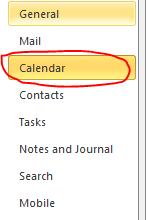

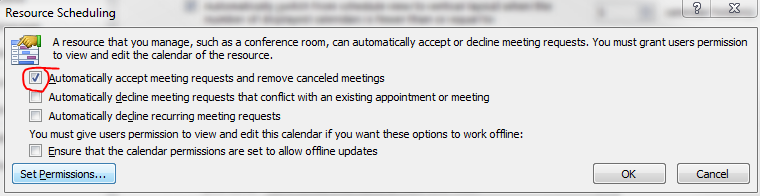
Thats it…uncheck and click ok..problem solved.
 PREMNAIR'S Blog
Insightful post, thanks a lot for spending the time to compose it. I like the direction you are taking your blog. I’m subscribing to your blog so I can follow along in the future. Would like to see more posts soon.
Is there a way to automatically accept anything added to your calendar? Case is this: Office Manager has access to CEO’s calendar but everything she puts on it he gets the Accept or Decline notices. He does not want this. He wants it to automatically happen.
Thanks for any and all info.
Isn’t this just SUPPOSED to be for “Resources” not for the personal calendar? I view this as a “bug” – true?
Just in case someone stubles across this, looking for a solution.
My resource meeting room used to work in office 2003/2007 however a recent upgrade to office 2010 failed to work when making a meeting request with the meeting room as a resource.
I had to implement this into my group policy from the following ms KB into my domain.
http://support.microsoft.com/default.aspx?scid=kb;EN-US;982774
Sigh..I used to love the automatic acceptance to clear out my meeting notices. Unfortunalely, too many meeting notices are coming on short notice so I had to disable….