Unknown's avatar

About PREMNAIR

Working as IT, Infrastructure & Security Manager in Dubai.

Overview of upgrade steps from Exchange 2007 to Exchange 2010

This is going to be our new task…here are some of the tips for how to start this

Upgrade process Exchange 2007 to Exchange 2010

Within the first Active Directory site or sites you are upgrading, the first Exchange 2010 server role you should install is the Client Access server role. When you are ready to begin your deployment, it is recommended to upgrade a single Active Directory site at a time to Exchange 2010. Depending on the size of your Active Directory site, this might be a single Client Access server computer or a load balanced array of Exchange 2010 Client Access servers. The recommended order to install the Exchange 2010 server roles is the following:

  1. Client Access Server role
  2. Hub Transport Server role
  3. Mailbox Server role
  4. Unified Messaging (UM) Server role
  5. Edge Transport Server role

When upgrading to Exchange 2010, you can’t perform an in-place server upgrade on an existing Exchange server

More article on this please click here

 Microsoft Exchange Analyzer, click here


Apple – Few more hours and the secret will be reveiled

McGraw-Hill’s CEO confirms that their textbooks will be on the Apple Tablet and it will be an iPhone OS based machine. When asked about rumors that their textbooks will be on the Apple tablet, Terry McGraw responds (2m 50s):  Watch the video on Mac Rumors..”Yeah, Very exciting. Yes, they’ll make their announcement tomorrow on this one. We have worked with Apple for quite a while. And the Tablet is going to be based on the iPhone operating system and so it will be transferable. So what you are going to be able to do now — we have a consortium of e-books. And we have 95% of all our materials that are in e-book format on that one. So now with the tablet you’re going to open up the higher education market, the professional market. The tablet is going to be just really terrific.”

Upgrading to Exchange 2007 SP2 on SCC

When you are going to consider upgrading from Exchange Server SP1 to SP2 on Single Copy Cluster environment, following needs to be taken care..Our Environment as follows

  • 2 Domain controller
  • 2 Hub and CAS
  • 2 Mailbox on SCC
  • 1 Edge server

We have just finish the upgrade process and the steps recorded as follows.

First step is to prepare the Schema on the Active Directory for Exchange server SP2 installation. This installation is typically a preparation of Exchange server 2010 readiness and i believe there won’t be any schema preparation, when you migrate from Exchange server 2007 SP2 to Exchange Server 2010.

  • Go to the domain controller, and insert the Exchange Server SP2 CD or copy the folder to the C drive of the domain controller.
  • Run on the command prompt level : SETUP /PS  or SETUP /PREPARESCHEMA
  • once you successfully finish the above step, run SETUP /PREPAREAD
  • once you successfully finish the above step, run SETUP /PREPAREDOMAIN

Now you have prepare your domain to accept the Exchange Server  2007 SP2 upgrade….(Server don’t re-start after the upgrade)

Now go to the Passive Node of each role.. Start with Hub & CAS role server(first one) and then copy the SP2 folder to C drive and run the setup on GUI mode…and then go to Hub & CAS (next server) and run the same… This will take minimum 1hr to complete on each server on Virtual machine.. Once the Hub & CAS is upgraded to SP2, Goto Exhcange Server Edge server and run the same. In each server, you will see the roles are getting updated to SP2.. Once you finish these server, the main task starts…While doing the upgradation process, there will be minimal disturbance…when H&C server in progress, OWA, OMA, IMAP will not work, When Edge is in progress, Mail flow will be disturbed…If you have a mail queue, users won’t notice any disturbance. You can do this on the live environment…with a minimal disturbance only.

This picture shows that all role are on the same..because this is on my test environment…when it comes to the role based server to do the upgrade, each role prerequisite will run on that server.

Lets go to Mail box(Mail1) and Mailbox server (server 1 & server 2) upgrade on SCC scenario…

  • Go to Passive cluster server(server 1) (This time Active mailbox (server 2) will be running and no disturbance)
  • Stop all the service that have open handles to performance counters…this includes OpsMgr Health Service, Backup Exec remote agent, Performance Log and Alerts, MOM Agent.
  • Then Stop and then restart the Remote Registry Service.
  • Now you have to go to command prompt and go to the folder of SP2 under C drive and run SETUP /M:UPGRADE
  • This will perform command line Exchange Server SP2 upgrade….once this finish, either restart the server or restart the service that has been stoped.
  • Now you have one Mailbox server (server1) with SP2 upgraded..
  • Go to Server1 and open Exchange Management Shell (this is to bring the mailbox to upgrade to SP2)
  • Type Stop-ClusteredMailboxServer Mail1  -StopReason “Upgrade to EXCH SP2” …Press enter and then “y” to confirm
  • Now the Mail box is offline
  • type Move-ClusteredMailboxServer Mail1 -TargetMachine server1 -MoveComment “Upgrade to SP2)..Press enter and then “y” to confirm
  • Now goto Command prompt of server1 and goto the directory of SP2 on C drive
  • Run the command to upgrade the clustered mailbox that is now owned by server1 
  • type Setup /upgradecms
  • This command will perform the clustered mailbox prerequisite checks and then upgrade the mailbox to SP2
  • Once this task is completed, and if it is not come online, we have to go and mount the database manually using Exchange management console GUI…now your mail store is also on SP2
  • Now your mail server is up and running with Exchange server 2007 SP2…don’t forget you have one more server on SCC to upgrade.
  • log on to server2 and go to  goto the directory of SP2 on C drive and run SETUP /M:UPGRADE
  • Once this is finish, your Exchange server environment is now on SP2… Versioning number will be 8.2.xx

Exchange Server SP2 upgrade procedure results in a brief outage during the upgrade process. Exchange Setup should be run only on the passive nodes in the cluster. All nodes need to be upgraded to Exchange 2007 SP1 or SP2 to be supported, but you must upgrade the nodes one at a time. After all nodes have been upgraded, the clustered mailbox server is upgraded, and then brought online.

Microsoft Exchange Server adds new Active Directory schema classes and attributes and modifies new ones. This document provides a summary of the Active Directory schema changes that are made when you install Microsoft Exchange Server 2007 Service Pack 2 (SP2). Refer to the .ldf files for more information about changes to the Active Directory schema. The .ldf files are located in the \AMD64\Setup\Data\ directory on the Setup media. For release note from Microsoft on this topic, click here

This document includes the following sections:

  • Classes Modified by Exchange 2007 SP2
  • Attributes Modified by Exchange 2007 SP2
  • Classes Added by Exchange 2007 SP2
  • Attributes Added by Exchange 2007 SP2
  • MAPI IDs Added by Exchange 2007 SP2
  • Extended Rights Added by Exchange 2007 SP2
  • Object IDs Added by Exchange 2007 SP2
  • Indexed Attributes Added by Exchange 2007 SP2

If you need more info, Click here

Microsoft Exchange Server 2007 RTM Build – Versioning

The RTM version of Exchange 2007 SP1 is build 08.01.0240.006, which is also represented as Version 8.1 (Build 240.6). This version information is consistently displayed in the Exchange Management Console, the Exchange Management Shell, and in the About Exchange Server 2007 Help dialog box. However, after applying SP1 to an Edge Transport server running the RTM version of Exchange 2007, the version information for the Edge Transport server will not be updated in the Exchange Management Console unless the Edge Transport server is re-subscribed to the Active Directory site. This is because the Edge Transport server does not directly update Active Directory with any configuration information. Instead, the version information for Edge Transport servers is recorded in Active Directory during the creation of an Edge Subscription. You can also determine the installed version of Exchange 2007 by examining the value for each installed role in the Registry at:

HKEY_LOCAL_MACHINE\SOFTWARE\Microsoft\Exchange\v8.0\<Role>\ConfiguredVersion

ConfiguredVersion is a string value in the format of X.X.XXX.X (e.g., 8.1.240.6). 8 is the major version number. The .1 portion indicates it is SP1 (RTM would have .0). 240 is the build number, and the .0 after 240 would be .6, the minor build number. The value of the ExchangeVersion property remains unchanged in Exchange 2007 SP1; the output of the Get-ExchangeServer cmdlet for the ExchangeVersion parameter is 0.1 (8.0.535.0).  More info Click here

Microsoft Dynamics GP 2010 – cool

User credentials and Company preference saved in the new GP2010, the user can launch Microsoft Dynamics GP 2010 and get to their role-based home page with ONE CLICK and no user interaction…still no sign on AD integration.

Office 2010 will be out in couple of month

Microsoft has yet to release the actual launch date for Office 2010, but according to the company’s Chief Executive Officer Steve Ballmer the next version of Office is closer than everybody thought….You’ll see the new version of Office, which comes out here in just a couple of months. It not only works on your PC but it will work through any Web browser and down onto the phone in new and rich ways…i’m already running the beta version and its so perfect to work with…and it has a tight integration with Exchange server 2010

Planet MARS — Brighest on Jan 27, 2010

Red planet Mars from close quarters as it comes closest to Earth and shines brightest Jan 27. It will not be so close or so bright over the next two years… the planet will appear the biggest it will in the next two years.  Mars can be seen all through the night and will be easy to locate.  More info Click here

Pulse living…an efficient energy solution company

PulseAGAIN CAME TO THE LIMELIGHT…..Technology creates buildings that are safe, intelligent, comfortable, and efficient: Living Buildings…Products designed and manufactured in the UAE by Pulse, an efficient energy solution company, which is attracting much national and international attention at the World Future Energy Summit in Abu Dhabi..more information about this technology..click here

“When we set up the company in Dubai in 2005, we wanted to focus on smart house solutions, but then we realised that we don’t just need to create more comfortable homes, but more energy efficient ones too,” Jimmy Grewal, co-founder and CEO of Pulse told Khaleej Times….more news Click here

Prices for a basic home kit is $500, which includes the smart thermostat metre, a water heater controller and a digital monitor display, all designed and produced by Pulse. “Coming up with a wireless metre was quite a challenge,” admitted Grewal. Indeed, this is not your ordinary metre controller, as it can be accessed not just by touch-screen or from remote control, but through the internet as well….THE DEFENITION OF SMART HOME IS RIGHT HERE WITH PULSE….WHAOOO

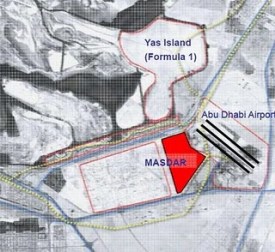
Masdar City – First carbon-neutral zero waste city in Abudhabi

Masdar City is the world’s first carbon-neutral zero waste city and is head- quarters of the International Renewable Energy Agency (IRENA)… Abu Dhabi, 10 years from now, if all goes according to plan, a city of 6 square kilometers housing 50,000 people will rise in the United Arab Emirates and it will be carbon neutral.  The project, called Masdar City, will burn no gas or oil, so its contribution to greenhouse gases will be minimal. Masdar is the centerpiece of emirate Abu Dhabi’s plans to get into the renewable energy market, a hedge against the day its oil wells run dry.

Proto Type car for the city..solar-powered cars would run under the city like a subway system. But McGuigan says the cars wouldn’t run on fixed routes. Basically, they’dl take you anywhere you wanted to go.

 …..80 percent of water will be recycled….the first city where waste is converted to energy and reduced to zero….The plan is to build Masdar City in record time. The first buildings are scheduled to be up by the end of next summer….Will wait for that day

World Future Energy Summit finished in Abu Dhabi

Green economic climate looks good….Though the Summit itself lasted four days  (January 18th – 21st) the entire week surrounding it was dubbed Future Energy Week and concluded with a meeting of the United Nations’ Advisory Group on Energy and Climate Change, an initiative of UN secretary general, Ban Ki-moon. The World Future Energy Summit has, this year, attracted more political engagement than ever before with more than 100 government delegations attending.  The strong numbers are clear testament to the continued momentum that is building around renewable energy.

The WFES concluded on a high spirit of brightening up the hopes of a better outcome at the ensuing global climate change talks in Mexico, in contrast with results of the Copenhagen Summit. – Courtsey Khaleej Times