Social engineering has become the dominant method of distribution for fake antivirus software. And most modern browsers, with one exception, do a terrible job of dealing with this type of threat. Current builds of Chrome display a
terrible flaw that puts you at greater risk than its competitors. In my testing, a malware author was able to exploit Chrome in four easy clicks. In stark contrast, Internet Explorer 9 used some new technology to flag the exact same
sites and files as suspicious, providing unmistakable warnings that have been shown to stop 95% of these attacks in their tracks. Ed Bott’s Microsoft Report
Category Archives: Internet Explorer
Windows 7 SP1 – getting slow while internet explorer is working – Resolution
If you ever face an issue of slowness (When internet explorer is working) after installing Windows 7 SP1, Reset the internet explorer settings to their default condition.
To do this, go to Tools->Internet Options->Advance-> at the bottom there is a button “Reset”
This will resolve the slowness.
Enjoy!!!
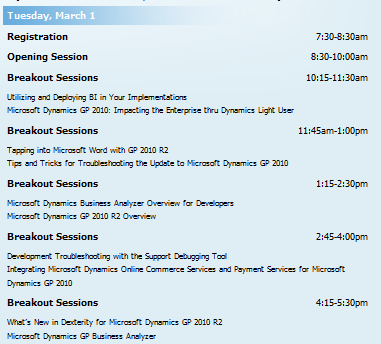
Microsoft Dynamics Greatplains 2010 R2 Feature list
This conference, has been on March 1–3, 2011 at the Microsoft Fargo Campus, which provide insight, skills and knowledge that will help move the business forward..and its for Microsoft Partners only
Highlights include:
- Interactive concurrent sessions – learn more about the solution from the Microsoft Dynamics GP team
- Roundtable discussions – visit with a small group on a variety of topics
- ISV Expo and reception – learn about the latest add-on solutions
Agenda as follows
Lot of thing happen in this conference. More info, Read David Musgrave Blog and Mariano Gomez Blog
The Road Map itself will give you how the GP future looks like…can’t wait to get hands on…
One of the good article about the The Evolution of the Microsoft Dynamics GP Roadmap from Mariano Gomez, Click here to read it
Again the coolest part is Microsoft Dynamics GP “12” will have a light deployment client as well as the current rich client, a web based client which will be capable of reproducing any Dexterity based window in an browser….cool naa..can’t wait to get hold of it..
I’m still wondering, when are they going to integrate the Active Directory integration of GP !!!
Here are some of the feature list of GP 2010 R2 highlighted in this conference
Waiting for the release!!!
Microsoft to introduce new anti-tracking feature in IE9
IE 9 is introducing a new anti-tracking feature to help users foil the efforts of behavioral advertisers. , called Tracking Protection List (TPL) will permit or block certain websites on the basis of preexisting lists. Users will still be able to visit them directly by clicking on a link or typing their address, but calls to them by other web pages will not be permitted. TPL builds upon the company’s existing InPrivate Filtering, but while this relies on frequency heuristics to build its ‘no go’ lists and is thus occasionally unpredictable, the new TPSs will be curated and so – hopefully – more reliable. Microsoft won’t generate the lists itself, but will instead look to third party organizations such as privacy groups or end users themselves. The lists will be an opt-in feature, and will receive regular automatic updates.
IE9 and Privacy: Introducing Tracking Protection .. Read more about this and watch the video, click here
New Hotmail look & feel …cool

I really love the new look and features…Outlook webapps is playing an important role here…Now, its faster Hotmail experience with great new features like one-click filters, Sweep, Active Views and more..also it does’nt now sign you automatically to messenger, when you log on to mail…cool one
Junk mail options are getting better..need room to improve..i’m waiting for the active sync for hotmail…or direct push service…
Hotmail on iPhone..superb…i tried..really cool..read this post
Best of luck to Hotmail Team!!!!
For your feedbacks…click here to post
Windows Live Team Blog…click here
Internet Explorer 9 and Safari 5

Interested in checking out the new web platform capabilities of Internet Explorer 9?…Test Drive
Internet Explorer 9 now also supports TIFF and JPEG XR images. JPEG XR offers better image quality than JPEG at the same file size.
A comparison video on the windows blog..click here