Old public folder – How to remove from Exchange server

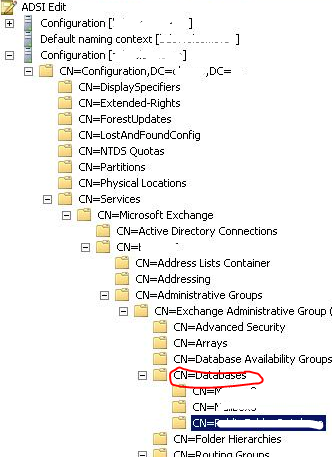
It is difficult to delete old public folder from EMC. How to do it, use the ADSIEDIT to clear the old ones.

Right click on the folder you want to delete from CN=Exchange Administrative Group, CN=Databases,  and click delete. The go to Active directory Sites and Services and initiate the replication across the domain.

Go to EMC and refresh.

Thats it.

Active Directory – Difference in between SYSVOL and NETLOGON folders

Regarding this topic, Oz Casey Dedeal Virginia, VA, United States had a good article on this topic..Read more Click here

Western Digital TV Live Hub

WD TV Live Hub 1 TB, Full-HD 1080p, network media center ( WDBABZ0010BBK)
Interface : Gigabit Ethernet, USB 2.0, HDMI, Composite A/V, Component Video, Optical audio
Capacity : 1 TB
Operating System : Windows/Mac

System Requirements

  • Standard or high definition television with HDMI or composite video connections. Cables not included.
  • Home network and broadband connectivity for online services.
File Formats Supported
Video – AVI (Xvid, AVC, MPEG1/2/4), MPG/MPEG, VOB, MKV (h.264, x.264, AVC, MPEG1/2/4, VC-1), TS/TP/M2T (MPEG1/2/4, AVC, VC-1), MP4/MOV (MPEG4, h.264), M2TS, WMV9 
Photo – JPEG, GIF, TIF/TIFF, BMP, PNG
Audio – MP3, WAV/PCM/LPCM, WMA, AAC, FLAC, MKA, AIF/AIFF, OGG, Dolby Digital, DTS
Playlist – PLS, M3U, WPL
Subtitle – SRT, ASS, SSA, SUB, SMI 
  1. MPEG2 MP@HL up to 1920x1080p24, 1920x1080i30 or 1280x720p60 resolution.
  2. MPEG4.2 ASP@L5 up to 1280x720p30 resolution and no support for global motion compensation.
  3. WMV9/VC-1 MP@HL up to 1280x720p60 or 1920x1080p24 resolution. VC-1 AP@L3 up to 1920x1080i30, 1920x1080p24 or 1280x720p60 resolution.
  4. H.264 BP@L3 up to 720x480p30 or 720x576p25 resolution.
  5. H.264 MP@L4.1 and HP@4.1 up to 1920x1080p24, 1920x1080i30, or 1280x720p60 resolution.
  6. An audio receiver is required for multi-channel surround sound digital output.
  7. Compressed RGB JPEG formats only and progressive JPEG up to 2048×2048.
  8. Single layer TIFF files only.
  9. Uncompressed BMP only.
  10. For details, please refer to the user manual.

Moving CRM customizations from online to ON-PREM

If you are interested in moving CRM Online customizations over to an On-Premise deployment, you should read KB article 976978.

Kevin Williamson has a good post on this read more, click here

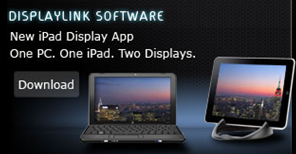
iPad apps from DisplayLink makes iPad a wireless Windows monitor

The application works with Windows XP, Vista, and 7 and requires an iPad with iOS 3.2 or later, the company said. DisplayLink announced an $1.99 application today for iPad which turns your ipad into a second monitor wirelessly connected to a Windows computer.

Read the press release from displaylink, click here.

DisplayLink announced the technology today at the CES show in Las Vegas..read the article from CNet

The DisplayLink iPad app turns your iPad into an extended monitor for your PC. Great for improving your productivity by freeing up desktop space on your notebook or desktop computer. Just drag any open window or application on to the iPad display sitting next to your primary display. Park your browser, email, social networking site, IM, or application control console on the iPad display and avoid application view switching on your primary display.

  • Creates an interactive, secondary wireless display for your PC with the iPad
  • Windows 7, Vista (32 and 64bit) and XP (32bit) compatible
  • Configuration using the familiar Windows graphics display utility
  • Discovers and connects the iPad screen to your PC over your wireless network quickly and reliably
  • Operates seamlessly with other DisplayLink multi-monitor and dock products to create a rich, productive multi-monitor environment

More info/Download DisplayLink iPad Host Software Driver,  …click here

Exchange server 2010 – Symantec 2010 – DAG Backup failed – Scenario/Solution

Here is a typical scenario of a DAG backup failure from Symantec.

If you come across an email alert from the Backup administrator like below,

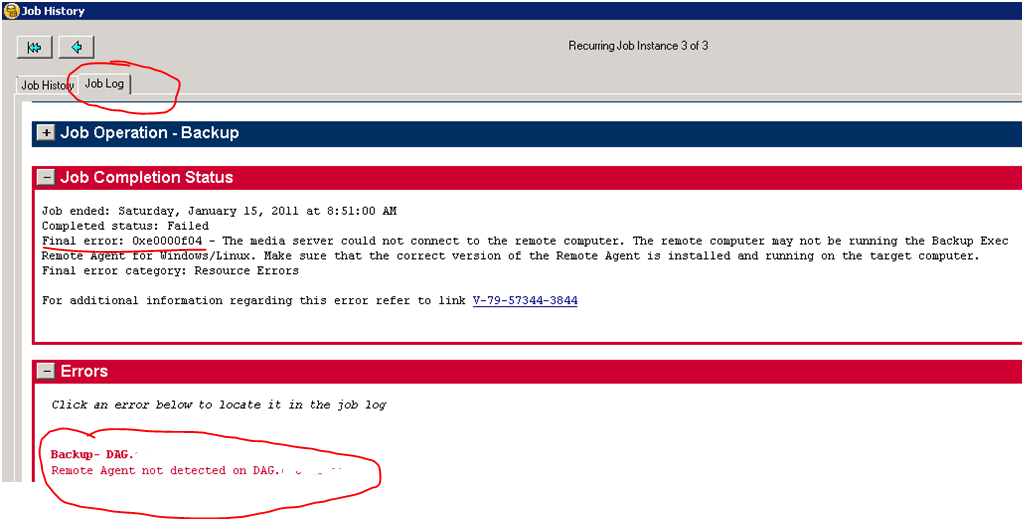
Not to be panic…click on the attachment and see what the error is..and it should be like below

Then go to details…

Exchange server 2010 DAG backup failed!!! ohhhhhh.. Try to ping the DAG IP address. If no response, Logon to Mailbox server, and open Failover cluster manager.

Remember, DAG’s basics is on clustering. Click on Cluster events

Goto to the Services -> click on Cluster Services and then click Restart.

This will happen when the mailbox server faces “Dirty Shutdown” or Network connection lost.

Customization – Quality vs On Time

A good blog from my colegue..I agree to that there should be customization quality, so that the upgrades/rollups are easy and the time comes after. Read more

Clicke here Vaidy Mohan’s Greatplains Blog

Enjoy!!!

WordPress for Windows Phone 7 now available

WordPress for Windows Phone 7 is available now for free in the Windows Mobile Marketplace.

Enjoy!!!

Tech·Ed Middle East in Dubai – March 8 – 10, 2011

Tech·Ed is Microsoft’s premier technical education event providing the most comprehensive technical training on Microsoft’s suite of products, technologies, solutions and services. Tech·Ed is the conference that will help you solve today’s real-world challenges and prepare you for tomorrow’s innovations.

Home page for this site…click here

Register Now..click here