iWork for iCloud Beta is now open

Apple has previously offered iWork for iCloud Beta to developers and now Cloud users  can access beta versions of Apple’s Pages, Numbers, and Keynote. Upon choosing one of those applications, they’ll have free access to the productivity suite, and create everything from presentations to spreadsheets. Apple announced iCloud for iWork at the Worldwide Developer Conference in June. The company said that it would make the platform available as a public beta. It’s not clear when it’ll come out of beta.


OS X 10.9 Mavericks – Developer Preview 6

Apple has released the sixth OS X 10.9 Mavericks Developer Preview on Wednesday, ahead of an expected launch this fall. Developers can download the sixth Mavericks preview via Software Update.

Active directory users joining from Mac machine

Active Directory

Joining a Mac to the Domain on Mac OS X

Snip20130701_4

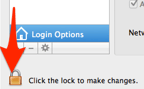
Click Users & Group from System preference and click Unlock button
Snip20130701_5

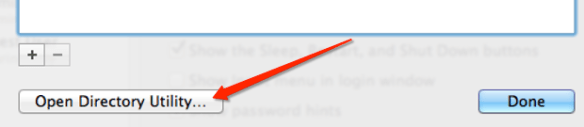
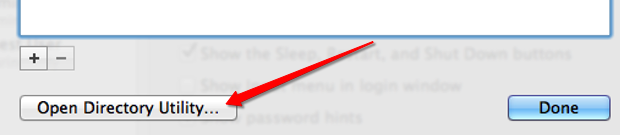
Select the Network Account Server by clicking “Edit” button…this will open the below screen option., then click “Open Directory Utility…

Snip20130701_9

Unlock the edit button and click the Active Directory to select and bind
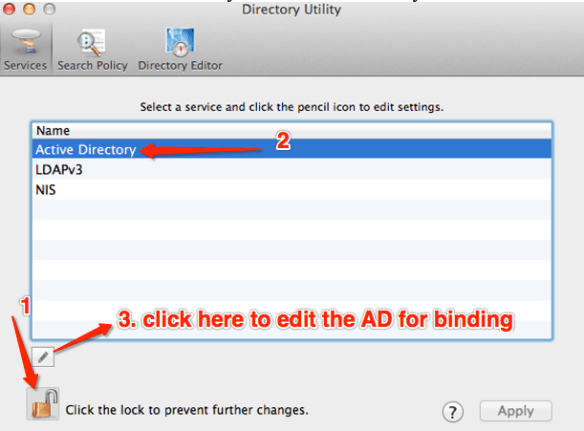
Snip20130701_8

When you click the edit button, next screen will open to type

  • Active Directory Forest:
  • Active Directory Domain:
  • Computer ID

after typing all the above values, click “Bind

Here another screen will appear to enter Domain Administrator and Password for bind process. type the information and click ok

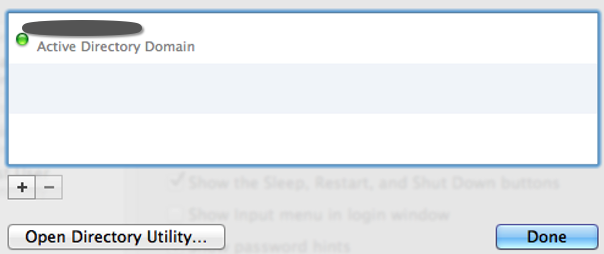
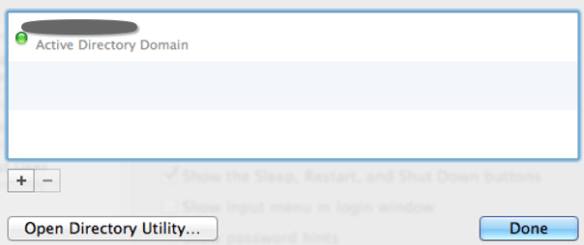
If the details are correct, below screen will appear with the GREEN button, showing that you have successfully bind the AD to your machine.
Snip20130701_7

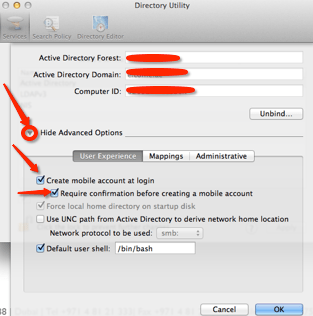
After the Bind process to the domain, Expand the “Show Advanced Option” and select the “User Experience” and check the following.
Snip20130701_10

Above selection of “Create mobile account at login”, is only for, if the AD user wants to login at offline mode. This can only be done, if the AD user has logged in once at the on-permises time, so that the system can cached it.

Click ok and go back to Users & Group

Click the “Option” button from “Allow network users to log in at login window”
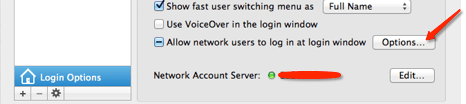
Snip20130701_11

Another screen will pop-up..by default “All network Users” is selected (if you want to keep all the AD users to log into this computer, keep it as it is or select “Only these network users” and then click the “+” button at the bottom. This will open another window with all the AD users list. Select the user that you want to add and click “Done”

Snip20130701_12

Now go back to the Users & Group, click the Login Option and select the “Display login window as”

Snip20130701_13

If you select “List of users” then this will show only all the active users in that machine at the login time.

If you select the “Name and Password” option, then you can type the user name and the password.

To give the AD user, LOCAL ADMIN right, at the Users & Group Login option, Select the user and then check mark the “Allow user to administer this computer”

Snip20130701_14

Now you are good to go…now unlock the “Login Option” to save the settings and prevent from unauthorised mistakes

Restart the Mac machine and login

Enjoy!!!

Windows Azure – Site-to-Site & Point-to-Site VPN’s

Snip20130701_1

New features added to the Azure Portal

Snip20130701_2

Appreciate this great move from Azure team, especially Yu-Shun Wang, Program Manager for Windows Azure Networking

Watch the Channel9 discussion about the same..click here

Click here to read more from ScottGu’s Blog

Windows Azure: General Availability of Infrastructure as a Service (IaaS) 

Tutorial on how to “Configure a Point-to-Site VPN in the Management Portal” 

Windows Azure Developer Center

If you don’t already have a Windows Azure account, you can sign-up for a free trial.

Enjoy!!!

The Adobe Creative Suite Cleaner Tool

The Adobe Creative Suite Cleaner Tool helps resolve installation problems for Adobe Creative Suite 6, Adobe Creative Cloud, Adobe Creative Suite 5 – 5.5, Adobe Creative Suite 4, and Adobe Creative Suite 3 software. The tool can clean up install records for any pre-release (beta) installations of these Creative Suite products. The Adobe Creative Suite Cleaner Tool is designed to not interfere with existing installations of previous versions of Adobe Creative Suite products; it does, however, allow you to remove them as well, if you so choose to.

Before you start

  1. Back up all files stored in Adobe product directories. This may include custom plug-ins or profiles you have installed.
  2. Be sure to read ReadMeFirst.pdf, which is downloaded with the Creative Suite Cleaner Tool.

Please refer to ReadMeFirst.pdf downloaded with the Creative Suite Cleaner Tool

Rollup 1 for Exchange Server 2010 SP3 – Released

Again our Exchange CXP team released Update Rollup 1 for Exchange Server 2010 SP3 to the Download Center.

A known issue with Exchange 2010 SP3 RU1 Setup

You cannot install or uninstall Update Rollup 1 for Exchange Server 2010 SP3 on the double-byte character set (DBCS) version of Windows Server 2012 if the language preference for non-Unicode programs is set to the default language. To work around this issue, you must first change this setting. To do this, follow these steps:

  1. In Control Panel, open the Clock, Region and Language item, and then click Region.
  2. Click the Administrative tab.
  3. In the Language for non-Unicode programs area, click Change system locale.
  4. On the Current system locale list, click English (United States), and then click OK.

After you successfully install or uninstall Update Rollup 1, revert this language setting, as appropriate.

Exchange team is planning to resolve it in a future rollup, but did not want to further delay the release of RU1.


Google Now – Now Comes to the iPhone and iPad

Snip20130502_1

Google has updated its Google Search app to include a bunch of Google Now features, providing live weather and traffic updates, sports team scores, and plenty more…The iOS version of Google Now is embedded into the Google Search app. Google Now is about pulling live information from your Google account to provide you with relevant information for your day. This includes traffic updates based on your calendar, or sports scores based on your location. In the Google Search app, it does this by showing you various “cards” when you open up the app, and tracking your day over WiFi.

Beautiful!!! Enjoy

OWC Envoy Pro EX – Portable, Bus-Powered USB 3.0 Storage Solution with OWC Aura Pro SSD

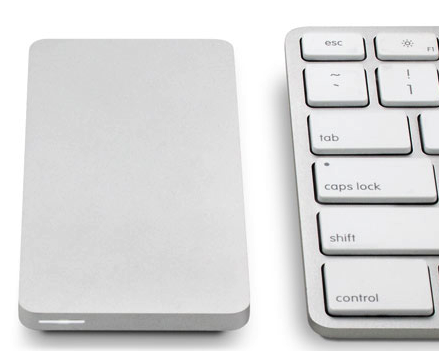
Snip20130501_1 Snip20130501_2

Ultra-portable, SuperSpeed bus-powered external SSD storage solution. With blistering fast transfer rates of up to 500MB/s, the Envoy Pro EX can handle any demanding storage and/or backup need in the office or on the road. And because it’s USB 3.0 bus-powered*, the Envoy Pro EX doesn’t require an AC power adapter, making it the ideal Plug and Play external storage solution.

More info click here.

Thanks to OWC (Other World Computing) aka macsales.com

Exchange 2013 – top features

Exchange server 2013, Increase user productivity and keep your organization safe, while maintaining the control you need.

i want to remain in control…

Exchange lets you tailor your solution based on your unique needs and ensures that your communications are always available, while you remain in control, on your own terms—online, on-premises, or a hybrid of the two.

To know more, Click here

Mac’s volume in 1/4 increments

Are you getting trouble with the volume? Here is the solution from Cult of Mac . Mac’s volume in 1/4 increments by pressing Shift + Option (Alt) + the volume key on your keyboard. It’ll raise your volume at smaller increments so you can find the perfect level
Thanks to Cult of Mac – Buster Heine