
40 years ago, seven emirates became one nation. This week marks the 40th anniversary of the birth of the United Arab Emirates.
I sincerely wish the UAE a happy 40th national day, and many more to come.
-Prem Nair

40 years ago, seven emirates became one nation. This week marks the 40th anniversary of the birth of the United Arab Emirates.
I sincerely wish the UAE a happy 40th national day, and many more to come.
-Prem Nair
I Really Love it!!!
The Nokia Lumia 800 with Windows Phone is the first Nokia smartphone to have Windows Phone 7.5. Its beautiful design is a head-turner. Simpler social networking keeps you connected to those who matter. Internet Explorer 9 gives you quicker browsing – plus the web like it is on your PC. And with a Carl Zeiss lens and 8-megapixel camera, you’ll shoot better photos and video.
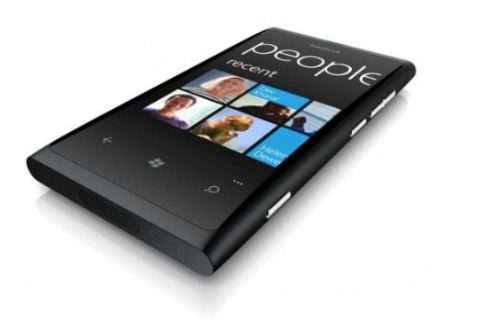
Lumia 800 is a “refinement” of the N9 – Seamless design: Curved 3.7″ AMOLED ClearBlack glass touchscreen display seamlessly integrated into a smooth one-piece body…People Hub: Facebook, Twitter, LinkedIn, email, Chat, SMS…Browser: Bing, Internet Explorer 9, HTML5, Wi-Fi…Camera: 8 MP Auto Focus with Carl Zeiss Optics, 2x LED Flash and HD Video
Reviews like it has a slightly smaller screen due to the intrusion of the Windows Phone Button, only 512 MB RAM, only 16GB onboard storage, No NFC etc etc etc
But rumours that Nokia is working on Windows Phone 8 – (aka Apollo)!!!

View all time hit : 136,839 hits
Thank you all for visiting my blog!!!
Enjoy
-PREMNAIR
In previous versions of Exchange, you would need to access the user’s mailbox to be able to do this. Without access to the mailbox, you can’t modify data in it.
Two ways for an exchange/domain administrator to access an user mailbox:
The first option grants the administrator access to all of the data in the user’s mailbox.
The second option grants the administrator access to all of the data that the user account can access within your company and locks the user out of his own user account.
Configure auto-reply options using the ECP
In Exchange 2010 SP1, you can configure auto-reply options for your users without using either of the above options.
Login to ECP through owa as Administrator or member of that group. Click options (right side top) and select “See all options”, From this screen, where “Manage Myself”, click “Another User” -> select the user you want and double click on the user. This will open his mail option ECP, and click “Tell people you’re on vacation” -> and select Automatic Replies and fillout the information and click Save.
Thats it!!!!
This command schedules internal and external auto-replies
Example, if a user is going on leave from 11/11/2011 to 12/10/2011: (MM/DD/YYYY format)
Set-MailboxAutoReplyConfiguration leaveusername@domain.com –AutoReplyState Scheduled –StartTime “11/11/2011” –EndTime “12/110/2011” –ExternalMessage “External OOF message here” –InternalMessage “Internal OOF message here”
For detailed syntax and parameter descriptions, see Set-MailboxAutoReplyConfiguration (Applies to Exchange Server 2010 SP1).
This command retrieves auto-reply settings for a mailbox.
Get-MailboxAutoReplyConfiguration leaveusername@domain.com
This command disables auto-reply configured for a mailbox:
Set-MailboxAutoReplyConfiguration leaveusername@domain.com –AutoReplyState Disabled –ExternalMessage $null –InternalMessage $null
Great leap…Enjoy!!!!
Announcement from Exchange team blog: Earlier today the Exchange CXP team released Update Rollup 6 for Exchange Server 2010 SP1 to the Download Center. Click here to download
This update contains a number of customer reported and internally found issues since the release of RU5. In particular we would like to specifically call out the following fixes which are included in this release:
With the release of Exchange 2010 SP1, we introduced the /hosting mode switch – a feature which deploys Exchange using an Active Directory structure that affords complete separation between tenant organizations shared on the same underlying platform. /Hosting mode makes the need for a solution like Hosted Messaging and Collaboration largely redundant when hosting multi-tenant Exchange. /Hosting mode does not ship with any automation tools necessary for hosters to operate a service at scale, but it does address the requirements typical of a multi-tenant infrastructure (such as tenant organizations and service plans). Read more from the exchange team blog, Click here
The error message from the time you upgraded to GP2010 R2. The error message is thrown when admin revoke access to a user on a company…read more on Vaidy’s blog
 PREMNAIR'S Blog