NFC – Near Field Communication

This technology allows  for simplified transactions, data exchange, and wireless connections between two devices in close proximity to each other, usually by no more than a few centimeters. It is expected to become a widely used system for making payments by smartphone in the United States. Many smartphones currently on the market already contain embedded NFC chips that can send encrypted data a short distance (“near field”) to a reader located, for instance, next to a retail cash register. Shoppers who have their credit card information stored in their NFC smartphones can pay for purchases by waving their smartphones near or tapping them on the reader, rather than bothering with the actual credit card.

It simplifies

  • File sharing
  • Electronic business card
  • Electronic wallet
  • Mobile payment
  • Parking ticket
  • Boarding pass…etc

Pairing is easy..not like Bluetooth or Wifi

This is the logo for NFC enables devices.

iPhone 5 might come up with NFC included devices in the near future. Persistent rumours and patent applications strongly indicate an NFC enabled iPhone is on the way, though there has been no official announcement yet.

The list of NFC phones available today

  • Google Nexus S
  • Samsumg Galaxy S II
  • Nokia C7 …Etc

NFC – its an ISO 18000-3 RFID compatible, Standardisation body is ISO/IEC, Network Standard is ISO 13157 etc, Network Type is Point-to-point, Cryptography not with RFID, Range <0.2m, Frequency 13.56MHZ, Bit rate 424kbit/s, Setup time <0.1s and Power consumption <15mA

Good luck!!!

Gefen – Full featured Low cost Digital Signage Media Player

The HD Digital Signage Media Player can connect to a display using either analog or digital video connectors. Connect an HDMI, Component, or Composite cable between the HD Digital Signage Media Player and the display. If using the networking capabilities of the HD Digital Signage Media Player, connect your network cable to the Ethernet port. Optionally, the digital or analog audio output connector can be used to connect the HD Digital Signage Media Player to an external audio processor or amplifier. Connect the included USB flash drive to the rear panel of the unit. Connect the 12 V DC power supply to the unit and connect the AC power cord to an available electrical outlet.

More Info Click here

Features:

  • Supports resolutions up to 1080p Full HD
  • HDMI, Component, and Composite A/V outputs active simultaeously
  • Text-based scheduling and playlist using a text editor
  • CMS for multiple units
  • Supports MPEG 1/2/4, DivX 3/4/5/6, XVid, and H.264/AVC video codecs
  • Supports MP3, MPEG, WMA, PCM, LPCM, ADPCM, FLAC, WAV, AAC, OGG, and MKA audio formats
  • Supports HD JPEG, GIF, PNG, BMP, TIF, and TIFF image formats
  • Wall-mountable enclosure for excellent heat dissipation and durability
  • Integrated OSD Menu for device configuration
  • Built-in FTP server and client to push and pull content
  • Full media scheduling and accounting logs
  • NTP client for time synchronization
  • USB 2.0 ports used for storage
  • Programmable PIN code prevents unauthorized access to OSD
  • Compatible file systems: NTFS, FAT16/FAT32, EXT3, and HFS+
  • IR remote control unit

A Good One – Mouse Without Boarders

KVM…Past history…!!!

 Mouse Without Borders allow multiple computers to share a single keyboard and mouse. In fact you can control up to four computers from a single mouse and keyboard with no extra hardware needed – it’s all software magic, developed by Truong Do who by day is a developed for Microsoft Dynamics. Four Computers can linked using this tool. Functions like cut, paste…drag and drop..login and lock to all four machine etc….

To know more & download this ..click here

The Garage is both a physical space in Building 4 at our Redmond HQ, and a company wide program that encourages grass roots invention, tinkering, ideas and incubation of projects. To know more about this click here

Nexsan’s Flexible Storage Platform – A New Experience

Yesterday i came across to this product and seems to be a great one!!! Nexsan is first to ship enterprise- class storage systems with 3TB SATA drives for 180TB in 4U.

Nexsan’s Flexible Storage Platform enables many storage technologies to be incorporated in one system. This is particularly useful to mid-sized organizations that prefer a single-system solution over having to buy many disparate systems. Nexsan pioneered storage systems that featured simultaneous multi-protocol access, and we designed our systems to be multi-tiered, supporting high-speed and high-cost SSD, mid-speed and mid-cost SAS and low-speed and low-cost SATA drives in one chassis. Our flexible storage platform supports our proprietary storage applications software, such as replication, de-duplication, data archiving, multi-tenancy, digital data backup and encryption. Nexsan’s industry-leading storage systems, the foundation of the Flexible Storage Platform™, contain anywhere between 14 and 60 drives and can be expanded with an additional expansion unit. Drives benefit from Nexsan’s Anti-vibration Design™, Cool Drive Technology™ and Active Drawer Technology™. All Storage Systems can be configured with dual active/active controllers with battery-backed cache for high throughput and no-single-point-of-failure architecture through the Fibre Channel and/or iSCSI host access ports for block services, or via LAN for file services. To know more about NEXSAN storage system, Click here.

Key Benefits

  • Offers SATA, SAS or SSD disk combinations
  • Highest density per rack inch with 60 disks in a 4U chassis
  • 180TB capacity in 4U
  • Three active drawers for easy servicing
  • Anti-vibration design maximizes disk reliability
  • AutoMAID® level 4 reduces energy consumption by 85%
  • Horizontal mid-plane maximizes airflow and cooling

pulse. getting better and better

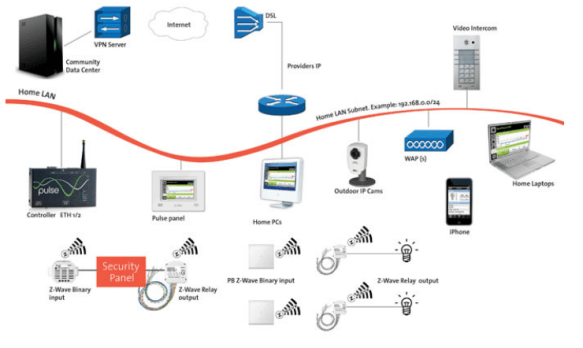
In my previous post(pulse living…an efficient energy solution company, and Home automation – Pulse living ), i was described this product, and now, to me…this looks like a mature and cost effective/affordable solution to every home owner/hotels. They have come up with even much better solutions, which integrates to our day-to-day devices, such as iPhone, iPads apps…etc. You can control your home from anywhere in the world…a real intelligent solution makes your home “an intelligent living”.

Pulse.control is built to the highest technical specifications and leverages the latest technologies as well as industry standards for building automation and networking. The versatile Intel IXP42x Network Processor enables us to deliver a massively scaleable solution while keeping energy consumption and heat dissipation to a minimum. Flash storage increases reliability and performance.  The Microsoft Windows Embedded CE 5.0 operating system can be managed and updated remotely. A range of connectivity options provides flexibility for even the most complex integration projects.

Pulse products are based on International standards for building and home automation such as KNX/EIB and Z-Wave. These standardized multi-vendor protocols cover the gamut of residential, hospitality, and commercial automation requirements including lighting, heating, ventilation, air conditioning, security and safety, window treatments, pool and spa, access and intercom, and metering. To more about the pulse standards click here

The beauty is that is a cost effective solution…with the architecture design which pulse can accomodate, within each home, the Pulse.control.pro acts as the brain of the home, connecting all systems via protocols such as KNX/EIB, Z-Wave, RS232, or TCP/IP. It can then be connected to any number of Pulse.touch screens via Ethernet or WiFi.

To know more about pulse solution, Click here

To know more about pulse products, Click here

Enjoy!!!

Gefen – Multiple Input A/V Switcher-Scaler for Conference Rooms with Built-In Audio Amplifier

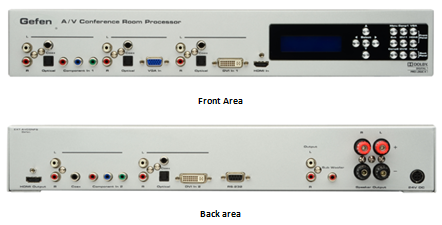
Gefen’s new A/V Conference Room Processor with built-in audio amplifier connects set top boxes, Blu-ray players, gaming consoles, computers and more.  Video is scaled and output in HDMI format with cinema-quality scaling up to 2K or 1080p Full HD resolution, supporting large-scale HDTV displays.  The audio is mixed down from 5.1 Dolby™ surround to two-channel audio with support for a powered subwoofer.  A built-in 2-channel audio amplifier delivers 25 watts per channel from digital and analog sources, ideal for creating high-fidelity sound in the conference room environment. Two speakers may be connected directly to the amplifier binding posts for “plug and play” installation in any conference room, educational facility or presentation venue.

HOW IT WORKS?

Connect each video input source and corresponding audio source to connectors on the front or rear panel. Power up the A/V Conference Room Processor.  The buttons on the front panel are used to select the active A/V source.  Use the LCD menu system to select the scaler output resolution and desired A/V processing functions. The A/V Conference Room Processor will convert the selected A/V inputs to HDMI video output with two-channel analog line-level and speaker-level with powered subwoofer support. …more info, Click Gefen Multiple Input A/V Switcher home page

Specifications:…more details click here

  • Maximum Pixel Clock: 165 MHz
  • Analog Video Bandwidth: 350 MHz
  • Input Video Signal: 1.2 Volts p-p
  • Input DDC Signal: 5 Volts p-p (TTL)
  • HDMI Input Connector: Type-A 19-pin, female
  • HDMI Output Connector: Type-A 19-pin, female
  • DVI Input Connectors: (2) DVI-I 29-pin, female
  • VGA Input Connector: HD-15, female
  • Digital Audio Input Connectors: (4) TOSLink, (4) S/PDIF
  • Analog Audio Input Connectors: (5) L/R RCA
  • Analog Audio Output Connectors: L/R + LFE, RCA
  • Speaker Connectors: L / R Binding Posts
  • Speaker Output: 25W per channel RMS
  • SNR: > 90 dB, THD: < 0.01% @1k at 2V RMS
  • Frequency Response: 20 Hz – 20 kHz, +/- 0.5 dB
  • RS-232 Serial Port: DB-9, female
  • Power Supply: 24V DC
  • Operating Temperature: 0 ~ 40 °C
  • Dimensions: 16.9″ W x 2.6″ H x 8″ D (2U rack space)
  • Shipping Weight: 15 lbs.

THUNDERBOLT™ TECHNOLOGY – high-speed, dual-protocol I/O technology from Intel

Developed by Intel (under the code name Light Peak), and brought to market with technical collaboration from Apple. Thunderbolt technology is a new, high-speed, dual-protocol I/O technology designed for performance, simplicity, and flexibility. This high-speed data transfer technology features the following:

  • Dual-channel 10 Gbps per port
  • Bi-directional
  • Dual-protocol (PCI Express* and DisplayPort*)
  • Compatible with existing DisplayPort devices
  • Daisy-chained devices
  • Electrical or optical cables
  • Low latency with highly accurate time synchronization
  • Uses native protocol software drivers
  • Power over cable for bus-powered devices

Intel’s Thunderbolt controllers interconnect a PC and other devices, transmitting and receiving packetized traffic for both PCIe and DisplayPort protocols. Thunderbolt technology works on data streams in both directions, at the same time, so users get the benefit of full bandwidth in both directions, over a single cable. With the two independent channels, a full 10 Gbps of bandwidth can be provided for the first device, as well as additional downstream devices. More info Click here.
Thunderbolt is a revolutionary I/O technology that supports high-resolution displays and high-performance data devices through a single, compact port. It sets new standards for speed, flexibility, and simplicity. And it makes its debut in the new MacBook Pro.  MacBook Pro now gives you access to a world of high-resolution displays and high-speed peripherals with one compact port. That’s because Thunderbolt is based on two fundamental technologies: PCI Express and DisplayPort. PCI Express is the technology that links all the high-performance components in a Mac. And it’s built into Thunderbolt. Which means you can connect external devices like RAID arrays and video capture solutions directly to MacBook Pro — and get PCI Express performance. That’s a first for notebooks. Thunderbolt also provides 10 watts of power to peripherals, so you can tackle workstation-class projects on the go. With PCI Express technology, you can use existing USB and FireWire peripherals — even connect to Gigabit Ethernet and Fibre Channel networks — using simple adapters. And because Thunderbolt is based on DisplayPort technology, the video standard for high-resolution displays, any Mini DisplayPort display plugs right into the Thunderbolt port. To connect a DisplayPort, DVI, HDMI, or VGA display, just use an existing adapter.
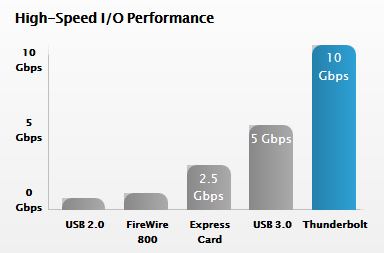
PERFORMANCE: Thunderbolt I/O technology gives you two channels on the same connector with 10 Gbps of throughput in both directions. That makes it ultrafast, and ultraflexible. You can move data to and from peripherals up to 20 times faster than with USB 2.0 and more than 12 times faster than with FireWire 800. You also have more than enough bandwidth to daisy-chain multiple high-speed devices, without using a hub or switch. For example, you can connect several high-performance external disks, a video capture device, and even a Mini DisplayPort display to a single Thunderbolt chain while maintaining maximum throughput.

More info from apple site, click here

Intel: We own ‘full rights’ to the Thunderbolt trademark, not Apple (UPDATED with clarification from Intel)

Apple iPad 2 may soon replace aviation paper charts

Apple iPad 2 may soon replace paper charts…to start with The Federal Aviation Administration (FAA) has granted preliminary approval for the use of iPads in airplane cockpits. Read more, Click here.
FAA: iPad Can Replace Charts For Executive Jet – Read more, Click here
Apple IPads in Cockpits May Hasten End of Era for Paper Charts – Bloomberg – Click here
FAA approves iPads for pilots’ electronic charts – CNN Tech
So to know more about iPad2 from Apple.. click here
For technical Specification, Click here
For Built-in Apps for iPad, Click here
Features:
  • iPad is one big, beautiful display — 9.7 inches of high-resolution photos, movies, web pages, books, and more. LED backlighting makes everything you see remarkably crisp, vivid, and bright.
  • Two powerful cores in one A5 chip mean iPad can do twice the work at once.
  • Multi-Touch on iPad. You use your fingers to do everything, so everything you do — surfing the web, typing email, reading books, and swiping through photos — is easier and a lot more fun.
  • You’ll see two cameras on iPad — one on the front and one on the back. They may be tiny, but they’re a big deal. They’re designed for FaceTime video calling, and they work together so you can talk to your favorite people and see them smile and laugh back at you.
  • It’s highly secure, stable, and responsive, and it’s made to work seamlessly with the iPad hardware. iOS 4 is the reason no other device has yet come close to iPad.
    Pick up your iPad, press the Home button, and it wakes from sleep instantly. That’s because iPad features fast, efficient, and reliable flash storage that lets you access data quickly.
  • Every iPad is built with advanced 802.11n wireless technology.  iPad is also available with 3G connectivity.
  • With the built-in accelerometer, you can rotate iPad to portrait or landscape, or even upside down, and whatever you’re watching, reading, or seeing adjusts to fit the display.
  • Video mirroring is new for iPad and for every app, web page, presentation, video, movie, or photo you want to show a big audience. Just plug in the Apple Digital AV Adapter or Apple VGA Adapter (sold separately) and your HDTV or projector becomes a bigger version of your iPad.
  • With up to nine times the graphics performance, gameplay on iPad is even smoother and more realistic.
  • Even with the new thinner and lighter design, iPad has the same amazing 10-hour battery life
  • AirPrint – Print your email, photos, web pages, and documents right from your iPad over Wi-Fi
  • Photo Booth – When the mood strikes, turn the camera on yourself, make some faces, and start shooting snapshot-style.
  • Accelerometer, three-axis gyroscope, and compass all work together.
  • AirPlay –  your music, photos, and video — can now stream wirelessly to your HDTV and speakers via AirPlay-enabled speakers or Apple TV on a Wi-Fi network

Western Digital TV Live Hub

WD TV Live Hub 1 TB, Full-HD 1080p, network media center ( WDBABZ0010BBK)
Interface : Gigabit Ethernet, USB 2.0, HDMI, Composite A/V, Component Video, Optical audio
Capacity : 1 TB
Operating System : Windows/Mac

System Requirements

  • Standard or high definition television with HDMI or composite video connections. Cables not included.
  • Home network and broadband connectivity for online services.
File Formats Supported
Video – AVI (Xvid, AVC, MPEG1/2/4), MPG/MPEG, VOB, MKV (h.264, x.264, AVC, MPEG1/2/4, VC-1), TS/TP/M2T (MPEG1/2/4, AVC, VC-1), MP4/MOV (MPEG4, h.264), M2TS, WMV9 
Photo – JPEG, GIF, TIF/TIFF, BMP, PNG
Audio – MP3, WAV/PCM/LPCM, WMA, AAC, FLAC, MKA, AIF/AIFF, OGG, Dolby Digital, DTS
Playlist – PLS, M3U, WPL
Subtitle – SRT, ASS, SSA, SUB, SMI 
  1. MPEG2 MP@HL up to 1920x1080p24, 1920x1080i30 or 1280x720p60 resolution.
  2. MPEG4.2 ASP@L5 up to 1280x720p30 resolution and no support for global motion compensation.
  3. WMV9/VC-1 MP@HL up to 1280x720p60 or 1920x1080p24 resolution. VC-1 AP@L3 up to 1920x1080i30, 1920x1080p24 or 1280x720p60 resolution.
  4. H.264 BP@L3 up to 720x480p30 or 720x576p25 resolution.
  5. H.264 MP@L4.1 and HP@4.1 up to 1920x1080p24, 1920x1080i30, or 1280x720p60 resolution.
  6. An audio receiver is required for multi-channel surround sound digital output.
  7. Compressed RGB JPEG formats only and progressive JPEG up to 2048×2048.
  8. Single layer TIFF files only.
  9. Uncompressed BMP only.
  10. For details, please refer to the user manual.

iPad apps from DisplayLink makes iPad a wireless Windows monitor

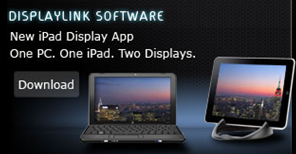
The application works with Windows XP, Vista, and 7 and requires an iPad with iOS 3.2 or later, the company said. DisplayLink announced an $1.99 application today for iPad which turns your ipad into a second monitor wirelessly connected to a Windows computer.

Read the press release from displaylink, click here.

DisplayLink announced the technology today at the CES show in Las Vegas..read the article from CNet

The DisplayLink iPad app turns your iPad into an extended monitor for your PC. Great for improving your productivity by freeing up desktop space on your notebook or desktop computer. Just drag any open window or application on to the iPad display sitting next to your primary display. Park your browser, email, social networking site, IM, or application control console on the iPad display and avoid application view switching on your primary display.

  • Creates an interactive, secondary wireless display for your PC with the iPad
  • Windows 7, Vista (32 and 64bit) and XP (32bit) compatible
  • Configuration using the familiar Windows graphics display utility
  • Discovers and connects the iPad screen to your PC over your wireless network quickly and reliably
  • Operates seamlessly with other DisplayLink multi-monitor and dock products to create a rich, productive multi-monitor environment

More info/Download DisplayLink iPad Host Software Driver,  …click here