I wish all my readers a very happy and prosperous new year ahead. I thank you for your support and advice.
-PREMNAIR


I wish all my readers a very happy and prosperous new year ahead. I thank you for your support and advice.
-PREMNAIR
Skydrive – Starting from June 20, 2011, is launching a new version of the SkyDrive website. Team took advantage of modern browsers and HTML5 to make SkyDrive faster, easier to navigate, and more beautiful for viewing photos. The new SkyDrive will be rolling out soon. Click here to see what Group Program Manager, SkyDrive.com, Mr. Omar Shahine has to discuss.
New look is good

Enjoy
On Exchange server 2010, If you create a distribution group with scope as Universal and type as Distribution, in your domain active directory.

and then you enable the mail from creating the mailbox server, then do the testing of email flow from internal and external.,
if you ever had face an error, “Technical details of permanent failure: SERVER tried to deliver your message, but it was rejected by the recipient domain. We recommend contacting the other email provider for further information about the cause of this error. The error that the other server returned was: 550 550 5.1.1 User unknown (state 14).”
Please do the following.

From your active directory, select the property of the group email id, then under mail flow settings, select Message Delivery Restrictions, then select Properties…, new window will open.
uncheck the box which states “Require that all senders are authenticated” and click ok..then apply and ok again.
Give some time to replicate this to Edge server…
Enjoy!!!!
With Microsoft Outlook Hotmail Connector 32-bit, you can use Microsoft Office Outlook 2003, Microsoft Office Outlook 2007 or Microsoft Office Outlook 2010 to access and manage your Microsoft Windows Live Hotmail or Microsoft Office Live Mail accounts, including e-mail messages, contacts and calendars for free!
Outlook Hotmail Connector enables you to use your Live Hotmail accounts within Outlook:
If you use the Outlook Hotmail Connector with Outlook 2010 you gain these additional benefits:
To download this from Microsoft site, click here
On May 10, 2011, Microsoft Corp. (Nasdaq: “MSFT”) and Skype Global S.à r.l today announced that they have entered into a definitive agreement under which Microsoft will acquire Skype, the leading Internet communications company, for $8.5 billion in cash from the investor group led by Silver Lake. The agreement has been approved by the boards of directors of both Microsoft and Skype.
Read the press release from Microsoft News Center.

Microsoft CEO Steve Ballmer and Skype CEO Tony Bates announce Microsoft's acquisition of Skype. San Francisco, May 10, 2011
Article from The Telegraph about this deal.
Skype will support Microsoft devices like Xbox and Kinect, Windows Phone and a wide array of Windows devices, and Microsoft will connect Skype users with Lync, Outlook, Xbox Live and other communities. Microsoft will continue to invest in and support Skype clients on non-Microsoft platforms. The acquisition will increase the accessibility of real-time video and voice communications, bringing benefits to both consumers and enterprise users and generating significant new business and revenue opportunities. The combination will extend Skype’s world-class brand and the reach of its networked platform, while enhancing Microsoft’s existing portfolio of real-time communications products and services.
In Windows 7, the taskbar has been completely redesigned to help you more easily manage and access your most important files and programs. As of Windows 7, the taskbar has been extended significantly under the guiding principle of getting users where they’re going as quickly and efficiently as possible. To that end, the application windows, files, and commands that the user needs to accomplish that are now centralized into a single taskbar button that consolidates previously scattered information sources and controls. A user can now find common tasks, recent and frequent files, alerts, progress notifications, and thumbnails for individual documents or tabs all in one place.

A small set of applications are pinned by default for new installations. Other than these, only the user can pin further applications; programmatic pinning by an application is not permitted. The Show Desktop feature from Quick Launch is now located at the taskbar’s far right. Hovering over this area causes all active windows to become transparent, showing the desktop. Clicking the area executes the familiar action of minimizing all windows and switching to the desktop.
You can just drag your web pages/programs to the task bar and the icon is created plus the menu available to that program is also listed..cool na take a look at what i created for me…my facebook, twitter, linkedin and my blog page…hmm

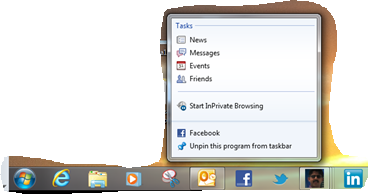
Change how icons appear in the notification area…to know click here
Enjoy!!!

Next week (Week 15), Microsoft will release Office for Mac 2011 Service Pack 1 (SP1) which will provide increased stability, security, and some new features to the suite – including improved Outlook syncing support – as well as some performance enhancements. This update will enable calendar syncing between Outlook for Mac and Apple’s Sync Services. This will let you sync your Outlook calendar as well as contacts, notes and tasks with any service or device that supports Sync Services, including your iPhone and iPad. Apple is introducing with their new version of MobileMe. MobileMe will no longer sync with MacOS Sync Services as of May 5th (or now if you have already moved your account to the new version of MobileMe calendar). As a result, Outlook 2011 SP1 calendars that sync with Sync Services on the Mac, will NOT be synced with MobileMe calendars.
The new Apple MobileMe Calendar service is an updated calendar service for iPhone, iPad, iPod touch, Mac, and PC. It includes:
The new MobileMe Calendar uses the CalDAV standard so users can view and edit their calendars using the built-in calendar applications on their iPhone, iPad, iPod touch, and Mac. Windows users can also view and edit their calendars with Microsoft Outlook using the MobileMe Control Panel for Windows.
More info Click here
Attachment size setting inside Exchange server 2010 for global user settings.
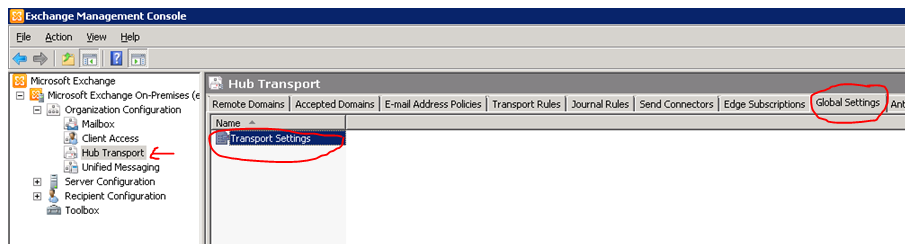
Edit the Transport settings and change the parameters as below.

Once you done it, click Apply and ok
Remember one thing, the more you increase the size of the attachment, the load on the CAS & Edge server increase…plus the Virus scanning engine too.
Thats all folks!!!
Most of you guys must have experience the scenario when “Outlook connection lost….” even if you have Exchange server 2010 (with Edge, 2 clustered H&C and 2 DAG configured MB) and Outlook 2010 in place. The reason is that, when you are doing a maintenance on one of the H&C, and if the client is connected to that H&C, communication to the MB is lost. The reason for this is that the cluster load balancing on the H&C cluster handler is not in place, even if the cluster name is published in the DNS server.

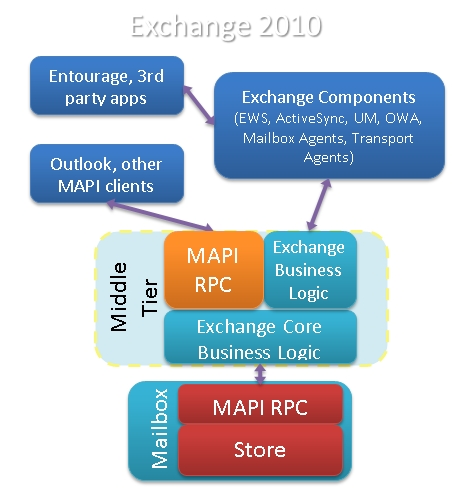
In Exchange 2007, 5 server roles that performed distinct functions within the Exchange organization. One role in particular – the Client Access server role – introduced a variety of new Web services, including the Availability service, the Auto discover service and Calendar Concierge services.
In Exchange 2010, same 5 server roles exists. However, there are some significant architectural changes and some shift in responsibilities. The most significant change in Exchange 2010, two new services on CAS called the RPC Client Access and Address Book services establish the RPC (Repote Procedure Call) endpoint for MAPI(Messaging Application Programming Interface), NSPI(Name Service Provider Interface) and RFR (Request for Response) client access. This new functionality replaces the RPC endpoints in the Information Store. The RPC endpoint in the Information Store has not been removed in Exchange 2010, but it has been modified to only accept requests from CAS servers. The RPC endpoint for public folder database access remains on the Mailbox server, however, Outlook clients now communicate directly with the RPC Client Access service on the Mailbox Server for public folder database access, and not with the Information Store.
When CAS starts communicating with the Mailbox server, it makes sense to view it as the Client Access server communicating with the Mailbox database via the Mailbox server that hosts the database. This is especially evident in a load-balanced array of Client Access servers and/or where your environment is configured to use Database Availability Groups that are associated with a Client Access server or Client Access server array.
By default, before a Client Access array is configured,
In order for the clients to utilize a CAS array
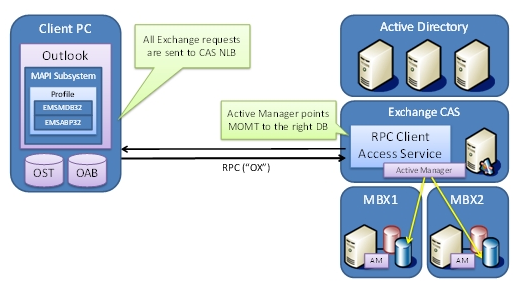
How to Setup!!!..
Goto one of the CAS server where the NLB is ( to read more about New-ClientAccessArray cmdlet, click here )
[1] Check is there are any pre-created CAS Arrays. PS Command : Get-ClientAccessArray

[2] Create new Client Access Array. Run the Cmdlet in EMS New-ClientAccessArray -Fqdn server.contoso.com -Site “Redmond” -Name “server.contoso.com”

[3] Associate databases with this CAS Array –
Use this CMDLet to add mailbox database to CAS array. Add all mailbox databases at once – Get-MailboxDatabase | Set-MailboxDatabase -RPCClientAccessServer “CASNLB.contoso.com”

Now the best part –
Configuring Outlook 2010 using Auto Discover
If you already configured Outlook client, Close the outlook, then goto Control Panel->Mail and change the Server name to the new CAS NLB name
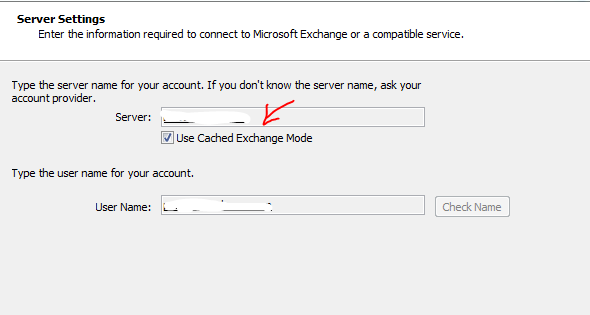
If you are going to use a new outlook configuration, Auto discover will return the new CAS NLB name.
Thats all folks!!! Enjoy!!!
 PREMNAIR'S Blog