Great Plains 10.0 and Great Plains 2010 – Analytical Accounting – Information about Check Links

If you are using AA, it is encouraged to be on the latest service pack so you have all the recent fixes. (A number of quality issues found in AA were fixed in SP4 and SP5 for Microsoft Dynamics GP 10.0, and RTM and SP1 for GP 2010.) .

More information from Dynamics GP Support and Services Blog, –  Click here

Elcome International – Productivity goes up using latest Microsoft Technology

As a system integrator, My company, Elcome is well aware of the technologies available to make our clients lives easier…The deployment of Microsoft Dynamics has also had a major impact on the company’s ability to operate. “One big area that we’ve been able to focus on is reporting, in terms of KPIs and business intelligence. There have been a lot of advances in Dynamics and the supporting tools to make it easier to produce different types of reports, and the ability to allow end users to customise, specifically things like SQL reporting services that are part of SQL 2008. We were using an old version of Microsoft Dynamics GP. Two versions old in fact,” we realises. “When we upgraded to the latest version – and I think we were one of their first customers to go live with the latest version which is Microsoft Dynamics GP 2010 – we also moved to the latest versions of all the underlying technology. That includes the latest version of Microsoft SQL Server 2010. We’ve also moved from 32-bit to 64-bit servers. Everything is now running on 64bit hardware and software.” – explains executive director at Elcome International, Jimmy Grewal…more information read the following article published by ITP publishers on ACN Magazine By Ben Furfie Published May 10, 2011, May 2011 issue..click here to read more

Microsoft GP 2010 – Analytical Accounting Menu Master Table (SY07110) Records Multiplying – Bug & Workaround

Analytical Accounting Menu Master Table (SY07110) Records Multiplying – Bug & Workaround  : read this solution/workaround from my collegue…a good post.

A good response from David Musgrave

The issue has been fixed in the latest hotfixes.. on Post1 and Post2

Enjoy!!!

Microsoft Dynamics GP “12” Web Client Architecture

The Web Client is the full GP application delivered through the Web. The key pieces to be delivered will be the core application components, ISV dictionaries, and in-house customizations – Dexterity customizations. At the
core of the web client is the UI update which will feature new homepage tiles, ribbons and tabs. Microsoft expects that UI performance will rival that of Terminal Server or better. Web Client to be introduced with codename GP “12. To know more about Microsoft Dynamics GP webclient, Mariano Gomez had an interest article to explain it. Click here to know more. To know more about the Rendering Engine, click here.

To know more about Silver light architecture, click here

Microsoft Dynamics GP 2010 Service Pack 2 – Released

CONGRATULATIONS!!!

The Microsoft Dynamics GP development team have been hard at work and have just released Service Pack 2 (R2) for Microsoft Dynamics GP 2010 on the 21st of April, 2011.

INSTALLATION INSTRUCTIONS

It is recommended to have a working backup of the the following items before applying any patch file:

1. DYNAMICS database
2. All company databases
3. Reports.dic – export the reports through Customization Maintenance (Tools | Customize | Customization Maintenance)
4. Forms.dic – export the forms through Customization Maintenance (Tools | Customize | Customization Maintenance)
5. eConnect PRE and POST Procedures if customized

NOTE: The Reports.dic and the Forms.dic may be located on the server or each workstation. If located at each workstation, make sure to backup the dictionaries at all workstations.

If you have Microsoft Dynamics GP 2010 already installed, use the steps below:
1. Download the latest patch release and installation guide below.
2. At the Microsoft SQL Server, double-click the patch file and the install will be silent and only show a progress window.
3. At the Microsoft SQL Server, launch Microsoft Dynamics GP Utilities and update the DYNAMICS database and all company databases.
4. Once the databases are updated at the server, update the modified forms and reports at the Additional Tasks window. Refer to the installation guide for the steps to update.
5. Install the patch file at all client workstations. The patch file can be published using Automatic Client Updates. Once a user logs in, they will be automatically prompted to install the patch. Refer to Chapter 5 in the
SystemAdminGuide.pdf on the Release 2010 DVD under Documentation.

If you are updating to Microsoft Dynamics GP 2010, the latest patch must be installed prior to launching Utilities. Refer to the steps below:
1. Install a server installation of Microsoft Dynamics GP 2010 including the Microsoft Dynamics GP features you use.
2. At the end of the Microsoft Dynamics GP 2010 installation, click Finish in the Installation Complete window.
3. Install the latest Microsoft Dynamics GP 2010 patch.
4. Convert your databases using Microsoft Dynamics GP 2010 Utilities.
5. Update all modified reports and forms dictionaries.

WHERE CAN YOU FIND IT?

Required: Live ID for sign-in to these portal.

CustomerSource: https://mbs.microsoft.com/customersource/downloads/servicepacks/mdgp2010_patchreleases.htm?printpage=false

PartnerSource: https://mbs.microsoft.com/partnersource/downloads/servicepack/mdgp2010_patchreleases.htm?printpage=false

Other useful links:

  1. Developing for Microsoft Dynamics GP by David Musgrave (Australia) and the Microsoft Dynamics GP Developer Support Team (USA).
  2. Inside Microsoft Dynamics GP – Official Blog page

Enjoy!!!

Microsoft Dynamics Greatplains 2010 R2 Feature list

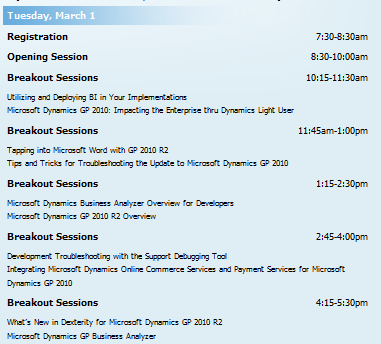
This conference, has been on March 1–3, 2011 at the Microsoft Fargo Campus, which provide insight, skills and knowledge that will help move the business forward..and its for Microsoft Partners only

Highlights include:

  • Interactive concurrent sessions – learn more about the solution from the Microsoft Dynamics GP team
  • Roundtable discussions – visit with a small group on a variety of topics
  • ISV Expo and reception – learn about the latest add-on solutions

Agenda as follows

Lot of thing happen in this conference. More info, Read David Musgrave Blog and Mariano Gomez Blog

The Road Map itself will give you how the GP future looks like…can’t wait to get hands on…

One of the good article about the The Evolution of the Microsoft Dynamics GP Roadmap from Mariano Gomez, Click here to read it

Again the coolest part is Microsoft Dynamics GP “12”  will have a light deployment client as well as the current rich client, a web based client which will be capable of reproducing any Dexterity based window in an browser….cool naa..can’t wait to get hold of it..

I’m still wondering, when are they going to integrate the Active Directory integration of GP !!!

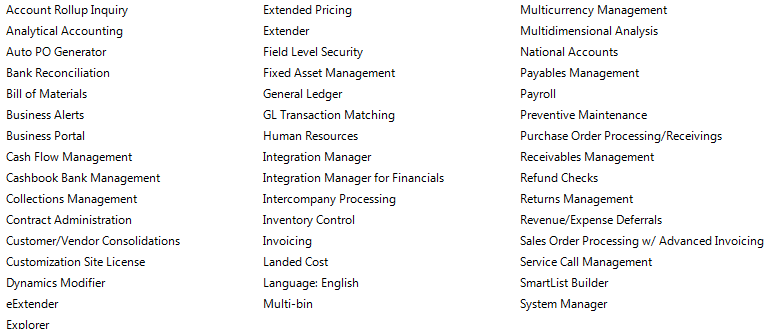
Here are some of the feature list of GP 2010 R2 highlighted in this conference

Waiting for the release!!!

Microsoft Dynamics GP – Dubai – Customer Day – March 21st – 22nd 2011

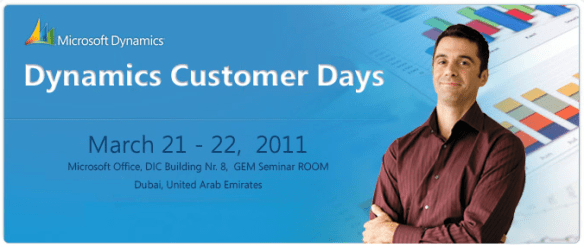
Microsoft Gulf is organizing the Dynamics Customer Days and stay up-to-date with the latest solutions Microsoft Dynamics is proving and get a chance to network with Dynamics customers in different businesses. Dynamics Customer events on March 21st – 22nd 2011 in the Microsoft Office GEM Seminar Room in Dubai.

Customization – Quality vs On Time

A good blog from my colegue..I agree to that there should be customization quality, so that the upgrades/rollups are easy and the time comes after. Read more

Clicke here Vaidy Mohan’s Greatplains Blog

Enjoy!!!

Great Plains 2010 gone live in 15 days!!!

Attend a Microsoft Dynamics GP 2010 Launch Event – The new way to do business

This year was a challenging year for us when it comes to ERP. Microsoft GP 8, we moved to GP10 and Microsoft released Great Plains 2010 and we decided to move to GP2010 because of the new features and collaborations. In 15 days we achieve this task by pulling the data from GP10 database, which is SQL2008 to GP2010 database. 15days with major customization on field service module, New codings on Analytical accounting and our in-house team is able to manage it well, within the time frame..and we are using all the below modules as well…

Now we are in Great Plains 2010…Congratulation to our team

Why can’t I run Microsoft Dynamics GP via ODBC over a WAN?

GP2010 beautiful article…from David Musgrave…click here to read more