SQL Server Code Name “Denali”

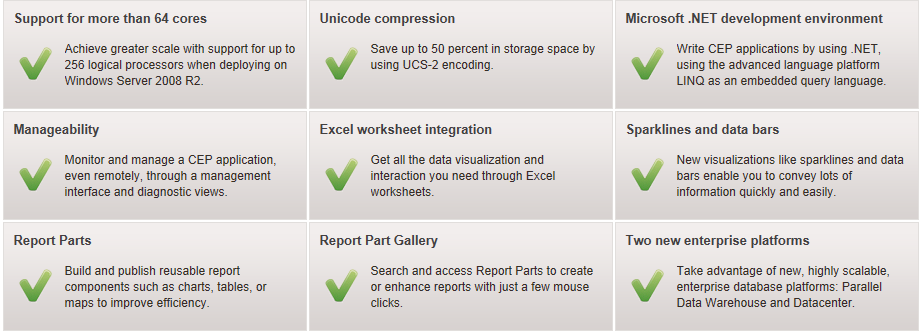
 SQL Server Code Name Denali‖ is a cloud-ready information platform that will help organizations unlock breakthrough insights across the organization and quickly build solutions to extend data across on-premises and public cloud backed by mission critical confidence. 

Extend the reach of data virtually anywhere across server and/or cloud with expansive developer technologies, Enable new scenarios with SQL Azure DataSync, a cloud service that provides bi-directional data synchronization between databases across datacenter and cloud,  Provide a consistent and open data-feed to power multiple user experiences across the web.
 

SQL Server code name “DENALI” CTP3 ..click here to download it

SQL Server code name “DENALI” Datasheet..download here from Microsoft

Security in Office 365 White Paper

Moving productivity services to the cloud requires a serious consideration of security and privacy issues and technologies. Office 365 is designed to deliver the enterprise-grade security you require to move to the cloud with confidence. This whitepaper provides an overview of the security practices and technology that support enterprise-grade security in Microsoft Office 365 for businesses of all sizes. Click here to download this from Microsoft Download center

System Center Monitoring Pack for Microsoft Dynamics CRM 2011

The System Center Monitoring Pack for Microsoft Dynamics CRM 2011 enables you to administer the Microsoft Dynamics CRM 2011 application in Microsoft System Center Operations Manager (SCOM) 2007 SP1 and System Center Operations Manager 2007 R2…click here to access from Microsoft Download Center

How to secure a Word Template in Microsoft Dynamics GP 2010 when using Word 2010 and 2007

The Dynamics Support team is publishing a series of helpful videos. Video that covering  “How to secure a Word Template in Microsoft Dynamics GP 2010 when using Word 2010 and 2007”, is now available at the Microsoft Dynamics Community Team Blog as well as the Microsoft Dynamics GP Blog.

Enjoy!!!

Great Plains 10.0 and Great Plains 2010 – Analytical Accounting – Information about Check Links

If you are using AA, it is encouraged to be on the latest service pack so you have all the recent fixes. (A number of quality issues found in AA were fixed in SP4 and SP5 for Microsoft Dynamics GP 10.0, and RTM and SP1 for GP 2010.) .

More information from Dynamics GP Support and Services Blog, –  Click here

Power Shell CMD – Exchange server 2010 – Check the status of the exchange server service(s)

To check the status of the exchange server service, go to EMS…and type get-service *exchange*

Enjoy!!!

Exchange server 2010 SP1 – Step by Step installlation on the production server – Live

Earlier i’ve done the Exchange server migration – 2007 to 2010 – Live cast, Its been 10 months since Exchange team release the SP1 for Microsoft Exchange server 2010….today i’m doing Microsoft Exchange server 2010 SP1 upgradation…Live page is opened.

Click here to view this live page

Enjoy!!!!

Update Rollup 4 for Exchange Server 2010 Service Pack 1 released

Update Rollup 4 for Exchange Server 2010 Service Pack 1 resolves issues that were found in Exchange Server 2010 Service Pack 1 since the software was released. This update rollup is highly recommended for all Exchange Server 2010 Service Pack 1 customers. Click here to download this. Please read the resolution (At the bottom of the page) before applying the rollups

Exchange server 2010 management tools do not start after the installation – Solution

Problem impacts Exchange management tools on servers running Exchange 2010 on

  • Windows Server 2008 SP2
  • Windows 2008 R2 RTM

Symptom: Event ID 1000 & 1023

  • Faulting application Powershell.exe, version 6.0.6002.18111, time stamp 0x4acfacc6, faulting module mscorwks.dll, version 2.0.50727.5653, time stamp 0x4d54a59c, exception code 0xc0000005, fault offset 0x00000000001d9e19, process id 0x%9, application start time 0x%10.
  • .NET Runtime version 2.0.50727.3053 – Fatal Execution Engine Error (000007FEF9216D36) (80131506)
  • Exchange Management Shell does not start
  • Exchange Management Console does not start
  • There might be a crash in Exchange Mailbox Replication Service (it is not clear yet if this is related)
  • Event Viewer might have trouble opening

Resolution : Please see the following KB article for the resolution of this problem. The solution already explained in the Microsoft Exchange team Blog.

SkyDrive from Windows Live

Skydrive – Starting from June 20, 2011, is launching a new version of the SkyDrive website. Team took advantage of modern browsers and HTML5 to make SkyDrive faster, easier to navigate, and more beautiful for viewing photos. The new SkyDrive will be rolling out soon. Click here to see what Group Program Manager, SkyDrive.com, Mr. Omar Shahine has to discuss.

New look is good

Enjoy
