Active Directory operation failed on *DomainController*. This error is not retriable. Additional information: Insufficient access rights to perform the operation.

When you try to move a mailbox from Exchange 2007 to Exchange 2010,  following error occured:

Error:
Active Directory operation failed on *DomainController*. This error is not retriable. Additional information: Insufficient access rights to perform the operation.
Active directory response: 00002098: SecErr: DSID-03150E8A, problem 4003 (INSUFF_ACCESS_RIGHTS), data 0

The user has insufficient access rights.

Exchange Management Shell command attempted:
’*OUStructure*’ | New-MoveRequest -TargetDatabase ‘Mailbox Database 1985885663′ -BadItemLimit ‘-1′

To resolve this error…..by editing the Advanced Security Settings for that user,

  • Open Active Directory Users and Computers
  • Find the user of which the mailbox error occured
  • Open  the properties of the user and go to the security tab (if this is not available, choose view and then advanced features in the AD users and computers under  MMC)
  • Click on [Advanced]
  • Check the box at the bottom which says “Include inheritable permissions from this object’s parent” and then click [OK] twice.
Error fixing

Then try to move it and it will work…

Activating Product Key – Exchange 2010

Activate the product key for Exchange Server 2010 (for each role installed)..otherwise you can run it for 119 days…!!!!

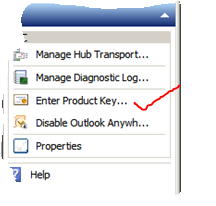
To activate the same, from the Exchange Management console of 2010, right pannel, you will see “Enter Product Key”…and enter the product key which comes with it…!!

Exchange 2010 – Manage CAS role – Access is denied error – HResult = -2147024891

ERROR: An IIS directory entry couldn’t be created. The error message is Access is denied.
. HResult = -2147024891

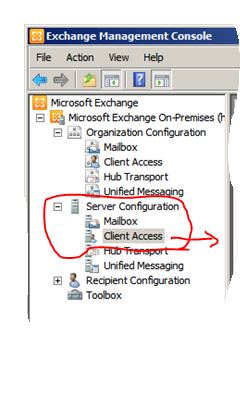
After installing Exchange 2010 server in an Exchange 2007 server environment may get some funny error results. After the installation Exchange 2010 , open the Exchange management console, you nee to go to Microsoft Exchange On-Premises -> ServerConfiguration -> Client Access and here you will receive the following error message.

So let run the “Get-OwaVirtualDirectory” in powershell and you will get the following result

From the power Shell command prompt .. Run

[PS] C:\Windows\system32>Get-OwaVirtualDirectory

An IIS directory entry couldn’t be created. The error message is Access is denied.
. HResult = -2147024891
    + CategoryInfo          : NotInstalled: (<ExchangeServer2007>\Exchange (Default Web Site):ADObjectId) [Get-OwaVirtualDirectory]
   , IISGeneralCOMException
    + FullyQualifiedErrorId : 4B12EB5D,Microsoft.Exchange.Management.SystemConfigurationTasks.GetOwaVirtualDirectory

Above command reads the Active Directory objects to see all the registered OWA virtual directories. The virtual directories you retrieve are the virtual directories from Exchange 2010,  but also from Exchange 2007. Next it connects to these directories and needs admin rights. This is the problem. Exchange 2010 creates a few new groups and one of them is Exchange Trusted Subsystem. Exchange Trusted Subsystem is automatically added to the local administrators group of the Exchange 2010 server but not on the Exchange 2007 servers. 

RESOLUTION :  All you need to do is add the Exchange Trusted Subsystem to the local administrators group on the Exchange 2007 CAS servers and restart the server, including the new 2010 H&C Server.

Now  run the “Get-OwaVirtualDirectory” in powershell we see:

[PS] C:\Windows\system32>Get-OwaVirtualDirectory

Name                                    Server                                  OwaVersion
—-                                    ——                                  ———-
Exchange (Default Web Site)             <ExchangeServer2007>                                 Exchange2003or2000
Public (Default Web Site)               <ExchangeServer2007>                               Exchange2003or2000
Exadmin (Default Web Site)              <ExchangeServer2007>                                 Exchange2003or2000

owa (Default Web Site)                  <ExchangeServer2010>                                 Exchange2010


Apple iPad 2 may soon replace aviation paper charts

Apple iPad 2 may soon replace paper charts…to start with The Federal Aviation Administration (FAA) has granted preliminary approval for the use of iPads in airplane cockpits. Read more, Click here.
FAA: iPad Can Replace Charts For Executive Jet – Read more, Click here
Apple IPads in Cockpits May Hasten End of Era for Paper Charts – Bloomberg – Click here
FAA approves iPads for pilots’ electronic charts – CNN Tech
So to know more about iPad2 from Apple.. click here
For technical Specification, Click here
For Built-in Apps for iPad, Click here
Features:
  • iPad is one big, beautiful display — 9.7 inches of high-resolution photos, movies, web pages, books, and more. LED backlighting makes everything you see remarkably crisp, vivid, and bright.
  • Two powerful cores in one A5 chip mean iPad can do twice the work at once.
  • Multi-Touch on iPad. You use your fingers to do everything, so everything you do — surfing the web, typing email, reading books, and swiping through photos — is easier and a lot more fun.
  • You’ll see two cameras on iPad — one on the front and one on the back. They may be tiny, but they’re a big deal. They’re designed for FaceTime video calling, and they work together so you can talk to your favorite people and see them smile and laugh back at you.
  • It’s highly secure, stable, and responsive, and it’s made to work seamlessly with the iPad hardware. iOS 4 is the reason no other device has yet come close to iPad.
    Pick up your iPad, press the Home button, and it wakes from sleep instantly. That’s because iPad features fast, efficient, and reliable flash storage that lets you access data quickly.
  • Every iPad is built with advanced 802.11n wireless technology.  iPad is also available with 3G connectivity.
  • With the built-in accelerometer, you can rotate iPad to portrait or landscape, or even upside down, and whatever you’re watching, reading, or seeing adjusts to fit the display.
  • Video mirroring is new for iPad and for every app, web page, presentation, video, movie, or photo you want to show a big audience. Just plug in the Apple Digital AV Adapter or Apple VGA Adapter (sold separately) and your HDTV or projector becomes a bigger version of your iPad.
  • With up to nine times the graphics performance, gameplay on iPad is even smoother and more realistic.
  • Even with the new thinner and lighter design, iPad has the same amazing 10-hour battery life
  • AirPrint – Print your email, photos, web pages, and documents right from your iPad over Wi-Fi
  • Photo Booth – When the mood strikes, turn the camera on yourself, make some faces, and start shooting snapshot-style.
  • Accelerometer, three-axis gyroscope, and compass all work together.
  • AirPlay –  your music, photos, and video — can now stream wirelessly to your HDTV and speakers via AirPlay-enabled speakers or Apple TV on a Wi-Fi network

Microsoft Dynamics Greatplains 2010 R2 Feature list

This conference, has been on March 1–3, 2011 at the Microsoft Fargo Campus, which provide insight, skills and knowledge that will help move the business forward..and its for Microsoft Partners only

Highlights include:

  • Interactive concurrent sessions – learn more about the solution from the Microsoft Dynamics GP team
  • Roundtable discussions – visit with a small group on a variety of topics
  • ISV Expo and reception – learn about the latest add-on solutions

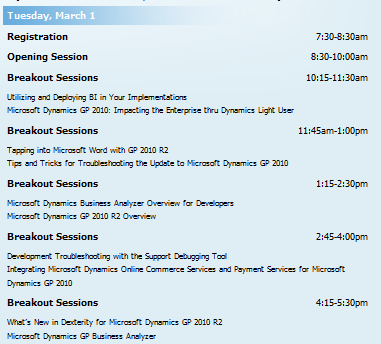
Agenda as follows

Lot of thing happen in this conference. More info, Read David Musgrave Blog and Mariano Gomez Blog

The Road Map itself will give you how the GP future looks like…can’t wait to get hands on…

One of the good article about the The Evolution of the Microsoft Dynamics GP Roadmap from Mariano Gomez, Click here to read it

Again the coolest part is Microsoft Dynamics GP “12”  will have a light deployment client as well as the current rich client, a web based client which will be capable of reproducing any Dexterity based window in an browser….cool naa..can’t wait to get hold of it..

I’m still wondering, when are they going to integrate the Active Directory integration of GP !!!

Here are some of the feature list of GP 2010 R2 highlighted in this conference

Waiting for the release!!!

Microsoft SharePoint Workspace 2010 – New turn

SharePoint Workspace 2010 is the new name for and succeeds Microsoft Office Groove 2007. SharePoint Workspace 2010 is a client application that provides fast, any-time interactive access to document libraries and lists on Microsoft SharePoint Server 2010 and Microsoft SharePoint Foundation 2010. SharePoint Workspace 2010 also provides options for creating Groove peer workspaces and Shared Folder workspaces. SharePoint Workspace 2010 is more versatile than Microsoft Office Groove 2007 and can be integrated with Microsoft SharePoint Server 2010 or can run independently. Microsoft SharePoint Workspace 2010 provides a client for Microsoft SharePoint Server 2010 and Microsoft SharePoint Foundation 2010 that enables real-time synchronization of desktop content with SharePoint documents and lists. SharePoint Workspace 2010 also provides options for creating Groove collaboration workspaces and synchronized shared folders. By using SharePoint Workspace 2010, information workers can easily synchronize online and offline content with a designated SharePoint site or collaborate with external partners and offsite team members through shared workspaces. SharePoint Workspace 2010 is included with Microsoft Office Professional Plus 2010.

Key features of SharePoint Workspace 2010 include the following:

A choice of workspace types:

  • SharePoint workspaces — Provide direct bi-directional synchronization of library and list content between a SharePoint site and a workspace on an individual client computer. Creation of a SharePoint workspace enables individual SharePoint users to check out and check in SharePoint library documents from their local computers, bring SharePoint documents and lists to their computers where they can work online or offline, and synchronize local content with a SharePoint site. When an individual client establishes a connection with a SharePoint server, synchronization occurs at regular intervals when the client is online. When a client cannot connect to a SharePoint site, the user can easily take work offline to make updates. The updated documents are automatically synchronized with SharePoint document libraries and lists when the user reconnects. This interface offers an efficient and satisfying alternative to browser access of SharePoint. Unlike other workspace types, the SharePoint workspace is a personal synchronized copy of a SharePoint site.
  • Groove workspaces — Provide a rich and secure peer collaboration environment that supports synchronization of content among peer client computers that host a shared workspace. Creation of a Groove workspace enables SharePoint Workspace users to quickly form teams and automatically synchronize online or offline contributions with fellow team members. A full set of collaboration tools lets team members schedule meetings, hold discussions, and share work with trusted partners around the world. Support for communications under various network conditions and across firewalls facilitates timely and effective collaboration.
  • Shared Folder workspaces — Support Windows folder sharing among clients. Creation of a Shared Folder workspace lets information workers share the contents of a common folder in a designated Windows Explorer directory.
  • Easy setup   Windows users can easily download and run SharePoint Workspace 2010 without IT assistance.
  • Offline and online collaboration   Information workers can easily synchronize online and offline work, through a SharePoint workspace, Groove workspace, or Shared Folder workspace. Content is synchronized dynamically among online collaboration points and updates are transmitted immediately when an offline client comes back online. When an offline client reconnects, SharePoint Workspace automatically adds offline contributions to the workspace and applies workspace updates to the previously offline client.
  • Integration with Windows logon   SharePoint Workspace 2010 uses Windows logon credentials to authenticate users so that a separate logon is not necessary.
  • Common file dialog boxes   Windows technology enables Microsoft Office 2010 users to directly open and save files in SharePoint Workspace.

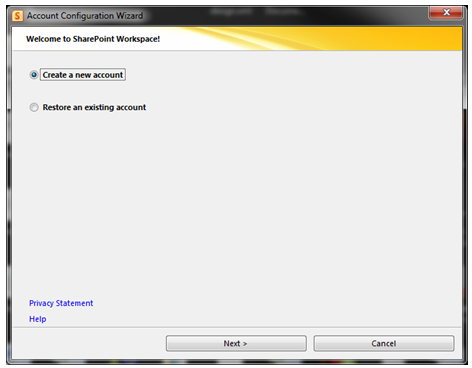
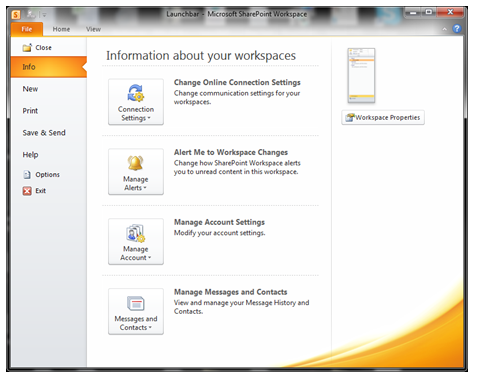
When you install Microsoft Office 2010 package, you will get a program, which is Sharepoint workspace 2010, which is the replacement of Grove and the installation as follows

If you have a SPS domain in your domain network, use your own login credential only.
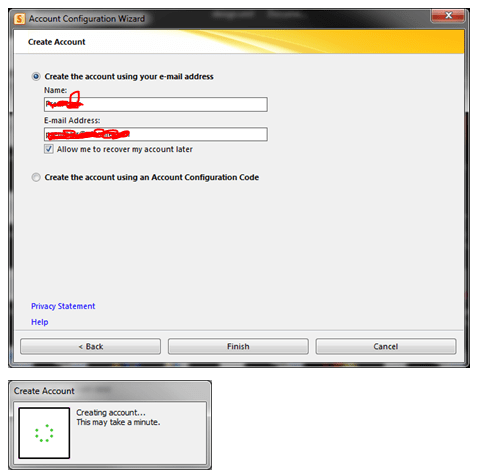
Once this is done, click Internet Explorer and open your SPS webpage. Under Site Action, Click Sync to SPS workspace

Once the Sync is completed, you can now use your doman SharePoint Site offline and online.

For Setting modification, use the File menu and do the needful

Operational Restrictions
SharePoint Workspace operates with a recommeded maximum number of synchronized documents – 10,000. Synchronizing extremely large document libraries, such as a Document Center, is not supported.

SharePoint Workspace also has limited support for metadata extensions to the document library. BDC Fields based on Business Connectivity Services – tagging documents based on external datasources – is not supported, and libraries that use BDC field definitions cannot be synced to Workspace. On the other hand, Managed Metadata fields (MMS) can be included in synchronized libraries. SharePoint Workspace is able to view, but not modify, field values based on MMS term stores.

To Download SharePoint Workspace 2010: Groove Web Services Software Development Kit, Click here.

Enjoy!!!

Microsoft Dynamics GP – Dubai – Customer Day – March 21st – 22nd 2011

Microsoft Gulf is organizing the Dynamics Customer Days and stay up-to-date with the latest solutions Microsoft Dynamics is proving and get a chance to network with Dynamics customers in different businesses. Dynamics Customer events on March 21st – 22nd 2011 in the Microsoft Office GEM Seminar Room in Dubai.