Unknown's avatar

About PREMNAIR

Working as IT, Infrastructure & Security Manager in Dubai.

iCloud and iOS5 from Apple

Apple announce its new OS which is iOS5 for mobile/ipad platform..comming this fall…cool isn’t it?

Lot of new features going to get release with this platform and it is compatible with iPhone 3GS, iPhone 4, iPod touch (3rd generation and 4th generation), iPad and iPad 2…

New feature like….

  • Notification Center: You get all kinds of notifications on your iOS device: new email, texts, friend requests, and more. With Notification Center, you can keep track of them all in one convenient location. Just swipe down from the top of any screen to enter Notification Center.
  • iMessage: With this you can send unlimited test message throug Wi-Fi or 3G from your iPad, iPhone or iPod touch to anyone with one of those devices. This apps built into the messages app, so you can send text, photos, videos, locations and contactss
  • Twitter: Integrated right into iOS 5… it even easier to tweet from your iPhone, iPad, or iPod touch. Sign in once in Settings, and suddenly you can tweet directly from Safari, Photos, Camera, YouTube, or Maps.
  • Camera: Now in iOS5, it integrates right onto the Lock Screen and you can take snaps instantly using the volume-up buttom and say “click”
  • PC free: New feature designed to be independence for all iOS devices. With iOS 5, you no longer need a computer to activate and set up your device…all you do is to connect your device wirelessly, right out of the box. Download free iOS software updates directly on your device. Do more with your apps — like editing your photos or adding new email folders — on your device, without the need for a Mac or PC. And back up and restore your device automatically using iCloud.
So what is this iCloud?? Its like a virtual Hard disk sitting on the cloud and when you sign up for iCloud, you get 5GB of free storage and it stores your content in the cloud. Your purchased music, apps, and books, as well as your photo stream, don’t count against your free storage. That leaves your mail, documents, Camera Roll, account information, settings, and other app data. With iCloud Photo Stream, when you take a photo on one device, it automatically appears on all your other devices. No syncing. No sending. Your photos are just there.

To get all these features, we have to patiently wait for this comming fall…if you want to get notified when iCloud is available, click here


Elcome International – Productivity goes up using latest Microsoft Technology

As a system integrator, My company, Elcome is well aware of the technologies available to make our clients lives easier…The deployment of Microsoft Dynamics has also had a major impact on the company’s ability to operate. “One big area that we’ve been able to focus on is reporting, in terms of KPIs and business intelligence. There have been a lot of advances in Dynamics and the supporting tools to make it easier to produce different types of reports, and the ability to allow end users to customise, specifically things like SQL reporting services that are part of SQL 2008. We were using an old version of Microsoft Dynamics GP. Two versions old in fact,” we realises. “When we upgraded to the latest version – and I think we were one of their first customers to go live with the latest version which is Microsoft Dynamics GP 2010 – we also moved to the latest versions of all the underlying technology. That includes the latest version of Microsoft SQL Server 2010. We’ve also moved from 32-bit to 64-bit servers. Everything is now running on 64bit hardware and software.” – explains executive director at Elcome International, Jimmy Grewal…more information read the following article published by ITP publishers on ACN Magazine By Ben Furfie Published May 10, 2011, May 2011 issue..click here to read more

Nexsan’s Flexible Storage Platform – A New Experience

Yesterday i came across to this product and seems to be a great one!!! Nexsan is first to ship enterprise- class storage systems with 3TB SATA drives for 180TB in 4U.

Nexsan’s Flexible Storage Platform enables many storage technologies to be incorporated in one system. This is particularly useful to mid-sized organizations that prefer a single-system solution over having to buy many disparate systems. Nexsan pioneered storage systems that featured simultaneous multi-protocol access, and we designed our systems to be multi-tiered, supporting high-speed and high-cost SSD, mid-speed and mid-cost SAS and low-speed and low-cost SATA drives in one chassis. Our flexible storage platform supports our proprietary storage applications software, such as replication, de-duplication, data archiving, multi-tenancy, digital data backup and encryption. Nexsan’s industry-leading storage systems, the foundation of the Flexible Storage Platform™, contain anywhere between 14 and 60 drives and can be expanded with an additional expansion unit. Drives benefit from Nexsan’s Anti-vibration Design™, Cool Drive Technology™ and Active Drawer Technology™. All Storage Systems can be configured with dual active/active controllers with battery-backed cache for high throughput and no-single-point-of-failure architecture through the Fibre Channel and/or iSCSI host access ports for block services, or via LAN for file services. To know more about NEXSAN storage system, Click here.

Key Benefits

  • Offers SATA, SAS or SSD disk combinations
  • Highest density per rack inch with 60 disks in a 4U chassis
  • 180TB capacity in 4U
  • Three active drawers for easy servicing
  • Anti-vibration design maximizes disk reliability
  • AutoMAID® level 4 reduces energy consumption by 85%
  • Horizontal mid-plane maximizes airflow and cooling

pulse. getting better and better

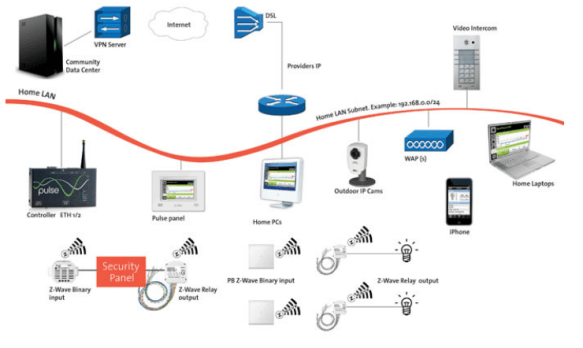
In my previous post(pulse living…an efficient energy solution company, and Home automation – Pulse living ), i was described this product, and now, to me…this looks like a mature and cost effective/affordable solution to every home owner/hotels. They have come up with even much better solutions, which integrates to our day-to-day devices, such as iPhone, iPads apps…etc. You can control your home from anywhere in the world…a real intelligent solution makes your home “an intelligent living”.

Pulse.control is built to the highest technical specifications and leverages the latest technologies as well as industry standards for building automation and networking. The versatile Intel IXP42x Network Processor enables us to deliver a massively scaleable solution while keeping energy consumption and heat dissipation to a minimum. Flash storage increases reliability and performance.  The Microsoft Windows Embedded CE 5.0 operating system can be managed and updated remotely. A range of connectivity options provides flexibility for even the most complex integration projects.

Pulse products are based on International standards for building and home automation such as KNX/EIB and Z-Wave. These standardized multi-vendor protocols cover the gamut of residential, hospitality, and commercial automation requirements including lighting, heating, ventilation, air conditioning, security and safety, window treatments, pool and spa, access and intercom, and metering. To more about the pulse standards click here

The beauty is that is a cost effective solution…with the architecture design which pulse can accomodate, within each home, the Pulse.control.pro acts as the brain of the home, connecting all systems via protocols such as KNX/EIB, Z-Wave, RS232, or TCP/IP. It can then be connected to any number of Pulse.touch screens via Ethernet or WiFi.

To know more about pulse solution, Click here

To know more about pulse products, Click here

Enjoy!!!

Microsoft Windows Phone – Previews of Next Release

In my previous blog i mentioned that  today May 25th, 2011, As promised, Microsoft intends to unveil a more detailed and full roadmap for the Windows Phone 7 mobile line. Yesterday, Microsoft previewed the next major release of Windows Phone, code-named “Mango,” through a series of media events around the world. “Mango” will deliver more than 500 new features to push the boundaries of the smartphone experience around communications, apps and the Internet. The “Mango” release will be available for free to Windows Phone 7 customers and is scheduled to ship on new phones beginning this fall. More details on device update timing will be provided closer to availability. Windows Phone will also add support for additional languages, expand access to apps by launching Windows Phone Marketplace in new countries, and partner with new OEMs to enable expansion to new markets.

This release include features such as

  • Threads: Switch between text, Facebook chat and Windows Live Messenger within the same conversation.
  • Groups: Group contacts into personalized Live Tiles to see the latest status updates right from the Start Screen and quickly send a text, email or IM to the whole group.
  • Deeper social network integration: Twitter and LinkedIn feeds are now integrated into contact cards, and “Mango” includes built-in Facebook check-ins and new face detection software that makes it easier to quickly tag photos and post to the Web.
  • Linked inbox: See multiple email accounts in one linked inbox. Conversations are organized to make it easy to stay on top of the latest mail.
  • Hands-free messaging: Built-in voice-to-text and text-to-voice support enables hands-free texting or chatting.

More information about this release, read the press release from Microsoft News Center.

Enjoy!!!

Gefen – Multiple Input A/V Switcher-Scaler for Conference Rooms with Built-In Audio Amplifier

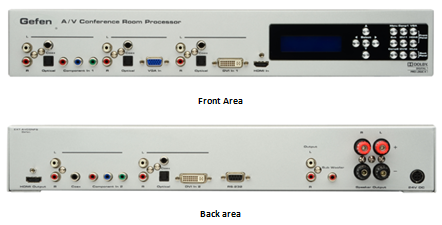
Gefen’s new A/V Conference Room Processor with built-in audio amplifier connects set top boxes, Blu-ray players, gaming consoles, computers and more.  Video is scaled and output in HDMI format with cinema-quality scaling up to 2K or 1080p Full HD resolution, supporting large-scale HDTV displays.  The audio is mixed down from 5.1 Dolby™ surround to two-channel audio with support for a powered subwoofer.  A built-in 2-channel audio amplifier delivers 25 watts per channel from digital and analog sources, ideal for creating high-fidelity sound in the conference room environment. Two speakers may be connected directly to the amplifier binding posts for “plug and play” installation in any conference room, educational facility or presentation venue.

HOW IT WORKS?

Connect each video input source and corresponding audio source to connectors on the front or rear panel. Power up the A/V Conference Room Processor.  The buttons on the front panel are used to select the active A/V source.  Use the LCD menu system to select the scaler output resolution and desired A/V processing functions. The A/V Conference Room Processor will convert the selected A/V inputs to HDMI video output with two-channel analog line-level and speaker-level with powered subwoofer support. …more info, Click Gefen Multiple Input A/V Switcher home page

Specifications:…more details click here

  • Maximum Pixel Clock: 165 MHz
  • Analog Video Bandwidth: 350 MHz
  • Input Video Signal: 1.2 Volts p-p
  • Input DDC Signal: 5 Volts p-p (TTL)
  • HDMI Input Connector: Type-A 19-pin, female
  • HDMI Output Connector: Type-A 19-pin, female
  • DVI Input Connectors: (2) DVI-I 29-pin, female
  • VGA Input Connector: HD-15, female
  • Digital Audio Input Connectors: (4) TOSLink, (4) S/PDIF
  • Analog Audio Input Connectors: (5) L/R RCA
  • Analog Audio Output Connectors: L/R + LFE, RCA
  • Speaker Connectors: L / R Binding Posts
  • Speaker Output: 25W per channel RMS
  • SNR: > 90 dB, THD: < 0.01% @1k at 2V RMS
  • Frequency Response: 20 Hz – 20 kHz, +/- 0.5 dB
  • RS-232 Serial Port: DB-9, female
  • Power Supply: 24V DC
  • Operating Temperature: 0 ~ 40 °C
  • Dimensions: 16.9″ W x 2.6″ H x 8″ D (2U rack space)
  • Shipping Weight: 15 lbs.

Exchange 2010 – Distribution group email id – Not able to receive email from external source – Solution

On Exchange server 2010, If you create a distribution group with scope as Universal and type as Distribution, in your domain active directory.

and then you enable the mail from creating the mailbox server, then do the testing of email flow from internal and external.,

if you ever had face an error, “Technical details of permanent failure: SERVER tried to deliver your message, but it was rejected by the recipient domain. We recommend contacting the other email provider for further information about the cause of this error. The error that the other server returned was: 550 550 5.1.1 User unknown (state 14).”

Please do the following.

From your active directory, select the property of the group email id, then under mail flow settings, select Message Delivery Restrictions, then select Properties…, new window will open.

uncheck the box which states “Require that all senders are authenticated” and click ok..then apply and ok again.

Give some time to replicate this to Edge server…

Enjoy!!!!

Microsoft GP 2010 – Analytical Accounting Menu Master Table (SY07110) Records Multiplying – Bug & Workaround

Analytical Accounting Menu Master Table (SY07110) Records Multiplying – Bug & Workaround  : read this solution/workaround from my collegue…a good post.

A good response from David Musgrave

The issue has been fixed in the latest hotfixes.. on Post1 and Post2

Enjoy!!!

Parallels Transporter Launches on the Mac App Store, Move from a PC to a Mac Easy!!!

Parallels®  today announced the launch of Parallels Transporter®, an application that makes the move from a Windows PC to a Mac easy by automatically transferring music, pictures, Internet bookmarks, documents and more. Parallels Transporter is available on the Mac App StoreSM today. Parallels, the undisputed leader and innovator in helping customers run Windows applications on their Mac without rebooting, has shipped more than three million copies of its award-winning Parallels Desktop for Mac software. The Parallels Transporter app is designed for Mac users who may not need to run Windows on their Mac at all; it is a simple way to bring everything you need from your PC together on your Mac without wasting your valuable time or incurring the expense of hiring a technology service to do the work:

  • Parallels Transporter Agent collects data on your PC and uses your wireless network or an external storage device to transfer it to Parallels Transporter on your Mac.
  • Parallels Transporter on your Mac receives data from the Parallels Transporter Agent and copies it to the appropriate locations on your Mac. The files stored in your Windows home directory are copied to the corresponding olders on your Mac so they can be accessed and used with compatible Mac programs. Internet bookmarks are copied to Safari or any other default web browser in Mac OS X.

In addition to moving pictures, music and documents from a PC to corresponding Mac folders, Parallels Transporter also moves Windows programs and other files into a virtual machine on your Mac in case they are needed. Customers who later decide they want to run Microsoft Windows and Mac operating systems and applications simultaneously on their Mac can simply purchase and download Parallels Desktop 6 for Mac.

Upcoming end of support: Windows Vista SP, Windows XP SP2, Windows 2000

Windows Vista Service Pack 1 (SP1) will reach the end of support on July 12, 2011. From that date onward, Microsoft will no longer provide support or free security updates for Windows Vista Service Pack 1 (SP1). In order to stay secure and continue support you must upgrade to Service Pack 2 (SP2).

Products no longer supported

  • As announced in 2008, support for Windows XP Service Pack 2 (SP2*) ended on July 13, 2010.
  • Also announced in 2008, support for Windows 2000 ended on July 13, 2010.
  • Support for Windows Vista Release to Manufacturing (RTM) ended April 13, 2010.

To better understand the Microsoft Support Lifecycle Policy and your support options visit the Microsoft Support Lifecycle

Microsoft Support Lifecycle Policy

The Microsoft Support Lifecycle policy took effect in October 2002, and applies to most products currently available through retail purchase or volume licensing and most future release products. Through the policy, Microsoft will
offer a minimum of:

  • 10 years of support (5 years Mainstream Support and 5 years Extended Support) at the supported service pack level for Business and Developer products
  • 5 years Mainstream Support at the supported service pack levelfor Consumer/Hardware/Multimedia products
  • 3 years of Mainstream Support for products that are annually released (for example, Money, Encarta, Picture It!, and Streets & Trips)