Unknown's avatar

About PREMNAIR

Working as IT, Infrastructure & Security Manager in Dubai.

Microsoft Exchange Server 2010 – Organizational Settings for MailTips

MailTips are informative messages displayed to users while they compose a message. Works with only Exchange server 2010 with Outlook 2007/2010.

Microsoft Exchange Server 2010 analyzes the message, including the list of recipients to which it’s addressed. If a potential problem is detected, MailTips notify users prior to sending the message. With the help of the information provided by MailTips, senders can adjust the message they are composing to avoid undesirable situations or non-delivery reports (NDRs).

You can’t use the EMC to enable or disable MailTips. You need to be assigned permissions before you can perform this procedure. To see what permissions you need, click here

EMS : Set-OrganizationConfig cmdlet to enable or disable MailTips in your organization. MailTips are enabled by default, when you install a new Exchange 2010 organization.

Examples of Mailtips, when you activate is like

  • Invalid Internal Recipient : The Invalid Internal Recipient MailTip is displayed if the sender adds a recipient that appears to be internal to the organization but doesn’t exist in Active Directory. It comes due to name resolution cache or an entry in the sender’s Contacts or if the sender types an SMTP address with a domain for which Exchange is authoritative and the address doesn’t resolve to an existing recipient. The MailTip indicates the invalid recipient and gives the sender the option to remove the recipient from the message…cool na
  • Mail Box full :  MailTip is displayed if the sender adds a recipient whose mailbox is full and your organization has implemented a Prohibit Receive restriction for mailboxes over a specified size. MailTip will be updated every two hours in his/her draft folder even if you save it and did’nt send the message.
  • External Recipients : The External Recipients MailTip is displayed if the sender adds a recipient that’s external, or adds a distribution group that contains external recipients. By default, this MailTip is turned off. You can turn it on using the Set-TransportConfig cmdlet. The External Recipients MailTip relies on group metrics data. Therefore, if you enable the External Recipients MailTip, make sure that the group metrics MailTip is also enabled. EMS : Set-OrganizationConfig -MailTipsExternalRecipientsTipsEnabled $true

To know more.. click here

Exchange server 2010 SP1 is bringing up with more featueres and i will update you this in my comming blog
Exchange 2010 SP1 FAQ and Known Issues

Since Exchange server 2010 SP1 has been released on the 1st of September 2010, its too early for me to roll out on my production environment. “Some of the hotfixes would have been rolled up in a Windows update or service pack. Given that the Exchange team released SP1 earlier than what was planned and announced earlier, it did not align with some of the work with the Windows platform. As a result, some hotfixes are available from MSDN/Connect, and some require that you request them online using the links in the corresponding KBAs. The administrator experience when initially downloading these hotfixes may be a little odd. However, once you download the hotfixes, and receive two of the hotfixes from CSS, you can use the same for subsequent installs on other servers. In due course, all these updates may become available on the Download Center, and also through Windows Update.”. Good to know that Exchange team is closely working on all the issues and updating it. I will wait for another 1 to 2 months for my rollout. For more information http://msexchangeteam.com/archive/2010/09/01/456094.aspx

Also another helpful blog for the SP1 installation… click here

Microsoft Exchange Server 2010 SP1 accepts only ten devices per account – iOS4..more info click here

Problems when installing Exchange 2010 Service Pack 1 on a TMG configured for Mail protection..Click here  (Update: A fix for this problem is now available for download as part of Software Update 1 for Microsoft Forefront Threat Management Gateway (TMG) 2010 Service Pack 1.)

Microsoft to introduce new anti-tracking feature in IE9

IE9

IE 9 is introducing a  new anti-tracking feature to help users foil the efforts of behavioral advertisers. , called Tracking Protection List (TPL) will permit or block certain websites on the basis of preexisting lists. Users will still be able to visit them directly by clicking on a link or typing their address, but calls to them by other web pages will not be permitted. TPL builds upon the company’s existing InPrivate Filtering, but while this relies on frequency heuristics to build its ‘no go’ lists and is thus occasionally unpredictable, the new TPSs will be curated and so – hopefully – more reliable. Microsoft won’t generate the lists itself, but will instead look to third party organizations such as privacy groups or end users themselves. The lists will be an opt-in feature, and will receive regular automatic updates.

IE9 and Privacy: Introducing Tracking Protection .. Read more about this and watch the video, click here

Automatically accepting meeting request from Microsoft Outlook 2010

Recently we have noticed that some of the users after upgrading from Microsoft Outlook 2007 to 2010, Meeting request gets auto accept and user won’t notice it.

How to resolve it in Outlook 2010…!

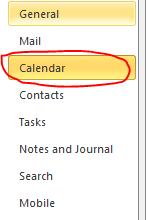
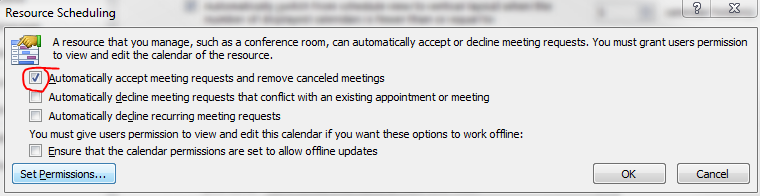
Goto->File->Options->Calender->Resource scheduling and uncheck it

Thats it…uncheck and click ok..problem solved.

Microsoft Office 365…whaooo

Microsoft Office 365 - Online Services & Hosted Software in the Cloud

What is this?????

Microsoft Office 365 delivers the power of cloud productivity to businesses of all sizes, helping to save time and money and free up valuable resources. Office 365 combines the familiar Microsoft Office desktop suite with online versions of our next-generation communications and collaboration services: Microsoft Exchange Online, Microsoft SharePoint Online, and Microsoft Lync Online. Office 365 services are easy to administer and simple to use—with the robust security, reliability, and control you need to run your business

Microsoft Office 365 includes: Exchange Online, SharePoint Online, Lync Online and the latest version of Microsoft Office Professional Plus desktop suite.

Microsoft Exchange Online is designed for organizations who want to get the benefits of cloud-based email without sacrificing the business-class capabilities that Exchange Server has been providing for decades. Built on Exchange Server 2010, Exchange Online provides organizations with the latest capabilities including built-in archiving, optional Conversation View, and MailTips, along with powerful web-based tools for managing online deployments.  With Exchange Online, Microsoft handles the ongoing maintenance, patches, and upgrades of the Exchange infrastructure while providing IT administrators the control and flexibility they require.

Microsoft Lync Online is a next-generation cloud communications service that connects people in new ways, anytime, from anywhere. Lync Online provides intuitive communications capabilities across presence, instant messaging, audio/video calling and a rich online meeting experience including PC-audio, video and web conferencing. Transform your interactions with colleagues, customers and partners from today’s hit-and-miss communication to a more collaborative, engaging, and effective experience.

Office 365 is the introduction of new productivity online services and capabilities. It provides new online platform capabilities related to the introduction of the latest underlying 2010 server software into Microsoft Online Services datacenters.  The limited beta release will be offered in following languages: Chinese (traditional), English, French, German, Italian, Japanese, and Spanish.

To know more..click here and to follow their blog, click here

Office 365 will be available for purchase in 2011.

Enterprise customers can contact a Microsoft sales representative or Microsoft partner directly for purchase details..to know about volume licensing, click here

Exchange Server 2010 SP1…Now Available

From my previous post Exchange Server 2010 Service Pack 1 Beta released and Exchange Server 2010 Service Pack 1 – Sneak-peak , they have released the RTM of Exchange server 2010 SP1..Read the blog 

Release Notes for Exchange Server 2010 SP1…Click here
What’s New in Exchange 2010 SP1…Click here
Exchange Server 2010 SP1 – Deployment topics … Click here
Deploy it today

Yahoo Mail Beta..look and feel of hotmail

Cool one..beautiful one…watch the ad .. http://features.mail.yahoo.com/

Look and feel…see it


Cool..isn’t it!!!

Windows 7 and Windows Server 2008 R2 SP1 RC

Windows 7 and Windows Server 2008 R2 SP1 RC helps keep your PCs and servers on the latest support level, provides ongoing improvements to the Windows Operating System (OS), includes previous updates delivered over Windows Update as well as continuing incremental updates to the Windows 7 and Windows Server 2008 R2 platforms based on customer and partner feedback, and is easy for organizations to deploy a single set of updates.

Windows 7 and Windows Server 2008 R2 SP1 RC will help you: Click here to get to know more : http://technet.microsoft.com/en-us/evalcenter/ff183870.aspx

  • Keep your PCs supported and up-to-date
  • Get ongoing updates to the Windows 7 platform
  • Easily deploy cumulative updates at a single time
  • Meet your users’ demands for greater business mobility
  • Provide a comprehensive set of virtualization innovations
  • Provide an easier Service Pack deployment model for better IT efficiency

Evernote 4 for Windows

Evernote 4 is a major departure from Evernote 3.5 in every way. While 3.5 added tons of great new features. So theydecided to start over from scratch, with fast, native C++ that we knew we could rely on. As you’ll see, the results are amazing. This new version will set a foundation for rapid improvement. It is designed to give you a great experience on any computer that you use, whether you’re on a netbook, a five year old Windows XP machine or a super fast top-of-the-line Windows 7 computer.

Here are a few of our favorite user interface improvements:

  • Space saving layout: The toolbar and menu bar are merged to take up less screen space. You can always switch to the old school layout in the Option menu.
  • More responsive interface: Switching between notes, displaying searches, bringing Evernote into the foreground, and virtually all other interactions are much faster.
  • Easier new note creation: We’ve added a New Note split button, which lets you pick the type of note you wish to create (text, ink or webcam). It will remember your selection for next time.
  • Relocated Search Bar: Note search and the search description now reside directly over the note list—a more intuitive location. You can click the small arrow to open and close the search description. Closing the description gives you more room to view your notes list, opening it makes it easy to modify your search.
  • Clearer note info: The note information panel is more crisp and clear with the title, notebook and source links right up top. Just like the search panel, you can open the note information panel to access the details. Navigating through the note info panel and tagging notes using your keyboard is fast and efficient.

Great Plains 2010 gone live in 15 days!!!

Attend a Microsoft Dynamics GP 2010 Launch Event – The new way to do business

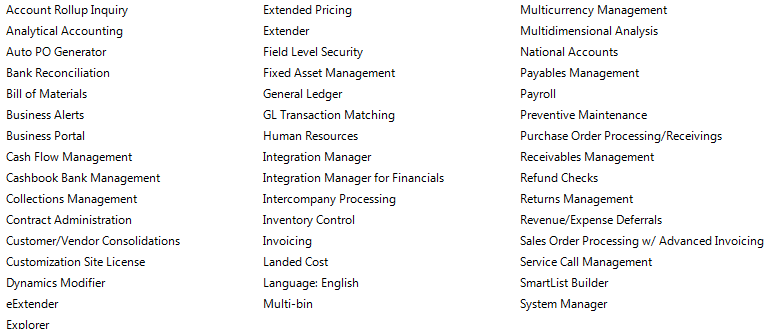
This year was a challenging year for us when it comes to ERP. Microsoft GP 8, we moved to GP10 and Microsoft released Great Plains 2010 and we decided to move to GP2010 because of the new features and collaborations. In 15 days we achieve this task by pulling the data from GP10 database, which is SQL2008 to GP2010 database. 15days with major customization on field service module, New codings on Analytical accounting and our in-house team is able to manage it well, within the time frame..and we are using all the below modules as well…

Now we are in Great Plains 2010…Congratulation to our team