SmartScreen® Application Reputation in IE9

One out of every 14 programs downloaded is malware, Microsoft reported in a blog post on Wednesday.  Application Reputation mechanism in Internet Explorer 9, Microsoft noted that IE blocks between 2 and 5 million attacks a day for IE8 and IE9 customers…PC Magazine has more news on this. Social-engineering attacks, like tricking a user into running a malicious program, are far more common than attacks on security vulnerabilities. Application Reputation  in IE9 helps protect users from these socially engineered malware attacks. Please click here to read this article from MSDN blog

Windows Phone 7 Connector (for Mac) – Beta

Windows Phone 7 Connector for Mac is a new software application that enables you to synchronize your favorite music*, videos*, photos* and podcasts* from iTunes and iPhoto.This software is not part of the Zune experience.  In order to enjoy the Zune experience on Mac, you will need to install a Windows OS (XP or higher).  Zune delivers music and video entertainment across Windows Phone 7, Xbox Live and Windows PC’s. *DRM Protected content will not be able to be synchronized with Windows Phone 7.

To Download this, click here or to go to Windows Phone 7 official website, click here

Mac OS X Lion developer preview 3

Apple Releases Mac OS X Lion Preview Update

Apple is expected to discuss lion at WWDC which takes place in early June.  Apple has targeted Mac OS X Lion for a summer release.   No word yet on what’s new in this build of Lion.   The build for this latest version is 11A459e. Mac OS X Lion developer preview 3 features some new enhancements including a redesigned login screen, the previously detailed Reading List feature in Safari, some new wallpapers, and other minor tweaks. The redesigned login screen above has an iOS-like feel to it with a silver-gradient backdrop and new icons across the bottom for sleep mode, restart, and shut down. Thanks to 9to5Mac.

And here’s what else is new in Lion Developer Preview 3:

  • New options in System Preferences>Mission Control
  • There is a new animation when logging into the computer and displaying the desktop (seems buggy at this time)
  • New Reminders menu in iCal
  • New next desktop button in Dashboard space:
  • New options when right-clicking (this appears to be buggy at this time):
  • Compatibility to external displays has been improved (especially in Mission Control)
  • There is now a Mission Control app
  • Finders toolbar has been slightly updated:
  • Desktop wallpapers have been updated (and new ones have been added);
  • Reading List has been enabled in Safari:
  • New changes in Mission Control: can add desktops right from Mission Control by clicking + button, close spaces from Mission Control, Mission Control no longer displaying text Desktop 1? etc., when hovering over desktop thumbnails, magnification of thumbnails are seen
  • Scrollbars now change color depending on the background (black background=light scrollbar and vice versa):

Check out the new Lion’ s Wallpaper..Click here

From Mac Rumors, Check out the preview details. Apple Releases Lion Developer Preview 3 and Xcode 4.1 Preview 5

Enjoy!!!

Bing Maps Control for iOS

The Bing Maps iOS Control is an Objective-C control for embedding maps directly into native iOS apps. With a rich, gesture-based UI provided by Seadragon, the Bing Maps iOS Control provides support for adding pushpins and other overlays to the map, allows your device location to be displayed, and provides the ability to retrieve contextual information for a given map location.

Supported Operating Systems:Apple Mac OS X

Mac OS X Snow Leopard, version 10.6.4 or later on a Macintosh computer with an Intel x86 processor.
  • Xcode version 4.0 or later
  • The latest version of the iOS SDK. (This SDK is available from http://developer.apple.com. An Apple Developer account is required.)

To download this, click here

Microsoft Remote Desktop Connection Client for Mac 2.1.1

Remote Desktop Connection Client for Mac 2.1.1 lets you connect from your Macintosh computer to a Windows-based computer or to multiple Windows-based computers at the same time. After you have connected, you can work with applications and files on the Windows-based computer.

  • Supported Operating Systems:Apple Mac OS X
  • Operating System Versions: Mac OS X version 10.5.8 or a later version of Mac OS

To download it, click here

NEW iPhone/iOS to Windows Phone 7 API mapping tool

The Windows Phone Interoperability site focuses on helping developers who have been creating phone applications on various platforms ramp up quickly on the Windows Phone 7 platform. The goal is to help them leverage existing skills, and provide recipes to successfully design and build applications for the Window Phone. The site will also address interoperability scenarios aiming to provide tools and guidance to help developers building applications for multiple platforms.

Launched today, the iPhone/iOS to Windows Phone 7 API mapping tool helps developers find their way around when they discover the Windows Phone platform. Think of the API mapping tool as being like a translation dictionary…more information, click here

Enjoy!!!!

THUNDERBOLT™ TECHNOLOGY – high-speed, dual-protocol I/O technology from Intel

Developed by Intel (under the code name Light Peak), and brought to market with technical collaboration from Apple. Thunderbolt technology is a new, high-speed, dual-protocol I/O technology designed for performance, simplicity, and flexibility. This high-speed data transfer technology features the following:

  • Dual-channel 10 Gbps per port
  • Bi-directional
  • Dual-protocol (PCI Express* and DisplayPort*)
  • Compatible with existing DisplayPort devices
  • Daisy-chained devices
  • Electrical or optical cables
  • Low latency with highly accurate time synchronization
  • Uses native protocol software drivers
  • Power over cable for bus-powered devices

Intel’s Thunderbolt controllers interconnect a PC and other devices, transmitting and receiving packetized traffic for both PCIe and DisplayPort protocols. Thunderbolt technology works on data streams in both directions, at the same time, so users get the benefit of full bandwidth in both directions, over a single cable. With the two independent channels, a full 10 Gbps of bandwidth can be provided for the first device, as well as additional downstream devices. More info Click here.

Thunderbolt is a revolutionary I/O technology that supports high-resolution displays and high-performance data devices through a single, compact port. It sets new standards for speed, flexibility, and simplicity. And it makes its debut in the new MacBook Pro.  MacBook Pro now gives you access to a world of high-resolution displays and high-speed peripherals with one compact port. That’s because Thunderbolt is based on two fundamental technologies: PCI Express and DisplayPort. PCI Express is the technology that links all the high-performance components in a Mac. And it’s built into Thunderbolt. Which means you can connect external devices like RAID arrays and video capture solutions directly to MacBook Pro — and get PCI Express performance. That’s a first for notebooks. Thunderbolt also provides 10 watts of power to peripherals, so you can tackle workstation-class projects on the go. With PCI Express technology, you can use existing USB and FireWire peripherals — even connect to Gigabit Ethernet and Fibre Channel networks — using simple adapters. And because Thunderbolt is based on DisplayPort technology, the video standard for high-resolution displays, any Mini DisplayPort display plugs right into the Thunderbolt port. To connect a DisplayPort, DVI, HDMI, or VGA display, just use an existing adapter.
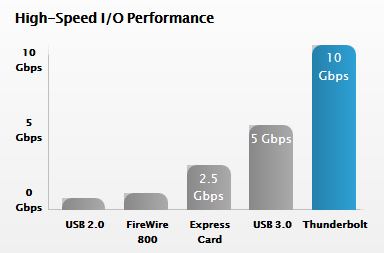
PERFORMANCE: Thunderbolt I/O technology gives you two channels on the same connector with 10 Gbps of throughput in both directions. That makes it ultrafast, and ultraflexible. You can move data to and from peripherals up to 20 times faster than with USB 2.0 and more than 12 times faster than with FireWire 800. You also have more than enough bandwidth to daisy-chain multiple high-speed devices, without using a hub or switch. For example, you can connect several high-performance external disks, a video capture device, and even a Mini DisplayPort display to a single Thunderbolt chain while maintaining maximum throughput.

More info from apple site, click here

Intel: We own ‘full rights’ to the Thunderbolt trademark, not Apple (UPDATED with clarification from Intel)


Microsoft Office for Mac 2011 SP1… comming soon

Next week (Week 15), Microsoft will release Office for Mac 2011 Service Pack 1 (SP1) which will provide increased stability, security, and some new features to the suite – including improved Outlook syncing support – as well as some performance enhancements. This update will enable calendar syncing between Outlook for Mac and Apple’s Sync Services. This will let you sync your Outlook calendar as well as contacts, notes and tasks with any service or device that supports Sync Services, including your iPhone and iPad.  Apple is introducing with their new version of MobileMe. MobileMe will no longer sync with MacOS Sync Services as of May 5th (or now if you have already moved your account to the new version of MobileMe calendar). As a result, Outlook 2011 SP1 calendars that sync with Sync Services on the Mac, will NOT be synced with MobileMe calendars.

The new Apple MobileMe Calendar service is an updated calendar service for iPhone, iPad, iPod touch, Mac, and PC. It includes:

  • The best calendar service for iPhone, iPad, and iPod touch
  • Calendar sharing with family and friends
  • Calendar publishing for a group or team
  • Event invitations with RSVPs
  • A new web application

The new MobileMe Calendar uses the CalDAV standard so users can view and edit their calendars using the built-in calendar applications on their iPhone, iPad, iPod touch, and Mac. Windows users can also view and edit their calendars with Microsoft Outlook using the MobileMe Control Panel for Windows.

More info Click here

Apple iPad 2 may soon replace aviation paper charts

Apple iPad 2 may soon replace paper charts…to start with The Federal Aviation Administration (FAA) has granted preliminary approval for the use of iPads in airplane cockpits. Read more, Click here.
FAA: iPad Can Replace Charts For Executive Jet – Read more, Click here
Apple IPads in Cockpits May Hasten End of Era for Paper Charts – Bloomberg – Click here
FAA approves iPads for pilots’ electronic charts – CNN Tech
So to know more about iPad2 from Apple.. click here
For technical Specification, Click here
For Built-in Apps for iPad, Click here
Features:
  • iPad is one big, beautiful display — 9.7 inches of high-resolution photos, movies, web pages, books, and more. LED backlighting makes everything you see remarkably crisp, vivid, and bright.
  • Two powerful cores in one A5 chip mean iPad can do twice the work at once.
  • Multi-Touch on iPad. You use your fingers to do everything, so everything you do — surfing the web, typing email, reading books, and swiping through photos — is easier and a lot more fun.
  • You’ll see two cameras on iPad — one on the front and one on the back. They may be tiny, but they’re a big deal. They’re designed for FaceTime video calling, and they work together so you can talk to your favorite people and see them smile and laugh back at you.
  • It’s highly secure, stable, and responsive, and it’s made to work seamlessly with the iPad hardware. iOS 4 is the reason no other device has yet come close to iPad.
    Pick up your iPad, press the Home button, and it wakes from sleep instantly. That’s because iPad features fast, efficient, and reliable flash storage that lets you access data quickly.
  • Every iPad is built with advanced 802.11n wireless technology.  iPad is also available with 3G connectivity.
  • With the built-in accelerometer, you can rotate iPad to portrait or landscape, or even upside down, and whatever you’re watching, reading, or seeing adjusts to fit the display.
  • Video mirroring is new for iPad and for every app, web page, presentation, video, movie, or photo you want to show a big audience. Just plug in the Apple Digital AV Adapter or Apple VGA Adapter (sold separately) and your HDTV or projector becomes a bigger version of your iPad.
  • With up to nine times the graphics performance, gameplay on iPad is even smoother and more realistic.
  • Even with the new thinner and lighter design, iPad has the same amazing 10-hour battery life
  • AirPrint – Print your email, photos, web pages, and documents right from your iPad over Wi-Fi
  • Photo Booth – When the mood strikes, turn the camera on yourself, make some faces, and start shooting snapshot-style.
  • Accelerometer, three-axis gyroscope, and compass all work together.
  • AirPlay –  your music, photos, and video — can now stream wirelessly to your HDTV and speakers via AirPlay-enabled speakers or Apple TV on a Wi-Fi network