
Updates to the Lync for iPhone and Lync for iPad apps have been posted to the Apple Store. Click here to know more

Updates to the Lync for iPhone and Lync for iPad apps have been posted to the Apple Store. Click here to know more
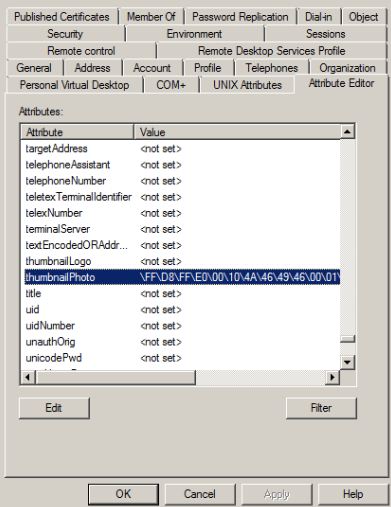
A cool tool (AD Photo Edit) which you can use to update your profile picture and have the picture displayed on your Lync Online home page or SharePoint site. This beautiful tool uploads a picture into the thumbnailPhoto attribute in Active Directory user properties.
This information is then synchronized with the Cloud through the Microsoft Online Services Directory Synchronization tool. You can download the AD Photo Edit from here. Once the tool is installed AD Photo Edit automatically detects and connects to your Active Directory. If you want to upload the domain users photo, you need to have administrative credential. Users are selected by using their “username”. There are free edition, which upload photos individually and bulk edition which is a paid edition.
When you update the photo, your user properties will be filled with values as show in the picture below, (If you already attach a picture, this tool will display the existing picture and you can change it with the new one). if there are no picture attached to your profile, this field will show as <not set>.
Enjoy!!!
Office 365 is a software and services offering from Microsoft that includes Microsoft Office and cloud-based access to Exchange, SharePoint and the software formerly known as Communications Server — Lync. By Josette Rigsby on CMS Wire has more on this…read here. Also for other O365 plan, click here
On May 10, 2011, Microsoft Corp. (Nasdaq: “MSFT”) and Skype Global S.à r.l today announced that they have entered into a definitive agreement under which Microsoft will acquire Skype, the leading Internet communications company, for $8.5 billion in cash from the investor group led by Silver Lake. The agreement has been approved by the boards of directors of both Microsoft and Skype.
Read the press release from Microsoft News Center.

Microsoft CEO Steve Ballmer and Skype CEO Tony Bates announce Microsoft's acquisition of Skype. San Francisco, May 10, 2011
Article from The Telegraph about this deal.
Skype will support Microsoft devices like Xbox and Kinect, Windows Phone and a wide array of Windows devices, and Microsoft will connect Skype users with Lync, Outlook, Xbox Live and other communities. Microsoft will continue to invest in and support Skype clients on non-Microsoft platforms. The acquisition will increase the accessibility of real-time video and voice communications, bringing benefits to both consumers and enterprise users and generating significant new business and revenue opportunities. The combination will extend Skype’s world-class brand and the reach of its networked platform, while enhancing Microsoft’s existing portfolio of real-time communications products and services.
SharePoint Workspace 2010 is the new name for and succeeds Microsoft Office Groove 2007. SharePoint Workspace 2010 is a client application that provides fast, any-time interactive access to document libraries and lists on Microsoft SharePoint Server 2010 and Microsoft SharePoint Foundation 2010. SharePoint Workspace 2010 also provides options for creating Groove peer workspaces and Shared Folder workspaces. SharePoint Workspace 2010 is more versatile than Microsoft Office Groove 2007 and can be integrated with Microsoft SharePoint Server 2010 or can run independently. Microsoft SharePoint Workspace 2010 provides a client for Microsoft SharePoint Server 2010 and Microsoft SharePoint Foundation 2010 that enables real-time synchronization of desktop content with SharePoint documents and lists. SharePoint Workspace 2010 also provides options for creating Groove collaboration workspaces and synchronized shared folders. By using SharePoint Workspace 2010, information workers can easily synchronize online and offline content with a designated SharePoint site or collaborate with external partners and offsite team members through shared workspaces. SharePoint Workspace 2010 is included with Microsoft Office Professional Plus 2010.
Key features of SharePoint Workspace 2010 include the following:
A choice of workspace types:
When you install Microsoft Office 2010 package, you will get a program, which is Sharepoint workspace 2010, which is the replacement of Grove and the installation as follows

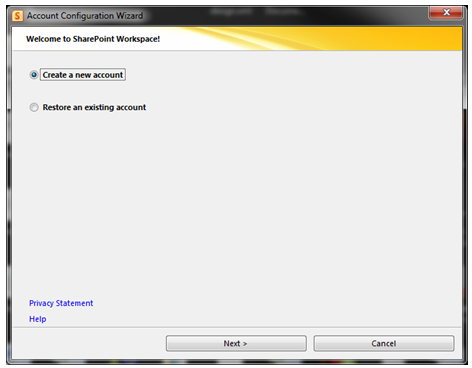
If you have a SPS domain in your domain network, use your own login credential only.

Once this is done, click Internet Explorer and open your SPS webpage. Under Site Action, Click Sync to SPS workspace


Once the Sync is completed, you can now use your doman SharePoint Site offline and online.
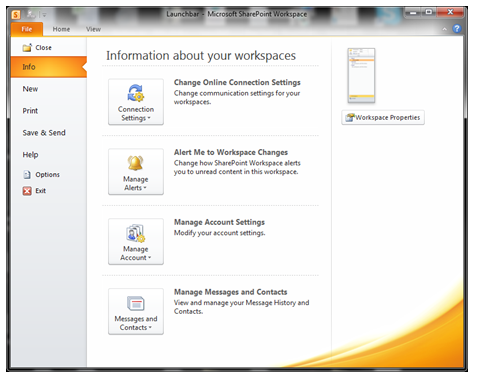
For Setting modification, use the File menu and do the needful
Operational Restrictions
SharePoint Workspace operates with a recommeded maximum number of synchronized documents – 10,000. Synchronizing extremely large document libraries, such as a Document Center, is not supported.
SharePoint Workspace also has limited support for metadata extensions to the document library. BDC Fields based on Business Connectivity Services – tagging documents based on external datasources – is not supported, and libraries that use BDC field definitions cannot be synced to Workspace. On the other hand, Managed Metadata fields (MMS) can be included in synchronized libraries. SharePoint Workspace is able to view, but not modify, field values based on MMS term stores.
To Download SharePoint Workspace 2010: Groove Web Services Software Development Kit, Click here.
Enjoy!!!

Awaiting for this product from Microsoft is over, Communications Server 2010, also called Wave 14 – renamed to Microsoft Lync Server 2010. Microsoft has announced that the new 2010 edition has been released to manufacturing (RTM). The official launch event was on November 17th 2010, so I am sure now that those who have Software assurance, will be downloading now and preparing for the installation/migration.
Microsoft Lync Server 2010 communications software offers instant messaging (IM), presence, conferencing, and telephony solutions that can support enterprise-level collaboration requirements. This is only available in 64-bit edition , it requires 64-bit hardware and the 64-bit edition of the Windows Server operating system. Client computers does not required to have 64-bit hardware or software.
Features and capabilities of Microsoft Lync Server 2010 communications software clients in the following categories:

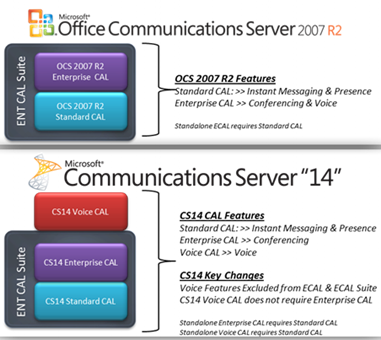
Tech•Ed North America 2010 ( New Orleans, June 7-10th) is done and they disclosed Communications Server “14” features and functionality during the event. You can catch presentation on-demand at Tech•Ed Online..Whats new in Communication 14 Video
Microsoft Communications ‘14’ really delivers on that promise of a more connected experience for people that want to stay plugged in to what’s going on, even when they are not there. The new collab experience is great. Having PowerPoint, the RoundTable view, and IM all in one view is great.
 PREMNAIR'S Blog