Microsoft Office for Mac 2011 SP1… comming soon

Next week (Week 15), Microsoft will release Office for Mac 2011 Service Pack 1 (SP1) which will provide increased stability, security, and some new features to the suite – including improved Outlook syncing support – as well as some performance enhancements. This update will enable calendar syncing between Outlook for Mac and Apple’s Sync Services. This will let you sync your Outlook calendar as well as contacts, notes and tasks with any service or device that supports Sync Services, including your iPhone and iPad.  Apple is introducing with their new version of MobileMe. MobileMe will no longer sync with MacOS Sync Services as of May 5th (or now if you have already moved your account to the new version of MobileMe calendar). As a result, Outlook 2011 SP1 calendars that sync with Sync Services on the Mac, will NOT be synced with MobileMe calendars.

The new Apple MobileMe Calendar service is an updated calendar service for iPhone, iPad, iPod touch, Mac, and PC. It includes:

  • The best calendar service for iPhone, iPad, and iPod touch
  • Calendar sharing with family and friends
  • Calendar publishing for a group or team
  • Event invitations with RSVPs
  • A new web application

The new MobileMe Calendar uses the CalDAV standard so users can view and edit their calendars using the built-in calendar applications on their iPhone, iPad, iPod touch, and Mac. Windows users can also view and edit their calendars with Microsoft Outlook using the MobileMe Control Panel for Windows.

More info Click here

Exchange 2010 SP1 FAQ and Known Issues

Since Exchange server 2010 SP1 has been released on the 1st of September 2010, its too early for me to roll out on my production environment. “Some of the hotfixes would have been rolled up in a Windows update or service pack. Given that the Exchange team released SP1 earlier than what was planned and announced earlier, it did not align with some of the work with the Windows platform. As a result, some hotfixes are available from MSDN/Connect, and some require that you request them online using the links in the corresponding KBAs. The administrator experience when initially downloading these hotfixes may be a little odd. However, once you download the hotfixes, and receive two of the hotfixes from CSS, you can use the same for subsequent installs on other servers. In due course, all these updates may become available on the Download Center, and also through Windows Update.”. Good to know that Exchange team is closely working on all the issues and updating it. I will wait for another 1 to 2 months for my rollout. For more information http://msexchangeteam.com/archive/2010/09/01/456094.aspx

Also another helpful blog for the SP1 installation… click here

Microsoft Exchange Server 2010 SP1 accepts only ten devices per account – iOS4..more info click here

Problems when installing Exchange 2010 Service Pack 1 on a TMG configured for Mail protection..Click here  (Update: A fix for this problem is now available for download as part of Software Update 1 for Microsoft Forefront Threat Management Gateway (TMG) 2010 Service Pack 1.)

iOS 4 and Exchange ActiveSync

Apple released iOS 4 recently and since its release there have been numerous reports of a number of issues with new iPhone 4s when using Exchange ActiveSync . Here is the link from Microsoft Exchange Team Blog

PATCH Released from Apple : iPhone users who use the iPhone4 or upgraded to iOS4 must install a related Apple configuration patch on their iPhone. The patch, along with installation directions, can be found here:
http://support.apple.com/kb/TS3398.

iTunes 9.2 is out…be ready for iOS4 deployment to your iphone

iTune 9.2 is ready to download.. http://www.apple.com/itunes/download/

Be ready for the new software with this download…cool

The iOS4 Release and iOS 4 Download will be released on June 21, 2010 by Apple. Estimate that the iOS4 Release Date Time is around 9:00 AM Pacific.

If you plan to get the iOS 4 Download, know that it works with iPhone 4G, iPhone 3GS, iPhone 3G, and all iPod touch models. You must get iTunes 9.2 download in order to get the iOS4 software when it is released.

I can’t wait to start the Mail connectivity with the multiple exchange account…heeeeee

Read Macrumors article for this

Microsoft Outlook Web apps – Phone sync

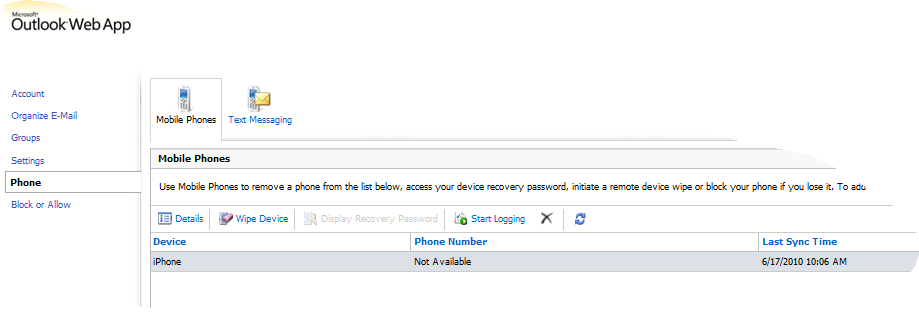
Now with Exchange server 2010 and Outlook Web apps, there is a menu called Option, where this is actually giving you the Exchange control panel for the selective user. From here you can manage the Phone syncronization.

From this option, you can see your device sync status and also when you lost the phone, you can wipe the data from here to protect your data of the lost phone.

Cool features..when you do Exchange server 2010 with Office 2010 and Office web apps.

Exchange server 2007 to 2010 Live migration!!!! Live blog!!! Live Platform…real time scenario!!!

Please find on my blog, one page dedicated to this task…you can see it on my blog top page… or click here

             TO                                          

 MIGRATION…Started on June 8, 2010 ….Today 20th of June..all the objects has been replicated to Exchange 2010..Now the decommissioning starts..Finish too

iPhone 4 and iOS4 from Apple – New Phone and OS

Apple CEO Steve Jobs kick-started the Worldwide Developers Conference 2010 in San Francisco with the announcement of the next generation iPhone model – iPhone 4.  The iPhone 3G will be sold no more. The iPhone 3GS would be sold for $99 with a two years contract.  Apple will start selling iPhone 4 starting at $199 with a two years contract in U.S. from June 24. The iPhone 4 would be available in a 16GB version costing $199 and 32GB version costing $299.  Apple has renamed the iPhone OS 4.0 for iPad and iPhone/iPod Touch devices to iOS4. From June 21, the iOS4 upgrade will be available free for all devices.  Features like multi-tasking and folders utilities will arrive with the iOS4 update for other Apple devices but iPhone 4 will come preloaded with it. The iPhone 4 will require iTunes 9.2 so we can anticipate that iTunes software upgrade in the coming weeks. Apple iPhone 4 will be available in white and black colors. Pre-orders begin on June 15 and phones will start shipping on June 24 in U.S., France, Germany, UK and Japan. Apple will roll out the iPhone 4 to 18 more countries in July, 24 more in August, and 40 more in September.

Processor:
Mysterious Apple A4 System-on-Chip processor used in the iPad, you won’t be surprised to discover that Apple has used the same A4 processor on the iPhone 4. Apple claims that this chip is power efficient and hence conserves power to add up to the battery life.
 
Display:
With the new iPhone 4, Apple debuts new display dubbed as ‘Retina Display’. This 3.5-inch multi-touch display offers 960×640 pixel resolution at 326 pixels per inch. This means crisper images and more amazing graphics display while playing games. Apart from that, this IPS technology based panel will offer 800:1 contrast ratio that would be four times better than the previous generation iPhone devices. 
Camera:
Apple has added 5 megapixel sensor with backside illuminated sensor and LED Flash. This new camera will also offer five times digital zoom and tap to focus options. Not only that, this 5 megapixel camera sensor is capable of recording 720p HD video at 30 frames per second. The LED Flash will stay illuminated for recording better quality picture in videos.
Gyroscope:
Apple has added three-axis gyroscope, a device maintaining orientation or measuring it based on the rotation mechanism of the object. This, clubbed with Accelerometer on the iPhone 4 makes it capable of 6-axis motion sensing.
Battery life:
Apple has put a larger battery in the iPhone 4. The lithium-ion rechargeable battery promises to offer up to 7 hours of talk time on 3G networks and 14 hours of talk time on 2G networks. Listen to music for 40 hours or watch videos for up to 10 hours. The most amazing part is that users can now browser mobile web for up to 10 hours on the iPhone 4.
 
OTHER FEATURES
 
Apple will also introduce new iMovie for iPhone app for video editing that will include options like scene transitions, themes, editable titles, and much more. This app will be available at a price of $5 after iOS4 is rolled out to everyone.
The iPhone 4 has a front facing camera that enables video calling dubbed as FaceTime that works even when the Wi-Fi is turned off. No setup or installation is required as FaceTime works out of the box. Apple has built FaceTime using a bunch of open standards like SIP (Session Initiation Protoco), H.264, AAC and so on. 
  • Quadband HSDPA/HSUPA
  • Wi-Fi (802.11n) 
  • Assisted GPS
  • Accelerometer
  • Digital Compass
  • Bluetooth 2.1 + EDR
  • iBooks App as free download
  • Microsoft’s search engine Bing officially added to search engine options.
  • Micro SIM just like the ones used in iPad 
  • LINKS

    To watch the video….click here

    To stay up to date on the latest iPhone news…click here to subscribe

    iPhone 4 Gallery..click here

    Engadget Live blog from WWDC 2010…click here

    Microsoft Exchange Server – Remote wipe on iphone 3Gs

    Remote Wipe – on iPhone

    This feature is available on Mobile Me for iPhone, but you have to subscribe this account…if you have exchange server in your organization/company….below article is for you guys…!!!

    Mobile phones can store sensitive corporate data and provide access to many corporate resources. If a device is lost or stolen, that data can be compromised. Microsoft Exchange Server 2010 / 2007 provides a remote device wipe feature. You can issue a remote device wipe command from the Exchange Management Shell. Users can issue their own remote device wipe commands from the Microsoft Office Outlook Web App user interface. (For users to do their remote wipe from Outlook Web Access->log into their Outlook Web access->on the right top, there will be a menu called “Options”->click Options–>on the left pane…you will find “Mobile Devices”–>click and select “Wipe all Data from Device…”)

    The remote device wipe feature also includes a confirmation function that writes a time stamp in the sync state data of the user’s mailbox. This time stamp is displayed in Outlook Web App and in the user’s mobile phone properties dialog box in the Exchange Management Console.

    So to test this feature, i’ve done the remote wipe from my Exchange server  to my iPhone 3Gs…(This server should be mailbox store where the mailbox properties of each user displayed) as displayed below.

    Select the user whom you want to do the remote wipe, Click on Manage mobile device…

    From the “Managed mobile device for….” area, select the iPhone, which is listed for this particular user, and at the bottom area where “Action” pane….select “Perform a remote wipe…” and then click “Clear” button.

    IF YOU ARE DOING THIS AS A TEST, MAKE SURE THAT YOU TAKE A BACKUP OF YOUR IPHONE FROM ITUNES FOR LATER RESTORE MODE…VERY IMPORTANT.

    Once this action is done, the next sync from the mobile to the server, Wipe command executes on the iPhone device..and screen goes blank….cool..No tention about the contacts or data.

    Now the hardest part is …this sounds great on, when you lost your iPhone and your IT team secure your data safe…!!!! but if you are doing a test on your own iPhone…errrrrrrrrrrrrrrrrrrrrrrrrrr

    After the remote wipe…iPhone just hung and display only Apple logo….for a very long time…(i never had a patient to wait…so i hard boot it…still the same logo smiling at me…and my colegues are telling me…”I told you…i told you…)

    Next step is to take the iphone to the next level….First Switch off the phone.. take it to DFU mode!!!! What is this? DFU (Device Firmware Upgrade) mode is not the same as restore mode. DFU mode bypasses the current OS installed and allows you to upgrade or downgrade your OS.

  • Attach the iPhone to the PC/MAC (make sure that your USB bay on your computer is working and the cable from apple too)
  • Turn the iPhone power off
  • Hold power and home together for *exactly* 10 seconds
  • Release power but keep holding home button in your phone until the PC/MAC beeps as a USB device is recognized.
  • At no point will the display come on with a USB symbol and iTune. Now your restore should work…iTunes will turn on and will ask you to upgrade the firmware and it starts downloading the firmware from apple site and once it is done,
  • Your restoress starts on the iphone…
  • After it is done, Device will get activated…but make sure that all the sync you should choose to “NONE” (There is a reason for this…believe me)…NO NEED TO CONFIGURE ANYTHING…BECAUSE WE ARE GOING TO RESTORE IT.
  • When we are doing all these stuff, there must be a mail from Exchange server to the selected user, in that user name.. in his/her inbox…a cool one like below..(i did not get this pic so i choose one from the net..instead of Device Type as PocketPC…our case it will show iPhone)
  • Read the red line…cool is’nt it…now you go back to Exchange server where you initiate the wipe..remove the device from the user list…and then clear the data….now your iphone is ready to sync
  • If you don’t do it, in my case..i was busy with restore option and did’nt saw the mail and once i restore from my backup…syncing contacts….gone again…thats a real pain…i’ve to do all from scratch…!!
  • Now connect your newly restored iPhone…it will show you on the iTunes area..Rightclick on the iPhone name and click Restore from Backup…and select the time you did last backup.
  • Now you iPhone is back as it was before….HOPE YOU WILL FIND A LOT OF MISSED CALL NOTIFICATION..
  • ENJOY…!!!!

    iPhone OS 4!!!

    iPhone OS 4 will work with iPhone 3G and iPhone 3GS, and with iPad. Not all features are compatible with all devices and multitasking is available only with iPhone 3GS.

    iPhone OS 4 introduces new features for business. Multitasking, enhanced security, new device management capabilities, and improved enterprise integration to bring iPhone into your company … more into Click here http://www.apple.com/iphone/business/preview-iphone-os/