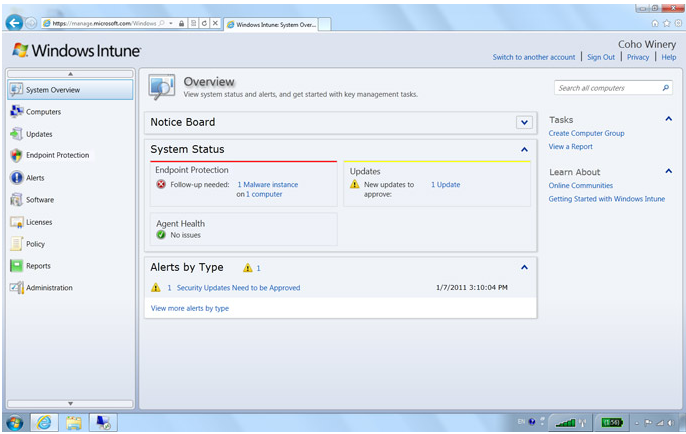
Windows Intune – Simplify PC Management

Simplify PC Management

Windows Intune is unique because it’s an end-to-end Microsoft solution that brings together Windows cloud services for PC management and endpoint protection with a Windows 7 Enterprise upgrade subscription. With the easy-to-use web-based console, you get immediate insight into your PC environment and can view update and malware status, alerts, security policies, and more. You just need an Internet connection and the Windows Intune client installed on each PC you wish to manage

To know more, click here

SkyDrive from Windows Live

Skydrive – Starting from June 20, 2011, is launching a new version of the SkyDrive website. Team took advantage of modern browsers and HTML5 to make SkyDrive faster, easier to navigate, and more beautiful for viewing photos. The new SkyDrive will be rolling out soon. Click here to see what Group Program Manager, SkyDrive.com, Mr. Omar Shahine has to discuss.

New look is good

Enjoy

Best Practices for Virtualizing Exchange Server 2010 with Windows Server® 2008 R2 Hyper V™

Many organizations today rely on some degree of virtualization. Whether it is a few virtual machines running on a single physical computer or a whole server farm across multiple root servers, virtualization optimizes investment in hardware and network infrastructure by:• Increasing the utilization of underused hardware. • Improving server availability.• Reducing IT costs. The purpose of this paper is to provide guidance and best practices for deploying Microsoft® Exchange Server 2010 in a virtualized environment with Windows Server® 2008 R2 Hyper V™ technology.  This paper has been carefully composed to be relevant to organizations of any size…Click here to download this paper from Microsoft

Enhanced Hardware Virtualization Support for Exchange 2010

The Microsoft Exchange team is enhancing positioning by including additional supported scenarios regarding Exchange Server 2010 running under hardware virtualization software. As of today, the following support scenarios are being updated, for Exchange 2010 SP1, and later…To know more, click here

Microsoft and Skype

On May 10, 2011, Microsoft Corp. (Nasdaq: “MSFT”) and Skype Global S.à r.l today announced that they have entered into a definitive agreement under which Microsoft will acquire Skype, the leading Internet communications company, for $8.5 billion in cash from the investor group led by Silver Lake. The agreement has been approved by the boards of directors of both Microsoft and Skype.

Read the press release from Microsoft News Center.

Microsoft CEO Steve Ballmer and Skype CEO Tony Bates announce Microsoft's acquisition of Skype. San Francisco, May 10, 2011

Article from The Telegraph about this deal.

Skype will support Microsoft devices like Xbox and Kinect, Windows Phone and a wide array of Windows devices, and Microsoft will connect Skype users with Lync, Outlook, Xbox Live and other communities. Microsoft will continue to invest in and support Skype clients on non-Microsoft platforms. The acquisition will increase the accessibility of real-time video and voice communications, bringing benefits to both consumers and enterprise users and generating significant new business and revenue opportunities. The combination will extend Skype’s world-class brand and the reach of its networked platform, while enhancing Microsoft’s existing portfolio of real-time communications products and services.


Microsoft Dynamics GP “12” Web Client Architecture

The Web Client is the full GP application delivered through the Web. The key pieces to be delivered will be the core application components, ISV dictionaries, and in-house customizations – Dexterity customizations. At the
core of the web client is the UI update which will feature new homepage tiles, ribbons and tabs. Microsoft expects that UI performance will rival that of Terminal Server or better. Web Client to be introduced with codename GP “12. To know more about Microsoft Dynamics GP webclient, Mariano Gomez had an interest article to explain it. Click here to know more. To know more about the Rendering Engine, click here.

To know more about Silver light architecture, click here

Dell Boomi Upgrades Its Cloud Gateway

AtomSphere SAAS application integration platform handles transfer of data between cloud-based and on-premises applications — and no appliances, software or coding is required.

Dell’s new cloud integration division, Boomi, has introduced several new features to its enterprise platform, which helps companies move to cloud computing while not disturbing the production use of their existing IT.

AtomSphere Spring 11, launched April 26 as the latest incarnation of Dell Boomi’s cloud integration strategy, features new capabilities for middleware connectivity, large-scale data management and migration, and “anywhere-type” integration monitoring.

The AtomSphere SAAS (software as a service) application integration platform handles transfer of data between cloud-based and on-premises applications—and no appliances, software or coding is required.

Chris Preimesberger has a good article…click here

Microsoft Online Services – Business productivity online standard suite

Microsoft brings together online versions of our most trusted communication and collaboration products with the security, reliability, and control you require.

Choosing Microsoft Online Services allows you to combine the power of rich desktop-based applications with the flexibility of fully-hosted Internet services. That gives your users an all-in-one integrated experience on the same rich clients your users already know with a consistent look and feel from virtually any device, in almost any location.

Microsoft Online Services benefits include:

The latest business productivity capabilities

  • Business-class e-mail, web conferencing, instant messaging, document collaboration and workflow all designed to work together seamlessly.

Ease of use

  • Services synchronize with your Microsoft Active Directory, so you maintain control and can continue to manage user policies centrally
  • A single administrative panel enables simple and centralized provisioning and management of new and existing users
  • End users can securely access the service virtually anywhere without the need for a VPN connection and through a wide selection of mobile
    devices

Privacy & rapid disaster recovery

  • Secure Internet protocols including HTTPS and HTTP over SSL to access your services
  • Redundant network architecture capable of disaster recovery
  • In the event of datacenter connectivity issues, services switch over to a backup datacenter

Greater flexibility

  • Build your own solution with individual services or purchase as an integrated suite
  • Choose to run some applications on-premises, or choose Online Services hosted and managed by Microsoft or Microsoft Partners
  • Leverage tools such as Active Directory Synchronization so you can make online, on-premises, or hybrid deployment choices by service, user roles,
    and geography to meet organizational needs best
  • Adjust your deployment model dynamically as your business needs shift and grow

Improved agility

  • Easily extend new capabilities to your organization without straining internal resources
  • Expand your IT capacity by adding new services without investing in the development of new skills or deploying new hardware and software
  • Free your valuable IT resources from routine management tasks to focus on core business initiatives that can deliver a true competitive
    advantage

Security & reliability

  • Microsoft Online Services run on a global network of data centers protected by multiple layers of security and operational best practices
  • Microsoft Online Services guarantee a service level agreement of 99.9% uptime
  • Data centers and services managed by rigorously screened and highly trained staff

Microsoft BizSpark: Helping startups succeed with all the right resources

Microsoft® BizSpark™ is a global program that helps software startups succeed by giving them access to Microsoft software development tools, connecting them with key industry players, including investors, and providing marketing visibility to help entrepreneurs starting a business. Get immediate access to current full-featured Microsoft development tools, platform technologies, and production licenses of server products (including Windows Azure Platform) for use in developing and bringing to market innovative and interoperable solutions…click here to know more

To know more about Microsoft App Hub, click the image below