Exchange server 2010 SP1 – Step by Step installlation on the production server – Live

Earlier i’ve done the Exchange server migration – 2007 to 2010 – Live cast, Its been 10 months since Exchange team release the SP1 for Microsoft Exchange server 2010….today i’m doing Microsoft Exchange server 2010 SP1 upgradation…Live page is opened.

Click here to view this live page

Enjoy!!!!

An error occurred during discovery of the database availability group topology. Error: An error occurred while attempting a cluster operation. Error: Cluster API “AddClusterNode() (MaxPercentage=12) failed with 0×80070005. Error: Access is denied.”

If the witness server you specify isn’t an Exchange 2010 server, you must add the Exchange Trusted Subsystem universal security group to the local Administrators group on the witness server. These security permissions are necessary to ensure that Exchange can create a directory and share on the witness server as needed. If the proper permissions aren’t configured, the following error is returned:
Error: An error occurred during discovery of the database availability group topology. Error: An error occurred while attempting a cluster operation. Error: Cluster API “AddClusterNode() (MaxPercentage=12) failed with 0×80070005. Error: Access is denied.”

If you specify a witness server, you must use either a host name or a fully-qualified domain name (FQDN). Using an IP address or a wildcard name isn’t supported. In addition, the witness server cannot be a member of the DAG.

To know more read Exchange server migration – 2007 to 2010 – Live cast

Old public folder – How to remove from Exchange server

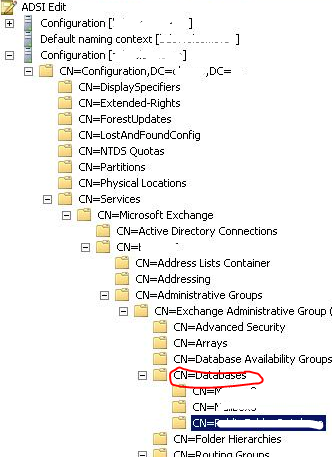
It is difficult to delete old public folder from EMC. How to do it, use the ADSIEDIT to clear the old ones.

Right click on the folder you want to delete from CN=Exchange Administrative Group, CN=Databases,  and click delete. The go to Active directory Sites and Services and initiate the replication across the domain.

Go to EMC and refresh.

Thats it.

Exchange Server 2010 Migration – Useful tools

Exchange Pre-Deployment Analyzer..Click here

The ExPDA tool performs a scan of your existing Exchange and Active Directory environments and produces a report that lists all items that require attention prior to deployment.

Exchange Server Profile Analyzer..Click here

The EPA tool performs a scan of either a single database or the entire organization to create an aggregated report of mailbox statistical information.

Log Parser…Click here

Log Parser, a powerful tool for querying text-based log files such as those that are generated by IIS and Message Tracking on Exchange servers

Exchange Server Remote Connectivity Analyzer..Click here

This tool will help you analyze whether the configuration has been done properly.

Performance Monitor..Click here or click here

The built-in Performance Monitor tool for Windows lets you collect performance data for every element of the Exchange servers and use it for capacity planning of the new Exchange 2010 servers.

Mailbox Server Requirements Calculator…Click here

The most complicated server role in an Exchange Server 2010 environment to calculate the sizing for is the Mailbox Server role, particularly when it comes to storage.

Exchange server 2007 to 2010 Live migration!!!! Live blog!!! Live Platform…real time scenario!!!

Please find on my blog, one page dedicated to this task…you can see it on my blog top page… or click here

             TO                                          

 MIGRATION…Started on June 8, 2010 ….Today 20th of June..all the objects has been replicated to Exchange 2010..Now the decommissioning starts..Finish too