Add UPN Suffixes to Active Directory users

UPN (User Principal Name) Suffixes: You can use Active Directory Domains and Trusts to add user principal name (UPN) suffixes for the existing user account. The default UPN suffix for a user account is the Domain Name System (DNS) domain name of the domain that contains the user account. You can add alternative UPN suffixes to simplify administration and user logon processes by providing a single UPN suffix for all users. The UPN suffix is used only within the Active Directory forest, and it is not required to be a valid DNS domain name.

To perform this procedure, you must be a member of the Domain Admins group or Enterprise Admins group in Active Directory Domain Services (AD DS), or you must have been delegated the appropriate authority. For using the appropriate accounts and group memberships, Click here.

To add UPN suffixes

  1. To open Active Directory Domains and Trusts, click Start, click Administrative Tools, and then click Active Directory Domains and Trusts.
  2. In the console tree, right-click Active Directory Domains and Trusts, and then click Properties.
  3. On the UPN Suffixes tab, type an alternative UPN suffix for the forest, and then click Add.

The procedure forusing the Active Directory module for Windows PowerShell. To open the Active Directory module, click Start, click Administrative Tools, and then click Active Directory Module for Windows PowerShell.

Sample AD PowerShell command to update UPNs in bulk

Get-ADUser-Filter * -properties homemdb | where {$_.homemdb -ne $null} | ForEach-Object ($_.SamAccountName) {$CompleteUPN = $_.SamAccountName + “@contoso.com”; Set-ADUser -Identity $_.DistinguishedName -UserPrincipalName $CompleteUPN}

The above script:
·        Gets all users with something in their homemdb attribute (i.e. mailbox users)
·        Creates a temporary variable called $completeUPN which is a combination of every user’s samaccountname plus @contoso.com
·        Sets each user to this new upn

Enjoy!!!

Remote Connectivity Analyzer now supports O365 – Tabbed!!!

Microsoft Exchange Remote Connectivity analyzer is now the Microsoft Remote  Connectivity Analyzer

The future direction for this tool is to incorporate more products as we have done with Office 365.

Thus dropping “Exchange” from the name made sense.

Tabbed user-interface to support multiple products and Office 365. Office 365 Single sign-on validation.  This test allows you to validate identity federated scenarios with Office 365.  Specifically, this new test targets the “Basic Authentication” federated scenario where a client sends credentials to Office 365 which in turn validates them against the on-premises ADFS server.

Below is the test result of a SSO from RCA.

Enjoy!!!


Office 365 System Requirements – Client side

If you ever look at all the migration that we do, we have to completed the biggest challenge; clients has been getting the system requirements ready for Office 365.

 Click here to know more from my dedicated blog for O365 users.

Enjoy!!!

Office 365 – Migration approach

This page has been move to a dedicated page..click here.

Office 365 – Cloud configuration – Step by step

In my previous post…ADFS…Active Directory Federation Service i was talking about the ADFS architecture and promise for the deployment or migration to O365 from Microsoft.

Here i’m dedicating a page for Office 365 live migration …Click here to divert to the page

Enjoy..!!!

OAB…long time to download?

An offline address book (OAB) is a copy of a collection of address lists that has been downloaded so that a Microsoft Outlook user can access the information it contains while disconnected from the server. Microsoft Exchange generates the new OAB files, compresses the files, and then places the files on a local share. Exchange administrators can choose which address lists are made available to users who work offline, and they can also configure the method by which the address books are distributed.

Pretty straight forward explanation of OAB replication on Exchange 2010 SP2 Rollup Update…Thanks to Greg Taylor, Principal Program Manager @ Exchange Customer Experience, who explained on EHLO…click here to read more of this article

One important thing to share :

Important:
OAB data is produced by the Microsoft Exchange System Attendant service running as Local System. If an administrator uses the security descriptor to prevent users from viewing certain recipients in Active Directory, users who download the OAB will be able to view those hidden recipients. Therefore, to hide a recipient from an address list, you set the HiddenFromAddressListsEnabled parameter on the Set-PublicFolder, Set-MailContact, Set-MailUser, Set-DynamicDistributionGroup, Set-Mailbox, and Set-DistributionGroups cmdlets. Alternatively, you can create a new default OAB that doesn’t contain the hidden recipients.

Click here to understand more on offline Address Book


Experiencing O365 platform with Microsoft online service

We are now experiencing the O365 environment to our domain…i should tell you that “beauty lies beneath the platform”…more to explore

Built to deliver the enterprise-grade security and reliability that businesses require, Microsoft Exchange Online provides hosted email, calendar and contacts on your PC, phone and web browser.

  • Built-in anti-virus and antispam filters protect your information and help you focus on what’s most important
  • Mobile sync to hundreds of devices means you can access and update your info while on the go
  • 99.9% uptime commitment with financially-backed SLA
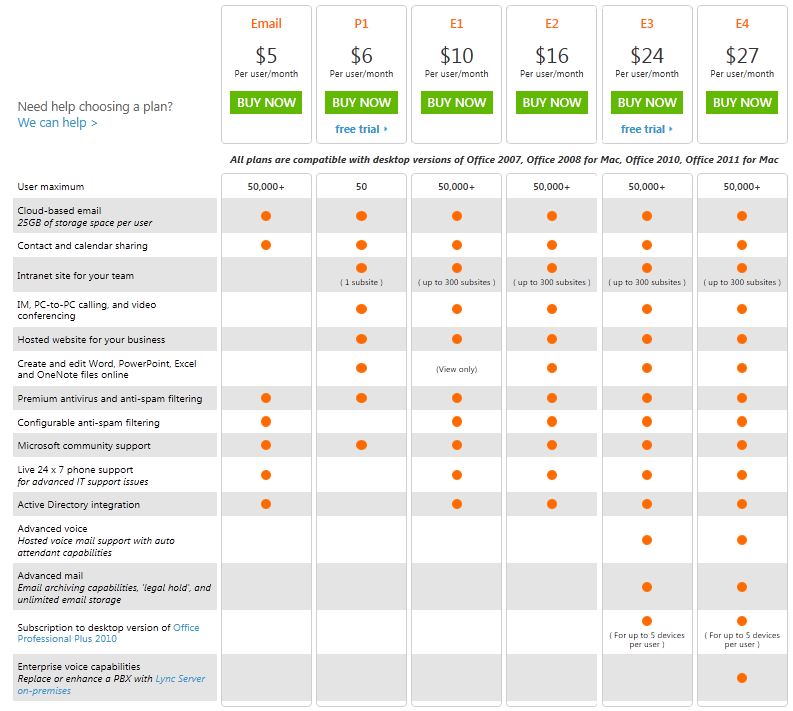
  • For a total of $5 per user per month, you control a rich hosted Exchangeenvironment with 25 GB mailboxes for every user without having to manage a server.
    • Data is hosted in geographically-distributed datacenters with continuous data backup and premiere disaster recovery capabilities
    • A team of security experts monitors Exchange Online around the clock and updates anti-virus and spam filters to address new threats as soon as they appear
    • Automatic patching eliminates the time and effort of maintaining and servicing your email system
    • An easy-to-use Web interface lets you manage your online environment from anywhere
  • Live phone support 24 hours a day, 7 days a week, 365 days a year
  • Large, 25 GB mailboxes are standard for every user so they can access all essential information in one place
  • Seamless integration with Outlook so your users can enjoy a rich, familiar email experience and offline access
  • Calendar sharing allows users to see free/busy information with colleagues, even if they work at another company
  • Email archiving, eDiscovery Search, retention policies, and optional legal hold help preserve and discover data
  • Security policies let you create approved mobile device lists, enforce PIN lock, and remotely wipe data from lost phones
  • Free tools for migrating IMAP and Exchange Server mailbox data to Exchange Online
  • Beauty of FOPE..Forefront Online Protection for Exchange integration and management through browser.

Here is the plan…and if you need more, go to O365 Home Site and for UAE users, go to O365 UAE plan

Enjoy!!!

PST Capture Tool – We ask, Microsoft Exchange team delivers it!!!

EHLO, our Exchange Halo team!!! always listening for feedback on what we’re doing well and delivers the tool best for us. As more and more of us evaluate and deploy the email archiving, retention and discovery capabilities of Exchange Server 2010 and Exchange Online, we understand that Personal Folders (.pst files) remain a challenge for us. The ability to search our network to discover and then import .pst files across your environment is critical, and that you need an admin-driven and straightforward tool for doing these things….here comes the EHLO.. In July 2011, Exchange team announce that later this year they will  be adding a new tool to our already rich portfolio of planning and deployment tools. This new tool, PST Capture, will be downloadable and free, and will enable you to discover .pst files on your network and then import them into both Exchange Online (in Office 365) and Exchange Server 2010 on-premises.

And now the EHLO action…..!!!!

PST Capture tool helps us search your network to discover and then import .pst files across your environment – all from a straightforward admin-driven tool. PST Capture will help reduce risk while increasing productivity for your users by importing .pst files into Exchange Online or Exchange Server 2010 – directly into users’ primary mailboxes or archives.

PST Capture documentation, Click here

To download PST Capture (Microsoft Exchange PST Capture is used to discover and import .pst files into Exchange Server or Exchange Online), click here

System requirements – Supported Operating Systems: Windows Server 2008 R2 Enterprise

  • Review the Technical Documentation prior to installation of Microsoft Exchange PST Capture
  • Exchange Server 2010, if used to import to Exchange Server 2010 mailboxes or archives
  • Exchange Online (Office 365) subscription if used to import to Exchange Online (Office 365) mailboxes or archives
  • Microsoft .NET Framework 3.5 or 3.5 Service Pack 1 (SP1)
  • Microsoft Outlook 2010 x64 (only required on the host computer where you install the Central Service and Console)

Thank you Microsoft Exchange Team!!!!

Microsoft Exchange Server 2010 Service Pack 2 (SP2)

Microsoft Exchange Server 2010 SP2 helps IT Professionals achieve new levels of reliability with greater flexibility, enhanced user experiences, and increased protection for business communications.

  • Flexible and reliable – Exchange Server 2010 SP2 gives you the flexibility to tailor your deployment based on your company’s unique needs and a simplified way to keep e-mail continuously available for your users.
  • Anywhere access – Exchange Server 2010 SP2 helps your users get more done by giving them the freedom to securely access all their communications – e-mail, voice mail, instant messaging, and more – from virtually any platform, Web browser, or device.
  • Protection and compliance – Exchange Server 2010 SP2 delivers integrated information loss prevention, and compliance tools aimed at helping you simplify the process of protecting your company’s communications and meeting regulatory requirements.

Before you install Exchange Server 2010 SP2, we recommend that you review the summary of system requirements and technical information located in the Exchange Server 2010 Technical Documentation Library.

You can download Exchange server 2010 SP2 from Microsoft Download Centre

Exchange Server 2010 site page