Exchange server 2013 – Publishing rule using TMG

Now that Exchange Server 2013 is available, some of you may well be wondering how to publish it to the Internet using Microsoft Threat Management Gateway (TMG) or perhaps the Microsoft Unified Access Gateway (UAG).

The first thing to know is that there is no Exchange Server 2013 publishing wizard, but do not panic as you can instead use the 2010 wizard, and then make some changes described here…Read the blog article from exchange team blog

Experiencing O365 platform with Microsoft online service

We are now experiencing the O365 environment to our domain…i should tell you that “beauty lies beneath the platform”…more to explore

Built to deliver the enterprise-grade security and reliability that businesses require, Microsoft Exchange Online provides hosted email, calendar and contacts on your PC, phone and web browser.

  • Built-in anti-virus and antispam filters protect your information and help you focus on what’s most important
  • Mobile sync to hundreds of devices means you can access and update your info while on the go
  • 99.9% uptime commitment with financially-backed SLA
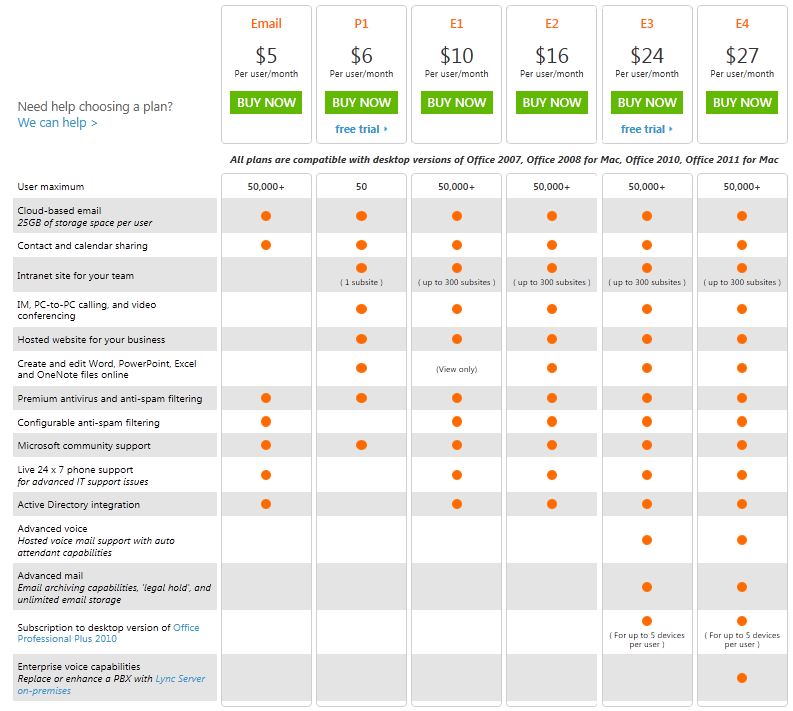
  • For a total of $5 per user per month, you control a rich hosted Exchangeenvironment with 25 GB mailboxes for every user without having to manage a server.
    • Data is hosted in geographically-distributed datacenters with continuous data backup and premiere disaster recovery capabilities
    • A team of security experts monitors Exchange Online around the clock and updates anti-virus and spam filters to address new threats as soon as they appear
    • Automatic patching eliminates the time and effort of maintaining and servicing your email system
    • An easy-to-use Web interface lets you manage your online environment from anywhere
  • Live phone support 24 hours a day, 7 days a week, 365 days a year
  • Large, 25 GB mailboxes are standard for every user so they can access all essential information in one place
  • Seamless integration with Outlook so your users can enjoy a rich, familiar email experience and offline access
  • Calendar sharing allows users to see free/busy information with colleagues, even if they work at another company
  • Email archiving, eDiscovery Search, retention policies, and optional legal hold help preserve and discover data
  • Security policies let you create approved mobile device lists, enforce PIN lock, and remotely wipe data from lost phones
  • Free tools for migrating IMAP and Exchange Server mailbox data to Exchange Online
  • Beauty of FOPE..Forefront Online Protection for Exchange integration and management through browser.

Here is the plan…and if you need more, go to O365 Home Site and for UAE users, go to O365 UAE plan

Enjoy!!!

Exchange server 2010 SP1 – Step by Step installlation on the production server – Live

Earlier i’ve done the Exchange server migration – 2007 to 2010 – Live cast, Its been 10 months since Exchange team release the SP1 for Microsoft Exchange server 2010….today i’m doing Microsoft Exchange server 2010 SP1 upgradation…Live page is opened.

Click here to view this live page

Enjoy!!!!

SmartScreen® Application Reputation in IE9

One out of every 14 programs downloaded is malware, Microsoft reported in a blog post on Wednesday.  Application Reputation mechanism in Internet Explorer 9, Microsoft noted that IE blocks between 2 and 5 million attacks a day for IE8 and IE9 customers…PC Magazine has more news on this. Social-engineering attacks, like tricking a user into running a malicious program, are far more common than attacks on security vulnerabilities. Application Reputation  in IE9 helps protect users from these socially engineered malware attacks. Please click here to read this article from MSDN blog

Forefront Endpoint Protection 2012 Beta

Forefront Endpoint Protection 2012 continues to deliver on the promise of Forefront Endpoint Protection 2010, simplifying and improving endpoint protection while also greatly reducing infrastructure costs. It builds on System Center Configuration Manager, allowing customers to implement endpoint protection as part of a unified infrastructure for securing and managing physical, virtual, and mobile client environments.  This shared infrastructure lowers ownership costs while providing improved visibility and control over endpoint management and security.  New features in the beta release include:- Support for System Center Configuration Manager 2012- Role-based administration- More efficient delivery of security updates..Click here to download.

Forefront Client Security has been superseded by Forefront Endpoint Protection 2010

This new addition to the Forefront family of security products builds on System Center Configuration Manager 2007 to provide desktop security and management in a single infrastructure. Forefront Endpoint Protection 2010 enables businesses to align security and management to improve endpoint protection while greatly reducing operational costs. This shared infrastructure helps reduce ownership costs while providing improved visibility and control over endpoint management and security.

Upgrading and migrating Client Security

Forefront Endpoint Protection 2010 features

Microsoft IT Increases Security and Streamlines Antimalware Management by Using Microsoft Forefront Endpoint Protection 2010

Trojan downloader Chepvil on the UPSwing – Microsoft Malware protection center

A new spam campaign using UPS (United Parcel Service) as a social-engineering draw was initiated this week.

The spammed message contains an attachment, detected as TrojanDownloader:Win32/Chepvil.I.

The spam campaign actually started around March 16th 2011. The threat was originally detected as Backdoor:Win32/Hostil.gen!A (was Backdoor:Win32/Hostil.F).

More specific signatures (TrojanDownloader:Win32/Chepvil.I and TrojanDownloader:Win32/Chepvil.J) were added on March 22nd 2011.

Encyclopedia entry – Microsoft Security Portal Updated:        Mar 26, 2011        |  Published:        Mar 25, 2011..Click here for more info

Exchange 2010 – Attachment size – Global setting (for Send & Receive)

Attachment size setting inside Exchange server 2010 for global user settings.

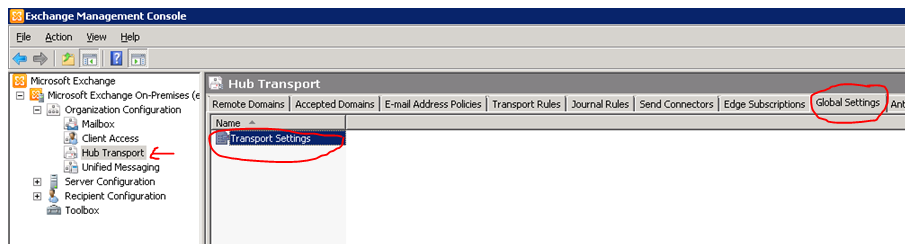
  • Go to your mailbox server
  • open EMC
  • goto Organization configuration
  • goto Hub Transport
  • select global setting tab

Edit the Transport settings and change the parameters as below.

Once you done it, click Apply and ok

Remember one thing, the more you increase the size of the attachment, the load on the CAS & Edge server increase…plus the Virus scanning engine too.

Thats all folks!!!

Exchange 2010 SP1 FAQ and Known Issues

Since Exchange server 2010 SP1 has been released on the 1st of September 2010, its too early for me to roll out on my production environment. “Some of the hotfixes would have been rolled up in a Windows update or service pack. Given that the Exchange team released SP1 earlier than what was planned and announced earlier, it did not align with some of the work with the Windows platform. As a result, some hotfixes are available from MSDN/Connect, and some require that you request them online using the links in the corresponding KBAs. The administrator experience when initially downloading these hotfixes may be a little odd. However, once you download the hotfixes, and receive two of the hotfixes from CSS, you can use the same for subsequent installs on other servers. In due course, all these updates may become available on the Download Center, and also through Windows Update.”. Good to know that Exchange team is closely working on all the issues and updating it. I will wait for another 1 to 2 months for my rollout. For more information http://msexchangeteam.com/archive/2010/09/01/456094.aspx

Also another helpful blog for the SP1 installation… click here

Microsoft Exchange Server 2010 SP1 accepts only ten devices per account – iOS4..more info click here

Problems when installing Exchange 2010 Service Pack 1 on a TMG configured for Mail protection..Click here  (Update: A fix for this problem is now available for download as part of Software Update 1 for Microsoft Forefront Threat Management Gateway (TMG) 2010 Service Pack 1.)

Exchange server 2010 – Edgeserver not able to save block IP

If you come across the issue of saving the IP which needs to block it under the “Edge server IP Block List” entry, following error receive “The server threw an exception. (Exception from HRESULT: 80010105 (RPC_E_SERVERFAULT))”

Why this is used : IP Block List is part of the connection filtering feature in Exchange. When the IP Block List feature is enabled on a computer, the Connection Filter agent analyzes all messages that come through all Receive connectors on that computer and it block all incoming messages from addresses specified in the IP Block list.

Reason for the above error : Duplicate IP exist inside the IP block list.

Resolution : From the EMS (Exchange management shell) use the following. You use the Add-IPBlockListEntry and Remove-IPBlockListEntry cmdlets to manage the addresses in the IP Block list. You can specify individual IP addresses, IP subnets using the CIDR notation, or IP ranges.

From the EMS,

If you want to list all the IP blocklist for verification, type  Get-IPBlockListEntry . This will list all the Block IP, and you can see the duplicate entries. Write down each of the dupicate entry seperately and then run the following command for each entries.

To remove an address from the IP Block list using the Shell, you must specify this IP. However, an easier way to remove an address is to pipeline the output of the Get-IPBlockListEntry cmdlet to the Remove-IPBlockListEntry cmdlet.

For example, if you want to remove the IP address 192.168.1.100 from your IP Block list, run the following command:

Get-IPBlockListEntry -IPAddress 192.168.1.100 | Remove-IPBlockListEntry

This will remove 192.168.1.100 from your IP block list, which is a duplicate, identified by you. For each entry, do the same by changing the IP. Once it is done, Your block list will start accepting the IP to block and  save it on the list, without throwing the error (as above mentioned)