
Microsoft Outlook Web apps – Administrator login – new features

Did you know that when you have Exchange 2010 server in your organization and you login through Outlook Web Apps, with administrator account, you have a lot of options to manage and view the entire organization, rather than going through EMC!!!!!

Logon to Outlook Web apps in your organization, and select options on the right side of the screen on top
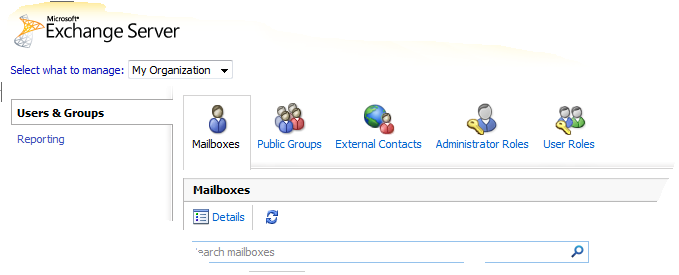
You get this screen, from there Select “Select what to manage:” and from the drop down menu, select My Organization..and then go to Reporting on the Left pane

Here you can view the queues, delevery status of each users, Public folder status, Mail enabled public folder status etc…!

BUT IF YOU LOGIN AS A NORMAL USER, ALL YOU CAN SEE IS AS BELOW..LIKE

Your organization contact details, Tools for organize mails, Groups belogs to, Settings,  Syncronized phone device to this account, etc…

and a cool feature of Outlook web apps is thaton the right side of the window, where help button is, click on the down arrow of the help icon and you will see “About”..click there and you will see the connectivity of your account with exchange server (good for administrators) like below one

Enjoy!!! i am enjoying it

Free Microsoft Office Web Apps Available

Microsoft launched its free Windows Live versions of Office Web Apps on Monday…click here to know more

The new service is currently available in English for Canada, Ireland, the United Kingdom and the United States. Canadians can access a French version too; a Spanish version is also available for the United States. Office Web Apps are simplified versions of Word, Excel, PowerPoint and OneNote that run in supported Web browsers. These applications use the “Ribbon” user interface menu system that was first introduced in Office 2007. Users need to sign up for a Windows Live password to access the service, but it’s all free. The service can be accessed anywhere using a supported browser and an Internet connection at http://www.office.live.com. Smartphone users can view Word and PowerPoint files without additional software on most devices, according to Microsoft’s announcement. Printing files in Word and PowerPoint Web Apps can be done right from the browser. Office Web Apps are tied to SkyDrive, Microsoft’s storage space in the Internet cloud. SkyDrive provides Office Web App users with 25 GB of storage space, which can be used to save files and share them with others. A coauthoring feature is available, but just for Excel and OneNote. Microsoft claims that users can collaborate on a document at the same time and not be locked out, even as various people try to access it. In addition, Office Web Apps preserves a version history, which is saved on SkyDrive.