Office 365 to another 22 new markets to grow our global footprint to 64 geographies – with more to come!
Microsoft has reduced Office 365 for enterprise plans by up to 20%.

Enjoy!!!

Office 365 to another 22 new markets to grow our global footprint to 64 geographies – with more to come!
Microsoft has reduced Office 365 for enterprise plans by up to 20%.
Enjoy!!!
If you ever look at all the migration that we do, we have to completed the biggest challenge; clients has been getting the system requirements ready for Office 365.
Click here to know more from my dedicated blog for O365 users.
Enjoy!!!
In my previous post…ADFS…Active Directory Federation Service i was talking about the ADFS architecture and promise for the deployment or migration to O365 from Microsoft.
Here i’m dedicating a page for Office 365 live migration …Click here to divert to the page
Enjoy..!!!
This page has been moved to a dedicated page for Office 365 users..click here

Transforming IT with Microsoft Private Cloud….Concept is aimed only for cost saving and maintenance free environment.
For a growing number of businesses, the journey to cloud computing starts with a private cloud implementation. A Microsoft private cloud dramatically changes the way your business produces and consumes IT services by creating a layer of abstraction over your pooled IT resources. This allows your datacenter to offer true infrastructure service capability as well as optimally managed application services. Microsoft private cloud solutions are built on Windows Server and System Center technology. Windows Azure is Microsoft’s public cloud computing platform. It’s a place to run your applications out on the internet, at scale. With geographically distributed datacenters worldwide, applications can be built, hosted and managed around the world. With Windows Azure, you can extend and even move your datacenter services off-premises or beyond a hosted environment, paying only for the resources you use at any given time. The flexible cloud computing platform of Windows Azure lets you focus on solving business problems and addressing customer needs, not on the infrastructure. Right now Public cloud on 3 platform flavour…Windows Azure, Office 365 and Microsoft online Services
To know more about Office 365, click here
To registed Office 365 for trial, click here
Enjoy!!!
We are now experiencing the O365 environment to our domain…i should tell you that “beauty lies beneath the platform”…more to explore
Built to deliver the enterprise-grade security and reliability that businesses require, Microsoft Exchange Online provides hosted email, calendar and contacts on your PC, phone and web browser.
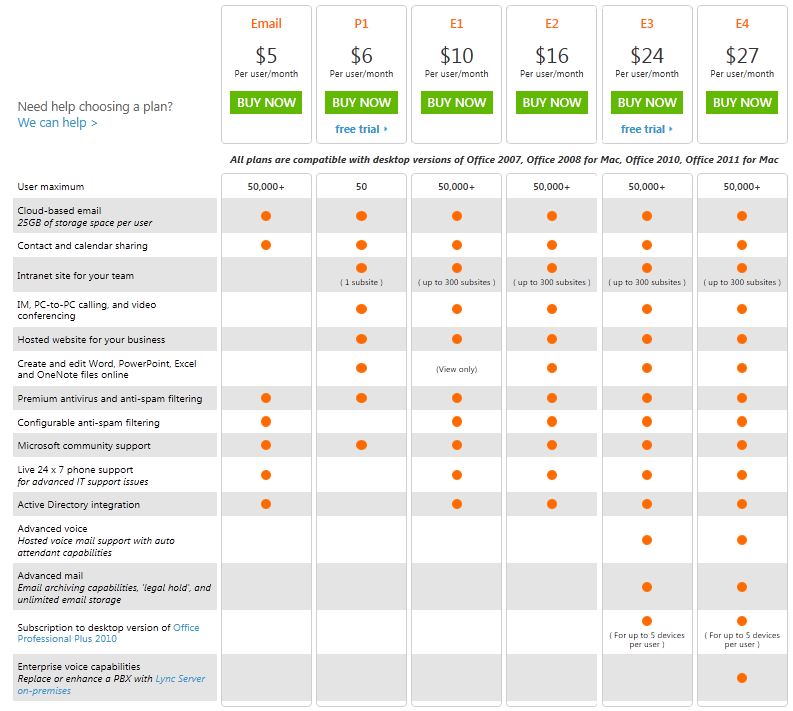
Here is the plan…and if you need more, go to O365 Home Site and for UAE users, go to O365 UAE plan
Enjoy!!!
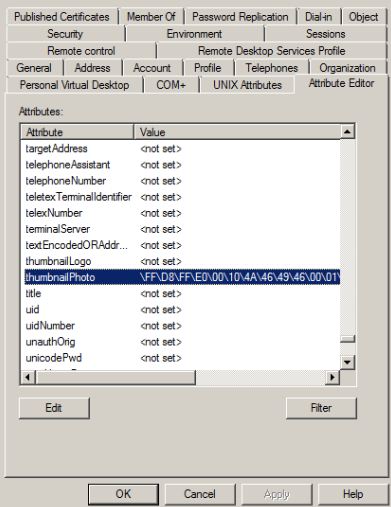
A cool tool (AD Photo Edit) which you can use to update your profile picture and have the picture displayed on your Lync Online home page or SharePoint site. This beautiful tool uploads a picture into the thumbnailPhoto attribute in Active Directory user properties.
This information is then synchronized with the Cloud through the Microsoft Online Services Directory Synchronization tool. You can download the AD Photo Edit from here. Once the tool is installed AD Photo Edit automatically detects and connects to your Active Directory. If you want to upload the domain users photo, you need to have administrative credential. Users are selected by using their “username”. There are free edition, which upload photos individually and bulk edition which is a paid edition.
When you update the photo, your user properties will be filled with values as show in the picture below, (If you already attach a picture, this tool will display the existing picture and you can change it with the new one). if there are no picture attached to your profile, this field will show as <not set>.
Enjoy!!!
On May 10, 2011, Microsoft Corp. (Nasdaq: “MSFT”) and Skype Global S.à r.l today announced that they have entered into a definitive agreement under which Microsoft will acquire Skype, the leading Internet communications company, for $8.5 billion in cash from the investor group led by Silver Lake. The agreement has been approved by the boards of directors of both Microsoft and Skype.
Read the press release from Microsoft News Center.

Microsoft CEO Steve Ballmer and Skype CEO Tony Bates announce Microsoft's acquisition of Skype. San Francisco, May 10, 2011
Article from The Telegraph about this deal.
Skype will support Microsoft devices like Xbox and Kinect, Windows Phone and a wide array of Windows devices, and Microsoft will connect Skype users with Lync, Outlook, Xbox Live and other communities. Microsoft will continue to invest in and support Skype clients on non-Microsoft platforms. The acquisition will increase the accessibility of real-time video and voice communications, bringing benefits to both consumers and enterprise users and generating significant new business and revenue opportunities. The combination will extend Skype’s world-class brand and the reach of its networked platform, while enhancing Microsoft’s existing portfolio of real-time communications products and services.
The Microsoft® SharePoint® 2010 Administration Toolkit contains functionality to help administer and manage Microsoft® SharePoint® Foundation 2010 and Microsoft® SharePoint® Server 2010. New in SharePoint 2010 Administration Toolkit 2.0, the SharePoint Diagnostic Studio 2010 (SPDiag 3.0) provides SharePoint administrators with a unified interface that can be used to gather relevant information from a farm, display the results in a meaningful way, identify performance issues, and share or export the collected data and reports for analysis by Microsoft support personnel. This tool is not supported for SharePoint Foundation 2010. Security Configuration Wizard (SCW) manifests, which add roles for SharePoint 2010 Products to Windows Server 2008 with Service Pack 2 or to Windows Server 2008 R2.
More info and to download this, click here

Microsoft brings together online versions of our most trusted communication and collaboration products with the security, reliability, and control you require.
Choosing Microsoft Online Services allows you to combine the power of rich desktop-based applications with the flexibility of fully-hosted Internet services. That gives your users an all-in-one integrated experience on the same rich clients your users already know with a consistent look and feel from virtually any device, in almost any location.
The latest business productivity capabilities
Ease of use
Privacy & rapid disaster recovery
Greater flexibility
Improved agility
Security & reliability
 PREMNAIR'S Blog