This page has been move to a dedicated page..click here.
Office 365 – Migration approach
Reply

This page has been move to a dedicated page..click here.
This page has been moved..please click here
In my previous post…ADFS…Active Directory Federation Service i was talking about the ADFS architecture and promise for the deployment or migration to O365 from Microsoft.
Here i’m dedicating a page for Office 365 live migration …Click here to divert to the page
Enjoy..!!!
An offline address book (OAB) is a copy of a collection of address lists that has been downloaded so that a Microsoft Outlook user can access the information it contains while disconnected from the server. Microsoft Exchange generates the new OAB files, compresses the files, and then places the files on a local share. Exchange administrators can choose which address lists are made available to users who work offline, and they can also configure the method by which the address books are distributed.

Pretty straight forward explanation of OAB replication on Exchange 2010 SP2 Rollup Update…Thanks to Greg Taylor, Principal Program Manager @ Exchange Customer Experience, who explained on EHLO…click here to read more of this article
One important thing to share :
| Important: |
|---|
| OAB data is produced by the Microsoft Exchange System Attendant service running as Local System. If an administrator uses the security descriptor to prevent users from viewing certain recipients in Active Directory, users who download the OAB will be able to view those hidden recipients. Therefore, to hide a recipient from an address list, you set the HiddenFromAddressListsEnabled parameter on the Set-PublicFolder, Set-MailContact, Set-MailUser, Set-DynamicDistributionGroup, Set-Mailbox, and Set-DistributionGroups cmdlets. Alternatively, you can create a new default OAB that doesn’t contain the hidden recipients.
Click here to understand more on offline Address Book
|
We are now experiencing the O365 environment to our domain…i should tell you that “beauty lies beneath the platform”…more to explore
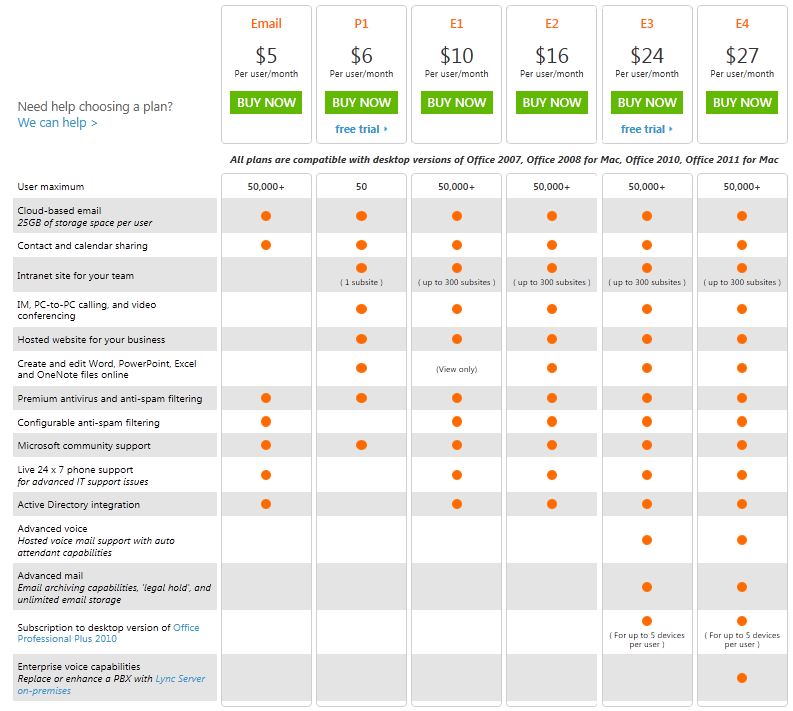
Built to deliver the enterprise-grade security and reliability that businesses require, Microsoft Exchange Online provides hosted email, calendar and contacts on your PC, phone and web browser.
Here is the plan…and if you need more, go to O365 Home Site and for UAE users, go to O365 UAE plan
Enjoy!!!
EHLO, our Exchange Halo team!!! always listening for feedback on what we’re doing well and delivers the tool best for us. As more and more of us evaluate and deploy the email archiving, retention and discovery capabilities of Exchange Server 2010 and Exchange Online, we understand that Personal Folders (.pst files) remain a challenge for us. The ability to search our network to discover and then import .pst files across your environment is critical, and that you need an admin-driven and straightforward tool for doing these things….here comes the EHLO.. In July 2011, Exchange team announce that later this year they will be adding a new tool to our already rich portfolio of planning and deployment tools. This new tool, PST Capture, will be downloadable and free, and will enable you to discover .pst files on your network and then import them into both Exchange Online (in Office 365) and Exchange Server 2010 on-premises.
And now the EHLO action…..!!!!
PST Capture tool helps us search your network to discover and then import .pst files across your environment – all from a straightforward admin-driven tool. PST Capture will help reduce risk while increasing productivity for your users by importing .pst files into Exchange Online or Exchange Server 2010 – directly into users’ primary mailboxes or archives.
PST Capture documentation, Click here
To download PST Capture (Microsoft Exchange PST Capture is used to discover and import .pst files into Exchange Server or Exchange Online), click here
Thank you Microsoft Exchange Team!!!!
Research in Motion (RIM) launched BlackBerry® Business Cloud Services for Microsoft Office 365, a new service for organizations to extend Microsoft Exchange Online to BlackBerry® smartphones. The service ensures people have industry-leading business collaboration tools while on the go. Read more, Click here
An important development from Microsoft Office Division – the beginning of the “Office 15” Technical Preview Program. Office 15 is the codename for the next generation of the Microsoft Office products and services…read more from PJ Hough, CVP of Development, Microsoft Office Division, click here
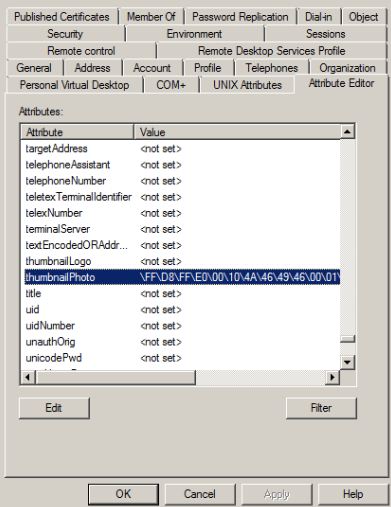
A cool tool (AD Photo Edit) which you can use to update your profile picture and have the picture displayed on your Lync Online home page or SharePoint site. This beautiful tool uploads a picture into the thumbnailPhoto attribute in Active Directory user properties.
This information is then synchronized with the Cloud through the Microsoft Online Services Directory Synchronization tool. You can download the AD Photo Edit from here. Once the tool is installed AD Photo Edit automatically detects and connects to your Active Directory. If you want to upload the domain users photo, you need to have administrative credential. Users are selected by using their “username”. There are free edition, which upload photos individually and bulk edition which is a paid edition.
When you update the photo, your user properties will be filled with values as show in the picture below, (If you already attach a picture, this tool will display the existing picture and you can change it with the new one). if there are no picture attached to your profile, this field will show as <not set>.
Enjoy!!!
Office 365 is a software and services offering from Microsoft that includes Microsoft Office and cloud-based access to Exchange, SharePoint and the software formerly known as Communications Server — Lync. By Josette Rigsby on CMS Wire has more on this…read here. Also for other O365 plan, click here
 PREMNAIR'S Blog