Research in Motion (RIM) launched BlackBerry® Business Cloud Services for Microsoft Office 365, a new service for organizations to extend Microsoft Exchange Online to BlackBerry® smartphones. The service ensures people have industry-leading business collaboration tools while on the go. Read more, Click here
Category Archives: Software
“Office 15” Begins Technical Preview – first time ever,simultaneously update of cloud services
An important development from Microsoft Office Division – the beginning of the “Office 15” Technical Preview Program. Office 15 is the codename for the next generation of the Microsoft Office products and services…read more from PJ Hough, CVP of Development, Microsoft Office Division, click here
Update your Active Directory Picture – Free Tool
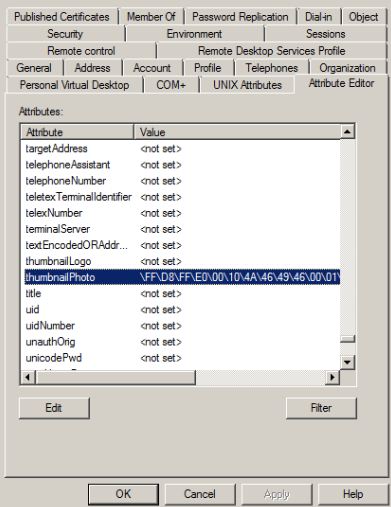
A cool tool (AD Photo Edit) which you can use to update your profile picture and have the picture displayed on your Lync Online home page or SharePoint site. This beautiful tool uploads a picture into the thumbnailPhoto attribute in Active Directory user properties.
This information is then synchronized with the Cloud through the Microsoft Online Services Directory Synchronization tool. You can download the AD Photo Edit from here. Once the tool is installed AD Photo Edit automatically detects and connects to your Active Directory. If you want to upload the domain users photo, you need to have administrative credential. Users are selected by using their “username”. There are free edition, which upload photos individually and bulk edition which is a paid edition.
When you update the photo, your user properties will be filled with values as show in the picture below, (If you already attach a picture, this tool will display the existing picture and you can change it with the new one). if there are no picture attached to your profile, this field will show as <not set>.
Enjoy!!!
Microsoft’s Offers Users Enhanced Office 365 for Less than a Happy Meal
Office 365 is a software and services offering from Microsoft that includes Microsoft Office and cloud-based access to Exchange, SharePoint and the software formerly known as Communications Server — Lync. By Josette Rigsby on CMS Wire has more on this…read here. Also for other O365 plan, click here
Online energy monitoring – Pulse Controller
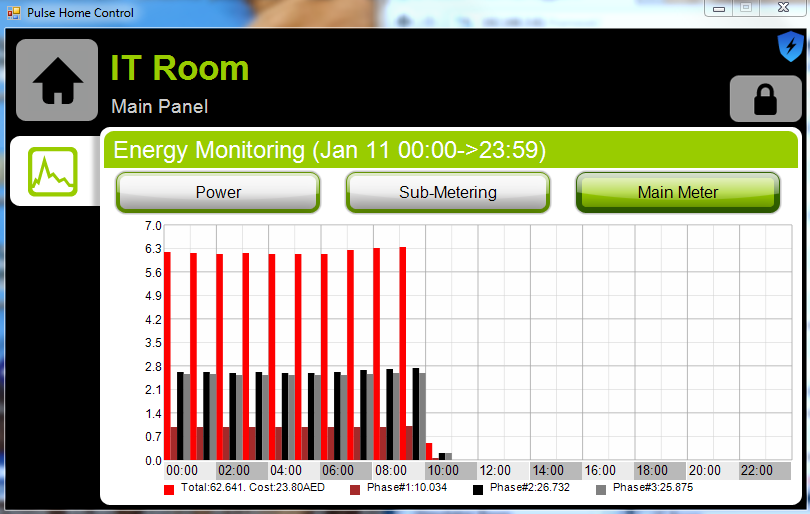
Now i’m able to veiw our entire office power consumption and my data centre power consumption. The beauty is that..this gives me zone wise details 24/7…. What a beauty!!!
Implementation cost : Less
Above shows the cost in AED/Dirhams and the consumption of 3Phase line in details…what an ease of monitoring.
This is the controller that does the magic.
More Info…click here
I wish you a very Happy & Prosperous New year…2012
Microsoft Exchange Server 2010 Service Pack 2 (SP2)
Microsoft Exchange Server 2010 SP2 helps IT Professionals achieve new levels of reliability with greater flexibility, enhanced user experiences, and increased protection for business communications.
- Flexible and reliable – Exchange Server 2010 SP2 gives you the flexibility to tailor your deployment based on your company’s unique needs and a simplified way to keep e-mail continuously available for your users.
- Anywhere access – Exchange Server 2010 SP2 helps your users get more done by giving them the freedom to securely access all their communications – e-mail, voice mail, instant messaging, and more – from virtually any platform, Web browser, or device.
- Protection and compliance – Exchange Server 2010 SP2 delivers integrated information loss prevention, and compliance tools aimed at helping you simplify the process of protecting your company’s communications and meeting regulatory requirements.
Before you install Exchange Server 2010 SP2, we recommend that you review the summary of system requirements and technical information located in the Exchange Server 2010 Technical Documentation Library.
You can download Exchange server 2010 SP2 from Microsoft Download Centre
Exchange Server 2010 site page
Nokia Lumia 800 – First Windows Phone 7.5
I Really Love it!!!
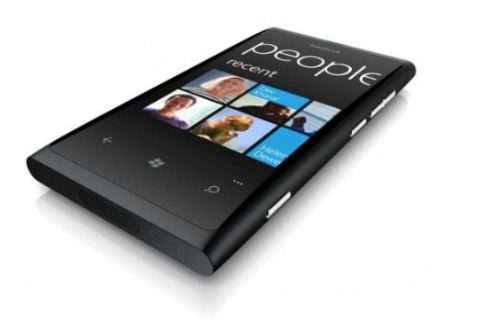
The Nokia Lumia 800 with Windows Phone is the first Nokia smartphone to have Windows Phone 7.5. Its beautiful design is a head-turner. Simpler social networking keeps you connected to those who matter. Internet Explorer 9 gives you quicker browsing – plus the web like it is on your PC. And with a Carl Zeiss lens and 8-megapixel camera, you’ll shoot better photos and video.

Lumia 800 is a “refinement” of the N9 – Seamless design: Curved 3.7″ AMOLED ClearBlack glass touchscreen display seamlessly integrated into a smooth one-piece body…People Hub: Facebook, Twitter, LinkedIn, email, Chat, SMS…Browser: Bing, Internet Explorer 9, HTML5, Wi-Fi…Camera: 8 MP Auto Focus with Carl Zeiss Optics, 2x LED Flash and HD Video
Extra features
- Micro SIM
- Nokia Maps
- Bing Maps
- Flight Mode
- Nokia Drive
- Nokia Music
- 2 Microphones
- 3D Accelerometer
- Proximity sensor
- Ambient light sensor
- Application Highlights
- Nokia Contacts Transfer
- Compass (Magnetometer Sensor
Operating band
- GSM 850
- GSM 900
- GSM 1800
- GSM 1900
- WCDMA Band V (850)
- WCDMA Band I (2100)
- WCDMA Band II (1900)
- WCDMA Band VIII (900)
Reviews like it has a slightly smaller screen due to the intrusion of the Windows Phone Button, only 512 MB RAM, only 16GB onboard storage, No NFC etc etc etc
But rumours that Nokia is working on Windows Phone 8 – (aka Apollo)!!!
Configure Automatic Replies for an user in Exchange 2010 – Using Exchange Control Panel (ECP)
In previous versions of Exchange, you would need to access the user’s mailbox to be able to do this. Without access to the mailbox, you can’t modify data in it.
Two ways for an exchange/domain administrator to access an user mailbox:
- Grant yourself full Access mailbox permission to the user’s mailbox.
- Change the user’s password and log in as the user.
The first option grants the administrator access to all of the data in the user’s mailbox.
The second option grants the administrator access to all of the data that the user account can access within your company and locks the user out of his own user account.
Configure auto-reply options using the ECP
In Exchange 2010 SP1, you can configure auto-reply options for your users without using either of the above options.
Login to ECP through owa as Administrator or member of that group. Click options (right side top) and select “See all options”, From this screen, where “Manage Myself”, click “Another User” -> select the user you want and double click on the user. This will open his mail option ECP, and click “Tell people you’re on vacation” -> and select Automatic Replies and fillout the information and click Save.
Thats it!!!!
Configure auto-reply options using the Shell Command
This command schedules internal and external auto-replies
Example, if a user is going on leave from 11/11/2011 to 12/10/2011: (MM/DD/YYYY format)
Set-MailboxAutoReplyConfiguration leaveusername@domain.com –AutoReplyState Scheduled –StartTime “11/11/2011” –EndTime “12/110/2011” –ExternalMessage “External OOF message here” –InternalMessage “Internal OOF message here”
For detailed syntax and parameter descriptions, see Set-MailboxAutoReplyConfiguration (Applies to Exchange Server 2010 SP1).
This command retrieves auto-reply settings for a mailbox.
Get-MailboxAutoReplyConfiguration leaveusername@domain.com
This command disables auto-reply configured for a mailbox:
Set-MailboxAutoReplyConfiguration leaveusername@domain.com –AutoReplyState Disabled –ExternalMessage $null –InternalMessage $null
Great leap…Enjoy!!!!
Released: Update Rollup 6 for Exchange Server 2010 SP1
Announcement from Exchange team blog: Earlier today the Exchange CXP team released Update Rollup 6 for Exchange Server 2010 SP1 to the Download Center. Click here to download
This update contains a number of customer reported and internally found issues since the release of RU5. In particular we would like to specifically call out the following fixes which are included in this release:
- 2627769 Some time zones in OWA are not synchronized with Windows in an Exchange Server 2010 environment
- 2528854 The Microsoft Exchange Mailbox Replication service crashes on a computer that has Exchange Server 2010 SP1 installed
- 2544246 You receive a NRN of a meeting request 120 days later after the recipient accepted the request in an Exchange Server 2010 SP1 environment
- 2616127 “0x80041606” error code when you use Outlook in online mode to search for a keyword against a mailbox in an Exchange Server 2010 environment.
- 2549183 “There are no objects to select” message when you try to use the EMC to specify a server to connect to in an Exchange Server 2010 SP1 environment