With the release of Exchange 2010 SP1, we introduced the /hosting mode switch – a feature which deploys Exchange using an Active Directory structure that affords complete separation between tenant organizations shared on the same underlying platform. /Hosting mode makes the need for a solution like Hosted Messaging and Collaboration largely redundant when hosting multi-tenant Exchange. /Hosting mode does not ship with any automation tools necessary for hosters to operate a service at scale, but it does address the requirements typical of a multi-tenant infrastructure (such as tenant organizations and service plans). Read more from the exchange team blog, Click here
Category Archives: Software
User Access Setup Error: GPS Error RevokeUserAudit: 58
The error message from the time you upgraded to GP2010 R2. The error message is thrown when admin revoke access to a user on a company…read more on Vaidy’s blog
Cannot Join Apple OS X Lion to Windows Active Diretory – How to fix it!!!
Action: New Mac OS X Lion to Active Directory binding.
Issue: Everytime I get the following error: authentication server encountered an error while attempting the requested operation.
Findings: Even if I’m connected to the internet, and using the Apple time server, the time on machines is not at all correct, which prevents the machines from binding to Windows Active Directory.
Solutions: Change the date and time to the correct values in your Apple machine and then restart the apple machine. Without a restart, this will not work.
NFC – Near Field Communication
This technology allows for simplified transactions, data exchange, and wireless connections between two devices in close proximity to each other, usually by no more than a few centimeters. It is expected to become a widely used system for making payments by smartphone in the United States. Many smartphones currently on the market already contain embedded NFC chips that can send encrypted data a short distance (“near field”) to a reader located, for instance, next to a retail cash register. Shoppers who have their credit card information stored in their NFC smartphones can pay for purchases by waving their smartphones near or tapping them on the reader, rather than bothering with the actual credit card.
It simplifies
- File sharing
- Electronic business card
- Electronic wallet
- Mobile payment
- Parking ticket
- Boarding pass…etc
Pairing is easy..not like Bluetooth or Wifi
This is the logo for NFC enables devices.
iPhone 5 might come up with NFC included devices in the near future. Persistent rumours and patent applications strongly indicate an NFC enabled iPhone is on the way, though there has been no official announcement yet.
The list of NFC phones available today
- Google Nexus S
- Samsumg Galaxy S II
- Nokia C7 …Etc
NFC – its an ISO 18000-3 RFID compatible, Standardisation body is ISO/IEC, Network Standard is ISO 13157 etc, Network Type is Point-to-point, Cryptography not with RFID, Range <0.2m, Frequency 13.56MHZ, Bit rate 424kbit/s, Setup time <0.1s and Power consumption <15mA
Good luck!!!
A Good One – Mouse Without Boarders
KVM…Past history…!!!
Mouse Without Borders allow multiple computers to share a single keyboard and mouse. In fact you can control up to four computers from a single mouse and keyboard with no extra hardware needed – it’s all software magic, developed by Truong Do who by day is a developed for Microsoft Dynamics. Four Computers can linked using this tool. Functions like cut, paste…drag and drop..login and lock to all four machine etc….
To know more & download this ..click here
The Garage is both a physical space in Building 4 at our Redmond HQ, and a company wide program that encourages grass roots invention, tinkering, ideas and incubation of projects. To know more about this click here
IE 10 – Windows developer preview
With the new IE10 engine included in the Windows Developer Preview, developers can work with more HTML5 technologies to build touch-friendly and beautiful interactive Web applications. With this update, IE10 includes support for touch-friendly sites to use many new technologies:
- Rich Visual Effects: CSS Text Shadow, CSS 3D Transforms, CSS3 Transitions and Animations, CSS3 Gradient, SVG Filter Effects
- Sophisticated Page Layouts: CSS3 for publication quality page layouts and application UI (CSS3 grid, flexbox, multi-column, positioned floats, regions, and hyphenation), HTML5 Forms, input controls, and validation
- Enhanced Web Programming Model: Better offline applications through local storage with IndexedDB and the HTML5 Application Cache; Web Sockets, HTML5 History, Async scripts, HTML5 File APIs, HTML5 Drag-drop, HTML5 Sandboxing, Web workers, ES5 Strict mode support.
To download the Windows developer preview to experience IE10 from Microsoft Connect, Click here
IE Blog…click here
Internet Explorer 10 Platform Preview 3 video overview on Windows 8 ..Click here
Enjoy!!!
Microsoft Online Services Migration Tools (32 bit)
Microsoft Online Services Migration Tools to forward copies of your Exchange Server mail to your Exchange Online mailboxes. You can also use the Migration Tools to copy content from your Exchange Server, POP3, or IMAP4 e-mail server mailboxes to your Exchange Online mailboxes. This product intended for use with Microsoft Online Services only.
Requirements provided to subscribers via the Microsoft Online Services Administration Center
So far online service is not available in the Middle east region..but soon its comming..hope for the best!! To download this, click here
Windows Intune – Simplify PC Management
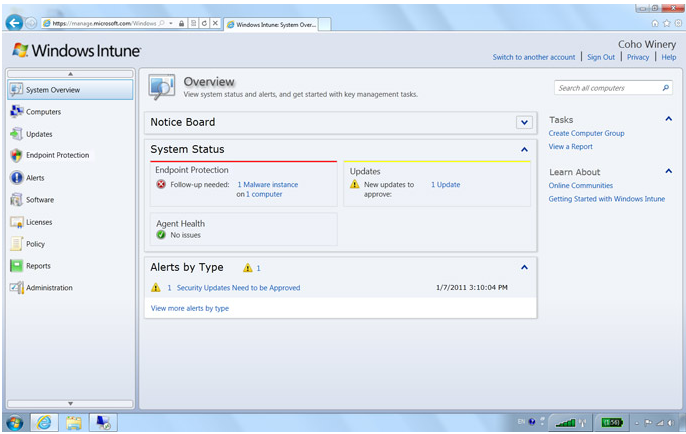
Simplify PC Management
Windows Intune is unique because it’s an end-to-end Microsoft solution that brings together Windows cloud services for PC management and endpoint protection with a Windows 7 Enterprise upgrade subscription. With the easy-to-use web-based console, you get immediate insight into your PC environment and can view update and malware status, alerts, security policies, and more. You just need an Internet connection and the Windows Intune client installed on each PC you wish to manage
To know more, click here
SQL Server Code Name “Denali”
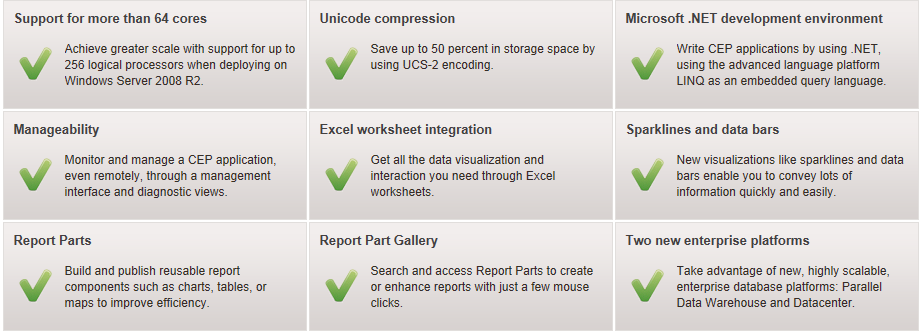
SQL Server Code Name Denali‖ is a cloud-ready information platform that will help organizations unlock breakthrough insights across the organization and quickly build solutions to extend data across on-premises and public cloud backed by mission critical confidence.
Extend the reach of data virtually anywhere across server and/or cloud with expansive developer technologies, Enable new scenarios with SQL Azure DataSync, a cloud service that provides bi-directional data synchronization between databases across datacenter and cloud, Provide a consistent and open data-feed to power multiple user experiences across the web.
SQL Server code name “DENALI” CTP3 ..click here to download it
SQL Server code name “DENALI” Datasheet..download here from Microsoft
Security in Office 365 White Paper
Moving productivity services to the cloud requires a serious consideration of security and privacy issues and technologies. Office 365 is designed to deliver the enterprise-grade security you require to move to the cloud with confidence. This whitepaper provides an overview of the security practices and technology that support enterprise-grade security in Microsoft Office 365 for businesses of all sizes. Click here to download this from Microsoft Download center