Windows 8 – How to disconnect VPN connection

Ha ha ha… New OS released and we are now findings work arounds…

When you connect a VPN network through Windows 8, how to disconnect an incoming virtual private network (VPN) connection in Windows 8 / Windows Server 2012.

  • Open Network Connections. To do this, use either of the following methods:
    • Swipe in from the right edge of the screen, or point to the lower/upper-right corner of the screen, and then click Search. Then, type ncpa.cpl, and then click the Ncpa.cpl icon.
    • Another option is press Win+R to open the Run window, type ncpa.cpl,  and then  click OK.
  • Right-click the incoming VPN connection that you want to disconnect,  and then  click Status.
  • On the General tab,  click Disconnect.
  • Close Network Connections.

Evoko room manager now support Office 365

New software release for Evoko room manager, that supports Office365 and Google Apps. Read the Blog

Enjoy!!!

Exchange Server “2013” Preview is out

Exchange 2013 preview release will subject to change when it reaches to RTM. Installing Exchange 2013 Preview is not for production environment.

Exchange 2013 preview is for simplicity of scale, hardware utilization, and failure isolation. With Exchange 2013 Preview, they reduced the number of server roles to two:

  1. the Client Access server role
  2. the Mailbox server role.

The Mailbox server includes all the traditional server components found in Exchange 2010

  • the Client Access protocols
  • Hub Transport service
  • Mailbox databases, and Unified Messaging.

The Mailbox server handles all activity for a given mailbox. The Client Access server provides authentication, redirection, and proxy services.

The Client Access server itself doesn’t do any data rendering. It is a thin and stateless server. There is never anything queued or stored on the Client Access server.

The Client Access server offers all the usual client access protocols: HTTP, POP and IMAP, and SMTP.

Managed Store works with the Microsoft Exchange Replication service to manage mailbox databases, which continues to use Extensible Storage Engine (ESE) as the database engine. Exchange 2013 Preview includes significant changes to the mailbox database schema that provide many optimizations over previous versions of Exchange. In addition to these changes, the Microsoft Exchange Replication service is responsible for all service availability related to Mailbox servers. The architectural changes enable faster database failover and better physical disk failure handling.

The Managed Store is also integrated with the FAST search engine (the same search engine used by SharePoint 2013 Preview) to provide more robust indexing and searching.

No more Exchange Management Console (EMC) Administration is now performed using the new web-based Exchange Administration Center and the Exchange Management Shell (3.0)

All certificate management is performed on the Client Access server. The Mailbox server has a self-signed certificate installed by default. The Client Access server automatically trusts the self-signed certificate on the Exchange 2013 Preview Mailbox server, so clients will not receive warnings about a self-signed certificate not being trusted provided that the Exchange 2013 Preview Client Access server has a non-self-signed certificate from either a Windows certificate authority (CA) or a trusted third party.

Exchange 2013 Preview offers greater integration with SharePoint 2013 Preview and Lync 2013 Preview. Benefits of this enhanced integration include:

  • Users collaborate more effectively by using site mailboxes.
  • Lync Server 2013 Preview can archive content in Exchange 2013 Preview and use Exchange 2013 Preview as a contact store.
  • Discovery Managers can perform In-Place eDiscovery and Hold searches across SharePoint 2013 Preview, Exchange 2013 Preview, and Lync 2013 Preview data.
  • Oauth authentication allows partner applications to authenticate as a service or impersonate users where required.

Public folders in Exchange 2013 Preview now take advantage of the existing high availability and storage technologies of the mailbox store. The public folder architecture uses specially designed mailboxes to store both the hierarchy and the public folder content. This new design also means that there is no longer a public folder database. Public folder replication now uses the continuous replication model. High availability for the hierarchy and content mailboxes is provided by the DAG. With this design, we’re moving away from a multi-master replication model to a single-master replication model.

Exchange 2013 Preview continues to make use of the database availability group (DAG) platform introduced in Exchange 2010 for both high availability and site resilience. Exchange 2013 Preview also includes enhancements to the DAG platform that improve manageability and reduce costs. These features include:

  • Managed availability.
  • Managed Store.
  • Automatic configuration and management of DAG networks.
  • Management via the Exchange Administration Center.
  • Enhancements to DAG-related cmdlets to introduce new scenarios.

PRE-REQUISITES

INSTALLATION TYPE

  • Install Exchange 2013 Using the Setup Wizard, Click here
  • Install Exchange 2013 in Unattended Mode, Click here

Remote Connectivity Analyzer gets an updated CAPTCHA experience

The improvements to the Remote Connectivity Analyzer CAPTCHA experience. It was very annoying to have both password fields get blanked out if you got the challenge incorrect. While we can’t remove this “feature” completely, we hope the enhancements will make a big difference.

The latest version (V1.4) of the Remote Connectivity Analyzer has the following improvements:

We are using a new CAPTCHA service provided by an internal team!!! EHLO rocks again!!!

  • The challenge is NOT case sensitive, so it doesn’t matter if you type upper or lower case letters. We also note this on the web page.
  • The CAPTCHA challenges will not include hard to distinguish letters/numbers. For example 2 and Z or O and 0.
  • If you get the challenge wrong, the password entries will not be removed.
  • Once you enter a correct response to the challenge, you will be verified for a set amount of time. This means you will not see additional CAPTCHA challenges until the timeout period expires.
  • The inbound SMTP test now inserts the IP address of the user performing the test into the test email message. The IP is also inserted into an SMTP Header (X-Originating-IP).
  • Fixed an issue in the Sender-ID test where certain DNS responses while evaluating the “exists” mechanism were incorrectly being treated as a TempError
  • The outbound SMTP Sender-ID tests now conform to the RFC specified limit of ten DNS-based mechanisms that can be used during the evaluation of the SPF record.

To know more, click here

Windows Server 2012 Release Candidate

Windows Server® powers many of the worlds’ largest datacenters, enables small businesses around the world, and delivers value to organizations of all sizes in between. Building on this legacy, Windows Server 2012 redefines the category, delivering hundreds of new features and enhancements spanning virtualization, networking, storage, user experience, cloud computing, automation, and more. Simply put, Windows Server 2012 helps you transform your IT operations to reduce costs and deliver a whole new level of business value.

To know more..click here

Download Windows Server 2012 Release Candidate (RC)…click here

Windows 8 Release Preview

It’s Windows reimagined and reinvented from a solid core of Windows 7 speed and reliability. It’s an all-new touch interface. It’s a new Windows for new devices.

Windows 8 Release Preview: Frequently asked questions…click here

Metro Style apps development….click here

The Windows 8 Release Preview & Windows Upgrade…click here

Product guide…click here

Internet explorer 10 – Built for speed, Internet Explorer brings you a faster web…click here

Your apps light up with connections to your friends and family. Info from the services you connect to—Hotmail, Messenger, Facebook, Twitter, LinkedIn, and more—appears right inside the Mail, Messaging, and People apps…click here to know more

Mount ISO image on Virtual server

If you ever planning to mount ISO image rather than inserting CD for software installation, this is how you do.

  • Open  the Hyper-V console
  • Select the Virtual machine you want to mount the image
  • Choose the Settings from the right side panel (as shown below)
  • Select the DVD drive from the Left panel
  • On the right panel, select image file
  • Browse the ISO image file path
  • Click OK

Microsoft System Centre 2012 – A new look

Game Changer – with System Center 2012, you get the most cost effective and flexible platform for managing your traditional datacenters, private and public clouds, and client computers and devices.

Microsoft System Center 2012 Configuration Manager and System Center 2012 Endpoint Protection provide a unified infrastructure to manage and protect physical, virtual, and mobile client environments, helping IT:

  • Empower users to be productive from anywhere, on whatever device they choose.
  • Provide a unified infrastructure for client management and protection.
  • Make it easier and faster to administer client systems and maintain system compliance.

Deliver flexible, cost-effective infrastructure using what you already own

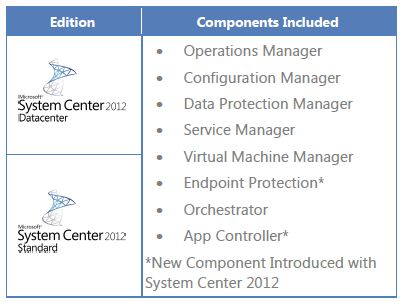
Products included

  • System Center 2012 Unified Installer is a utility designed to perform new, clean installations of System Center 2012 for testing and evaluation purposes only.
  • System Center 2012 App Controller provides a common self-service experience across private and public clouds that can help you empower application owners to easily build, configure, deploy, and manage new services.
  • System Center 2012 Configuration Manager provides comprehensive configuration management for the Microsoft platform that can help you empower users with the devices and applications they need to be productive while maintaining corporate compliance and control.
  • System Center 2012 Data Protection Manager provides unified data protection for Windows servers and clients that can help you deliver scalable, manageable, and cost-effective protection and restore scenarios from disk, tape, and off premise.
  • System Center 2012 Endpoint Protection, built on System Center Configuration Manager, provides industry-leading threat detection of malware and exploits as part of a unified infrastructure for managing client security and compliance that can help you simplify and improve endpoint protection.
  • System Center 2012 Operations Manager provides deep application diagnostics and infrastructure monitoring that can help you ensure the predictable performance and availability of vital applications and offers a comprehensive view of your datacenter, private cloud, and public clouds.
  • System Center 2012 Orchestrator provides orchestration, integration, and automation of IT processes through the creation of runbooks that can help you to define and standardize best practices and improve operational efficiency.
  • System Center 2012 Service Manager provides flexible self-service experiences and standardized datacenter processes that can help you integrate people, workflows, and knowledge across enterprise infrastructure and applications.
  • System Center 2012 Virtual Machine Manager provides virtual machine management and services deployment with support for multi-hypervisor environments that can help you deliver a flexible and cost effective private cloud environment.

Heterogeneous support

  • System Center 2012 enables you to integrate a wide range of technologies into a coherent private cloud:
  • Manage different hypervisors centrally from a single pane of glass with support for Windows Server Hyper-V, VMWare vSphere, and Citrix XenServer.
  • Monitor Windows Server, Sun Solaris, and various Linux and Unix distributions.
  • Integrate toolsets from HP, CA, BMC, EMC, and VMware into automated workflows.

 Download the trial (180days) System Centre 2012…Click here

Articles you may interest in

Enjoy!!!


Microsoft® SQL Server® 2012 Performance Dashboard Reports

The SQL Server 2012 Performance Dashboard Reports are Reporting Services report files designed to be used with the Custom Reports feature of SQL Server Management Studio. The reports allow a database administrator to quickly identify whether there is a current bottleneck on their system, and if a bottleneck is present, capture additional diagnostic data that may be necessary to resolve the problem.

Common performance problems that the dashboard reports may help to resolve include:

  • CPU bottlenecks (and what queries are consuming the most CPU)
  • IO bottlenecks (and what queries are performing the most IO)
  • Index recommendations generated by the query optimizer (missing indexes)
  • Blocking
  • Latch contention

The information captured in the reports is retrieved from SQL Server’s dynamic management views. There is no additional tracing or data capture required, which means the information is always available and this is a very inexpensive means of monitoring your server.

Few report examples

Microsoft SQL Server 2012

Editions overview

The SQL Server 2012 Editions have been streamlined to better align with how customers are deploying applications and solutions.  SQL Server 2012 will be released in 3 main editions*:

  • Enterprise for mission critical applications and large scale data warehousing
  • Business Intelligence, a new product edition, providing premium corporate and self-service BI
  • Standard for basic database, reporting and analytics capabilities

Refer to Datasheet and FAQ for more details

Top Features

  • AlwaysOn Availability Groups
  • Windows Server Core Support
  • Columnstore Indexes
  • BI Semantic Model
  • User-Defined Server Roles
  • Enhanced Auditing Features
  • Sequence Objects
  • Enhanced PowerShell Support
  • Distributed Replay
  • PowerView
  • SQL Azure Enhancements
  • Big Data Support