
Recently i come across this issue, and resolution for how to fix it
PROBLEM : When you receive attachment in your outlook, and when you try to open it, it says ” No permission to open the attachment”
Troubleshoot : This has nothing to do with the permission..this is because the temp folder is full…either you clear the temp folder or do the following..
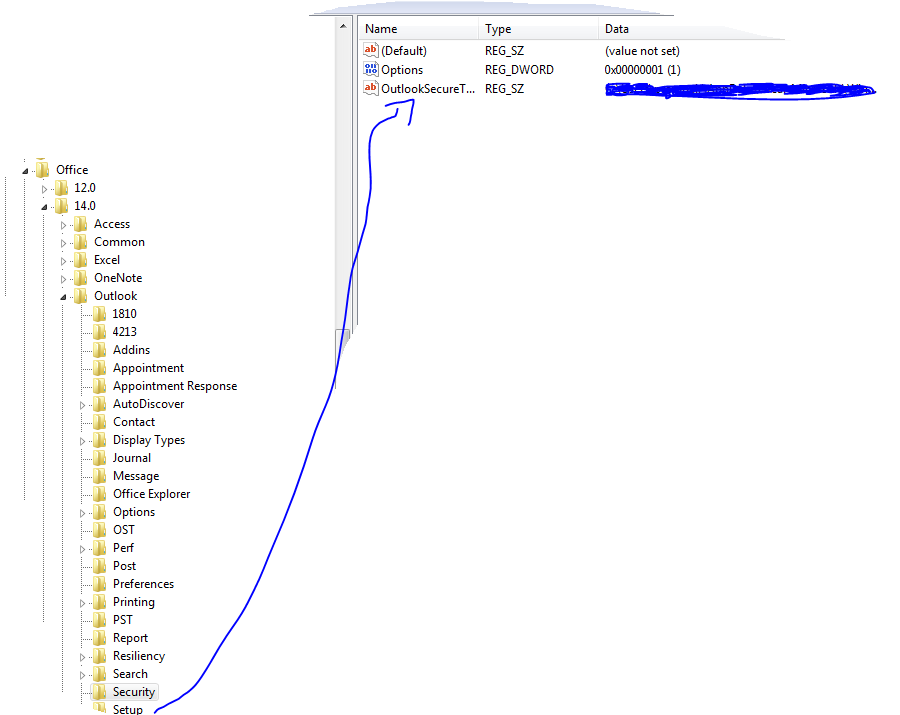
Solution : Go to REGEDIT->HKEY_CURRENT_USER ->Software ->Microsoft ->Office then click
- 12 ->If you are using Microsoft Outlook 2007
- 14 ->if you are using Microsoft Outlook 2010
then click Outlook -> expand it, select Security and edit the path “OutlookSecureTempFolder”
Check the image below
(Normally here you will see the default path..creat a temp folder under the available drive and then give the path here)
 PREMNAIR'S Blog