iWork for iCloud Beta is now open

Apple has previously offered iWork for iCloud Beta to developers and now Cloud users  can access beta versions of Apple’s Pages, Numbers, and Keynote. Upon choosing one of those applications, they’ll have free access to the productivity suite, and create everything from presentations to spreadsheets. Apple announced iCloud for iWork at the Worldwide Developer Conference in June. The company said that it would make the platform available as a public beta. It’s not clear when it’ll come out of beta.


OS X 10.9 Mavericks – Developer Preview 6

Apple has released the sixth OS X 10.9 Mavericks Developer Preview on Wednesday, ahead of an expected launch this fall. Developers can download the sixth Mavericks preview via Software Update.

Active directory users joining from Mac machine

Active Directory

Joining a Mac to the Domain on Mac OS X

Snip20130701_4

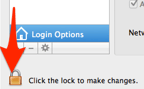
Click Users & Group from System preference and click Unlock button
Snip20130701_5

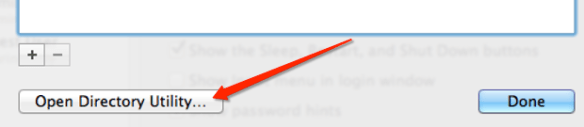
Select the Network Account Server by clicking “Edit” button…this will open the below screen option., then click “Open Directory Utility…

Snip20130701_9

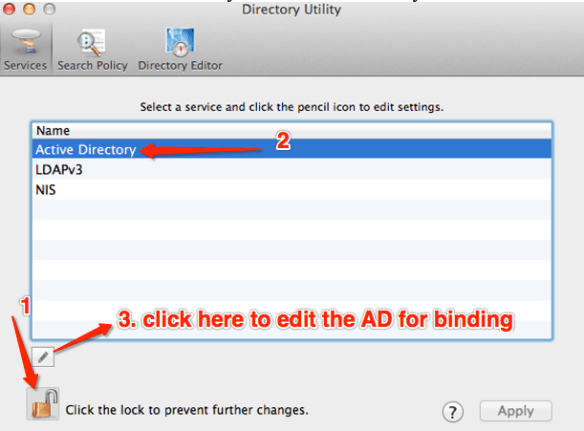
Unlock the edit button and click the Active Directory to select and bind
Snip20130701_8

When you click the edit button, next screen will open to type

  • Active Directory Forest:
  • Active Directory Domain:
  • Computer ID

after typing all the above values, click “Bind

Here another screen will appear to enter Domain Administrator and Password for bind process. type the information and click ok

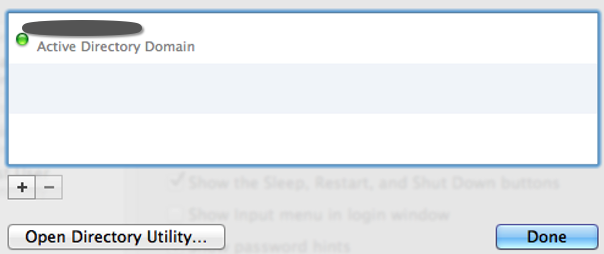
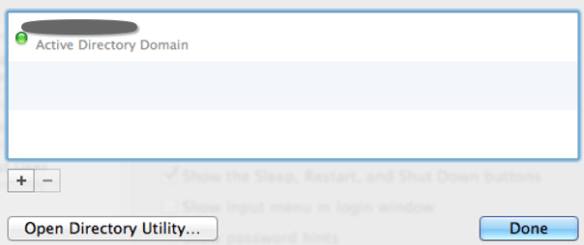
If the details are correct, below screen will appear with the GREEN button, showing that you have successfully bind the AD to your machine.
Snip20130701_7

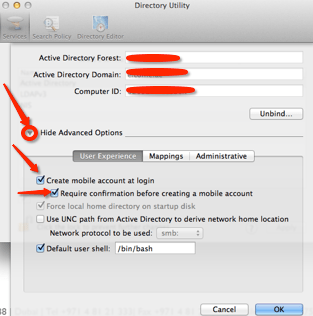
After the Bind process to the domain, Expand the “Show Advanced Option” and select the “User Experience” and check the following.
Snip20130701_10

Above selection of “Create mobile account at login”, is only for, if the AD user wants to login at offline mode. This can only be done, if the AD user has logged in once at the on-permises time, so that the system can cached it.

Click ok and go back to Users & Group

Click the “Option” button from “Allow network users to log in at login window”
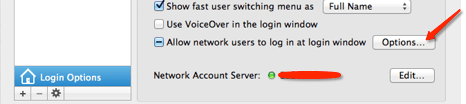
Snip20130701_11

Another screen will pop-up..by default “All network Users” is selected (if you want to keep all the AD users to log into this computer, keep it as it is or select “Only these network users” and then click the “+” button at the bottom. This will open another window with all the AD users list. Select the user that you want to add and click “Done”

Snip20130701_12

Now go back to the Users & Group, click the Login Option and select the “Display login window as”

Snip20130701_13

If you select “List of users” then this will show only all the active users in that machine at the login time.

If you select the “Name and Password” option, then you can type the user name and the password.

To give the AD user, LOCAL ADMIN right, at the Users & Group Login option, Select the user and then check mark the “Allow user to administer this computer”

Snip20130701_14

Now you are good to go…now unlock the “Login Option” to save the settings and prevent from unauthorised mistakes

Restart the Mac machine and login

Enjoy!!!

Google Now – Now Comes to the iPhone and iPad

Snip20130502_1

Google has updated its Google Search app to include a bunch of Google Now features, providing live weather and traffic updates, sports team scores, and plenty more…The iOS version of Google Now is embedded into the Google Search app. Google Now is about pulling live information from your Google account to provide you with relevant information for your day. This includes traffic updates based on your calendar, or sports scores based on your location. In the Google Search app, it does this by showing you various “cards” when you open up the app, and tracking your day over WiFi.

Beautiful!!! Enjoy

OWC Envoy Pro EX – Portable, Bus-Powered USB 3.0 Storage Solution with OWC Aura Pro SSD

Snip20130501_1 Snip20130501_2

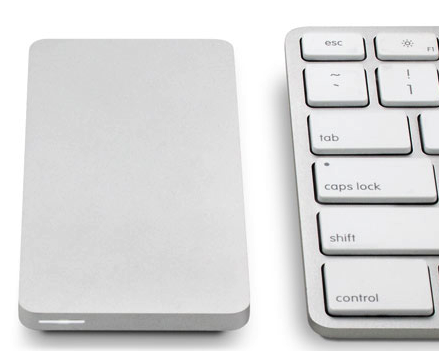
Ultra-portable, SuperSpeed bus-powered external SSD storage solution. With blistering fast transfer rates of up to 500MB/s, the Envoy Pro EX can handle any demanding storage and/or backup need in the office or on the road. And because it’s USB 3.0 bus-powered*, the Envoy Pro EX doesn’t require an AC power adapter, making it the ideal Plug and Play external storage solution.

More info click here.

Thanks to OWC (Other World Computing) aka macsales.com

Mac’s volume in 1/4 increments

Are you getting trouble with the volume? Here is the solution from Cult of Mac . Mac’s volume in 1/4 increments by pressing Shift + Option (Alt) + the volume key on your keyboard. It’ll raise your volume at smaller increments so you can find the perfect level
Thanks to Cult of Mac – Buster Heine

USB 3 – The Facts

usb3

USB 3.0 is the second major revision of the Universal Serial Bus (USB) standard for computer connectivity. The standard from 2008 implements a 5 Gbit/s transfer rate. In the late 1990s, the first major revision was made to the USB 1.1 specification. The revision was called USB 2.0 which added a new transfer speed called Hi-Speed (HS – 480 Mbit/s) to the earlier speeds (Low Speed (LS) – 1.5 Mbit/s and Full Speed (FS) – 12 Mbit/s).

The enhancements to Super Speed USB are not just for higher data rates, but for improving the interaction between device and host computer. While the core architectural elements are inherited from before, several changes were made to support the dual bus arrangement, and several more are notable for how users can experience the improvement that USB 3.0 makes over USB 2.0.

Major USB 3.0 improvements

  • Higher transfer rates (up to 4.8Gbps)
  • Increased maximum bus power
  • New power management features
  • Full-duplex data transfers
  • Support for new transfer types
  • Backward USB 2.0 compatibility
  • New connectors and cables

The good news is that USB 3.0 has been carefully planned from the start to peacefully co-exist with USB 2.0. First of all, while USB 3.0 specifies new physical connections and thus new cables to take advantage of the higher speed capability of the new protocol, the connector itself remains the same rectangular shape with the four USB 2.0 contacts in the exact same location as before. Five new connections to carry receive and transmitted data independently are present on USB 3.0 cables and only come into contact when mated with a proper Super Speed USB connection.

USB 3.0 achieves the much higher performance by way of a number of technical changes. Perhaps the most obvious change is an additional physical bus that is added in parallel with the existing USB 2.0 bus. This means that where USB 2.0 previously had 4 wires (power, ground, and a pair for differential data), USB 3.0 adds 4 more for two pairs of differential signals (receive and transmit) for a combined total of 8 connections in the connectors and cabling. These extra two pairs were necessary to support the Super Speed USB target bandwidth requirements, because the two wire differential signals of USB 2.0 were not enough.

The Cable circuit for USB3 shielded wire as follows

usb3a

Latest OS from Apple and Microsoft starts supporting USB3 with connector. Apple OSX Mountain Lion and Windows 8 comes with USB3 driver support.

Cool!!!

Apple World Wide Developers Conference – 2012

WWDC 2012…Scheduled between June 11 and 15 at San Francisco’s Moscone Center, the conference has been known for launching Apple’s newest products, software, and technologies. Rumors circulating around the web are pointing towards a MacBook Pro refresh, the release of OS X Mountain Lion and announcements surrounding the hotly anticipated release of iOS 6, Apple’s reported next-generation mobile operating system…etc. Mountain Lion is one of the highlights of WWDC 2012, and with the new operating system, Apple might announce the redesigned MacBook Pro that sports the MacBook Air-like design (with no optical drive) and will come with a new processor, a new iSight camera and might ship with 4G LTE support…..

Enjoy!!!

Sky Drive – All you need to know!!!

If you have a Windows Live account (or an old Hotmail account), then you have 25GB of free storage on SkyDrive. If you don’t have one, go and grap it. SkyDrive is a great way to store lots of files in the cloud for easy access remotely. Windows 7  and now defenetely on windows 8 will let you map your SkyDrive folders as network drives, making access even simpler.

How to map SkyDrive to your computer?

Windows 7 will let you map your SkyDrive to your local machine. How to do it? Here is the step

  • Sign in to your Windows Live account.
  • Get your ID from the address bar (Below showing how to get it)
    • Click on the “Files” as shown below

    • Look at the address bar and you will find your “CID” number just copy that number
  • Now go to your Windows 7 computer
  • Open My Computer, then select “Map network drive” near the top bar.
  • Select the drive letter you want, then type the following  under the “Folder bar”
  • \\docs.live.net@SSL\ and then copy your CID number here \
  • Check mark “Reconnect at logon”
  • Click Finish
  • Once you click finish, system will automatically attempt to log on to your SkyDrive.
  • Next system will show you to enter SkyDrive credential.
  • Enter the username and password and clik PK

Thats it..your SkyDrive is now mapped to your local machine.

Here you can rename the folder (If in case the language is not proper in you SkyDrive). What ever you do at the local “mapped” Skydrive, it will reflect in your SkyDrive as well.

Apps for SkyDrive?

Allmost all the device now support SkyDrive and it is free apps..you just name it..Windows, Mac, Windows Phone, iPhone, iPad…Click here to download it

Read the article from Mike Torres, and Omar Shahine, group program managers for SkyDrive.

Enjoy!!!


SkyDrive from Microsoft – Delivering new capabilities

Mike Torres, Oman Shahine and skydrive team did a wonderful job. Read this post