Outlook cannot open attachments!!!

Recently i come across this issue, and resolution for how to fix it

PROBLEM : When you receive attachment in your outlook, and when you try to open it, it says ” No permission to open the attachment”

Troubleshoot : This has nothing to do with the permission..this is because the temp folder is full…either you clear the temp folder or do the following..

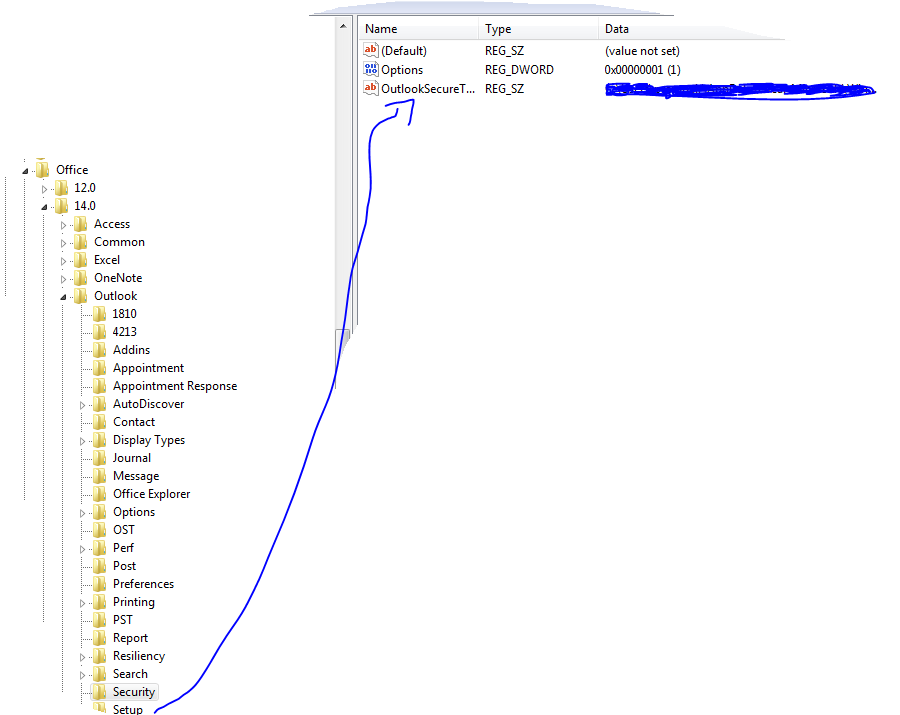
Solution : Go to REGEDIT->HKEY_CURRENT_USER ->Software ->Microsoft ->Office then click

  • 12 ->If you are using Microsoft Outlook 2007
  • 14 ->if you are using Microsoft Outlook 2010

then click Outlook -> expand it, select Security and edit the path “OutlookSecureTempFolder

Check the image below

 (Normally here you will see the default path..creat a temp folder under the available drive and then give the path here)

Microsoft is going to stop support for Windows XP SP2

SP1 and SP2 retirement

Microsoft support for the Windows XP with Service Pack 2 (SP2) 32-bit operating system will end July 13, 2010, and support for the Windows Vista Release to Manufacturing (RTM) operating system will end April 13, 2010.

Important Dates Product End of Mainstream Support End of Extended Support
Windows XP SP2   July 13, 2010
Windows Vista RTM April 13, 2010  
Windows 2000 Professional SP4   July 13, 2010
Windows 2000 Server SP4   July 13, 2010

Users can upgrade their Windows XP SP2 to Windows XP  SP3 and use the system till 2014… If you are still running Microsoft Windows XP SP2 (Service Pack 2), you have until July 13 to upgrade. The venerable SP2 version reaches the end of its life on July 13, after which there will be no more updates…more info click here

Drobo – The new storage system

All new style  – BeyondRAID leverages the benefits of traditional RAID systems, while leaving many of the limitations behind. This next-generation of redundant storage technology brings together safety, reliability, expandability, efficiency and ease-of-use.

BeyondRAID fits in the same place of the software stack as traditional RAID between the file system and the driver. Hence, BeyondRAID can be adopted without any change in infrastructure, allowing you to maintain your current file system and operating system, while eliminating the friction costs typically associated with moving to a new technology platform.

As business conditions change over time, IT managers are obliged to choose between purchasing a new RAID array and the cost and effort of redeploying a more appropriate RAID level. Data Robotics BeyondRAID solves these two critical issues, delivering flexibility without downtime. Built on an advanced storage virtualization platform, BeyondRAID chooses the correct RAID algorithm based on data protection needs at any given moment. Since the technology works at the block level, it can write blocks of data that alternate between data protection methodologies. If an IT manager needs to add storage capacity to a Drobo product, he or she can simply insert additional disk drives or replace the smallest disks—no need to change RAID levels, purchase a new storage array or go through the complex administration of pooling RAID groups. This even allows IT managers to switch from single to dual disk redundancy with a single click, thereby ensuring enterprise-level dual parity data protection if required

Beauty is that..now you have the requirement only for 1TB Volume and in future your requirement is 16TB and currently in your hand you have one 1TB drive and one 2TB drive…its simple..insert both and configure the volume to 16TB …DONE…as it is near to reach the inserted disk capacity to maximum, DROBO warns and you insert another one…now a days you can get higher capacity HDD in less price…tomorrow it will be cheaper too…

They now release the new system which is Drobo Elite..Dual High-Speed iSCSI Interfaces It’s an industry- standard, high performance protocol that has become extremely popular with businesses and individuals who demand high data storage throughput, but it can often be complex to manage. DroboElite changes that by introducing zero- click iSCSI connection creation with optional LUN-level CHAP authentication for both Windows and Mac OS X.

There are different options available..i’m using DROBO Pro and DROBO Elite….cool ones with rackmount kit too

Disk Interface

Eight-bay capacity – 3.5″ SATA I or SATA II hard drives, Mix and match capacities, drive brands and speeds

File System Supports :
Windows: NTFS
Mac OS X: HFS+
Linux4: EXT3
VMware: VMFS

Operating System Support : Windows XP (Service Pack 3), Windows Vista (Service Pack 1), Windows 7, Windows 2003 Server, Windows 2008 Server, Mac OS X 10.5.6 or greater (Intel Only), Mac OS X Server 10.5.6 or greater (Intel Only), Linux, VMware ESX/ESXi 3.5 or VMware vSphere 4

To know more about this click this link

Outlook client mails missing !!!

Ok, I have a user trying to use OWA but his Inbox is empty. He only can see new mail when it arrives but once it’s read it disappears. Any ideas? If he uses his Outlook client from his desktop eveything is fine, I have seen issues the other way around where OWA is showing everything but local Outlook client emails are missing. I tried rebuilding his and enabling and disabling local cached mode just to try with no luck.
It’s happening to only one user. No POP3 and no Rules. Using Standard Edition.
ANS : This usually means that the user has selected the ‘Unread Messages’ view in the OWA toolbar.
Where to Found :
Where is the Unread Message view on the tool bar? I can not find it. I am having this exact problem.
ANS : Look above the “New” button in the toolbar in IE, next to Inbox. It should say “Messages”.

How to reset DELL machine from Vista Business to Enterprise upgrade

Dell D630 Vista upgrade issue
 
I want to share with you guys
I recently brought Dell D630, which comes with Windows Vista – Business edition
I’ve Windows vista Enterprise license, and would like to upgrade this to Enterprise
There are no way the system will allow the upgrade..it always comes to the blue screen
Even if you try on the safe mode, it won’t go

the solution which works with me is that
when it boots, Press F2, this will take you to the BIOS settings, there you press ALT+F
This will prompt you for SATA changes..press save changes and press ESC and then say YES.

This works fine and now i’m using Vista Enterprise, without any issue (cross the finger)
Anyone who experience this issue, can try out

How to log on to Windows Server 2003 as admin after disabling the admin account

Windows Server 2003 allows you disable the the local Administrator account to provide an additional level of security. It even defaults to disabling the local Administrator on the destination computer of a RIS (Remote Installation Services) install.

To log on as the local Administrator after you disable that account:

01. Restart your server.

02. After the POST (Power On Self Test), press F8.

03. On the Advanced Options menu, use the ARROW keys to select Safe Mode and press Enter.

04. Select the operating system that you want to start and then press Enter.

05. Log on as Administrator. If prompted, select an item in the Why did the computer shut down unexpectedly list and press OK.

06. Right-click My Computer and press Manage.

07. Expand Local Users and Groups.

08. Select Users.

09. Right-click Administrator in the right-hand pane and press Properties.

10. Clear the Account is disabled box and press OK.

11. Restart your server and log on normally as Administrator.

NOTE: You can also log on to the Recovery Console while the Administrator account is disabled.

How do you change the installation key without reinstalling Office?

It happens more often than you might think: you have two Office licenses and install the wrong one on a computer. If you activate it, Microsoft will think you moved it to a new computer and it can create problems later on.

How do you change the installation key without reinstalling Office?

 Close all Office applications that are open. Open the registry editor (Start menu, Run, type regedit) Find the following registry key and locate the correct key for the application that needs a new installation key (“CD key”). HKEY_LOCAL_MACHINE\SOFTWARE\Microsoft\Office\11.0\Registration The Office suite and any applications you installed individually will each have a registry key, identified by a GUID which resembles this one: {90110409-6000-11D3-8CFE-0150048383C9} Look at the data values for the application name, then delete the two ProductID keys – (DigitalProductID and ProductID). Open the application (any of the Office applications if you changed the suite key) and enter the correct CD key.

 If you already activated Office, you’ll need to reactivate it using the correct key. If you have more than one Office license, after activating the correct copy on the correct computer, save the activation files and export the Registration registry key. When you reinstall Office, you can use any of your licenses to install it then restore the activation and run the exported *.reg file to restore the correct licensing information on that computer.