Even if you delete item from the deleted items from your outlook 2010, you can go to the tab under folder on the main page of the outlook 2010 and click “Recover Deleted Item” and view the items on the list

- Outlook 2010 feature

Even if you delete item from the deleted items from your outlook 2010, you can go to the tab under folder on the main page of the outlook 2010 and click “Recover Deleted Item” and view the items on the list

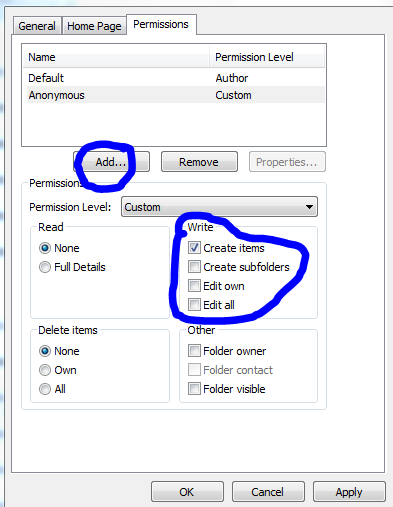
When you have a mail enabled public folder in your exchange server 2007/2010 environment, you might face issues with email forwarding from the public folder from your user account, where you will get an error “Operation failed”.
Resolution :
Exchange Server 2007 SP3 supports all Exchange 2007 roles on the Windows Server 2008 R2 operating system.
Exchange 2007 SP3 provides support only for a new installation of Exchange on Windows Server 2008 R2.
Exchange 2007 SP3 is not supported in an upgrade scenario on Windows Server 2008 R2. For example, Exchange 2007 SP3 does not support the following installation scenarios:
Exchange Server 2007 SP3 provides
Useful Links
Other downloads
Issues
If you have not already done so, I highly recommend you create an SPF record for your domain as this will make it much more difficult for spammers to forge your domain in order to spam domains in other organizations.
Sender Policy Framework..WikiPedia Definition
Creating your own SPF record is a relatively simple process, Microsoft even provides a web-based GUI wizard that will help you do this.. Domain holders need to complete an inventory and publish all IP addresses of their outbound e–mail servers in the DNS zone file. This is an administrative step that requires no changes to an organization‘s e–mail or DNS software. Even if your domain has no outbound e–mail servers, you can help protect your domain from spoofing by publishing an SPF record in the DNS that states this. Microsoft Safety Home Page click here

Implementation Tips for the Sender ID Framework—Creating Your SPF Record..Click here
Sender ID Overview Click here
Please find on my blog, one page dedicated to this task…you can see it on my blog top page… or click here
 TO
TO 
MIGRATION…Started on June 8, 2010 ….Today 20th of June..all the objects has been replicated to Exchange 2010..Now the decommissioning starts..Finish too


The Microsoft Forefront comprehensive line of business security products provides greater protection and control through integration with your existing IT infrastructure and through simplified deployment, management, and analysis. Microsoft Forefront helps you confidently meet ever-changing threats and increased business demands with highly responsive information protection and access control solutions supported by Microsoft technical guidance…last year was a greater start for microsoft with the new line of Longhorn products..like Windows 7, Windows Server 2008, R2, Office 2010, Sharepoint 2010, GP10, CRM4, now Forefront…the security product…which seems to be very well working with client side and server side…cool one…To download the forefront products, click here
Also The Forefront products include:
Forefront Client Security – anti-virus for file-level protection
Forefront Security for Office Communications Server – Antivirus for Corporate Instant Messaging
Forefront Security for Exchange – Antivirus for Exchange databases and email traffic
Forefront Security for SharePoint – Antivirus that integrates into SharePoint sites
 PREMNAIR'S Blog