Update Rollup 3-v2 for Exchange Server 2007 Service Pack 3 (KB2530488)

Update Rollup 3-v2 for Exchange Server 2007 Service Pack 3 (SP3) resolves issues that were found in Exchange Server 2007 SP3 since the software was released. This update rollup is highly recommended for all Exchange Server 2007 SP3 customers. This update rollup does not apply to Exchange Server 2007 Release To Manufacturing (RTM), Exchange Server 2007 Service Pack 1 (SP1) or Exchange Server 2007 Service Pack 2 (SP2). For a list of update rollups applicable to Exchange Server 2007 RTM , Exchange Server 2007 Service Pack 1 (SP1) or Exchange Server 2007 Service Pack 2 (SP2), refer to the Knowledge Base article KB937052. To know more/ download this, Click here

Exchange 2010 SP1 FAQ and Known Issues

Since Exchange server 2010 SP1 has been released on the 1st of September 2010, its too early for me to roll out on my production environment. “Some of the hotfixes would have been rolled up in a Windows update or service pack. Given that the Exchange team released SP1 earlier than what was planned and announced earlier, it did not align with some of the work with the Windows platform. As a result, some hotfixes are available from MSDN/Connect, and some require that you request them online using the links in the corresponding KBAs. The administrator experience when initially downloading these hotfixes may be a little odd. However, once you download the hotfixes, and receive two of the hotfixes from CSS, you can use the same for subsequent installs on other servers. In due course, all these updates may become available on the Download Center, and also through Windows Update.”. Good to know that Exchange team is closely working on all the issues and updating it. I will wait for another 1 to 2 months for my rollout. For more information http://msexchangeteam.com/archive/2010/09/01/456094.aspx

Also another helpful blog for the SP1 installation… click here

Microsoft Exchange Server 2010 SP1 accepts only ten devices per account – iOS4..more info click here

Problems when installing Exchange 2010 Service Pack 1 on a TMG configured for Mail protection..Click here  (Update: A fix for this problem is now available for download as part of Software Update 1 for Microsoft Forefront Threat Management Gateway (TMG) 2010 Service Pack 1.)

Exchange Server 2010 SP1…Now Available

From my previous post Exchange Server 2010 Service Pack 1 Beta released and Exchange Server 2010 Service Pack 1 – Sneak-peak , they have released the RTM of Exchange server 2010 SP1..Read the blog 

Release Notes for Exchange Server 2010 SP1…Click here
What’s New in Exchange 2010 SP1…Click here
Exchange Server 2010 SP1 – Deployment topics … Click here
Deploy it today

Windows 7 and Windows Server 2008 R2 SP1 RC

Windows 7 and Windows Server 2008 R2 SP1 RC helps keep your PCs and servers on the latest support level, provides ongoing improvements to the Windows Operating System (OS), includes previous updates delivered over Windows Update as well as continuing incremental updates to the Windows 7 and Windows Server 2008 R2 platforms based on customer and partner feedback, and is easy for organizations to deploy a single set of updates.

Windows 7 and Windows Server 2008 R2 SP1 RC will help you: Click here to get to know more : http://technet.microsoft.com/en-us/evalcenter/ff183870.aspx

  • Keep your PCs supported and up-to-date
  • Get ongoing updates to the Windows 7 platform
  • Easily deploy cumulative updates at a single time
  • Meet your users’ demands for greater business mobility
  • Provide a comprehensive set of virtualization innovations
  • Provide an easier Service Pack deployment model for better IT efficiency

Great Plains 2010 gone live in 15 days!!!

Attend a Microsoft Dynamics GP 2010 Launch Event – The new way to do business

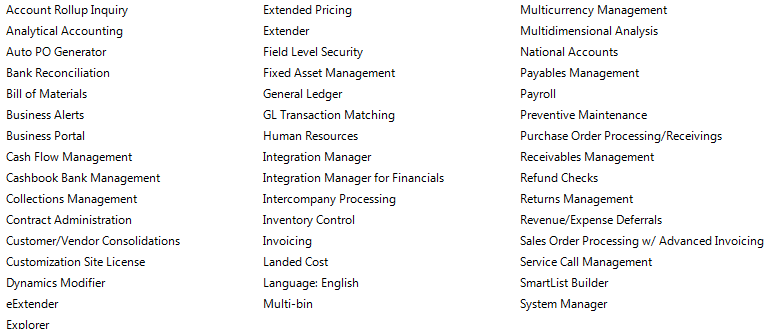
This year was a challenging year for us when it comes to ERP. Microsoft GP 8, we moved to GP10 and Microsoft released Great Plains 2010 and we decided to move to GP2010 because of the new features and collaborations. In 15 days we achieve this task by pulling the data from GP10 database, which is SQL2008 to GP2010 database. 15days with major customization on field service module, New codings on Analytical accounting and our in-house team is able to manage it well, within the time frame..and we are using all the below modules as well…

Now we are in Great Plains 2010…Congratulation to our team

Exchange Server 2010 Service Pack 1 Beta released

In my last post Exchange Server 2010 Service Pack 1 – Sneak-peak and Microsoft Exchange Team Blog Yes Virginia, there is an Exchange Server 2010 SP1, the team shared information on some of the features  and  expected fixes  that are coming with the SP1 update. Microsoft committed to providing the final version of Exchange Server 2010 SP1 before the end of 2010, and now they have release the Beta of Exchange Server 2010 SP1. Video Preview from MSEXCHANGE Team ..You can download the Microsoft Exchange Server 2010 SP1 Beta from here…This pre-release software is intended for evaluation purposes only. You must accept the license terms before you are authorized to use the software. There is no product support for this trial software.

Is The New Exchange 2010 Service Pack Enough to Stop the Migration to Google Apps?..Click here to read

Exchange Server 2007 Service Pack 3 released

Exchange Server 2007 SP3 supports all Exchange 2007 roles on the Windows Server 2008 R2 operating system.

Exchange 2007 SP3 provides support only for a new installation of Exchange on Windows Server 2008 R2.

Exchange 2007 SP3 is not supported in an upgrade scenario on Windows Server 2008 R2. For example, Exchange 2007 SP3 does not support the following installation scenarios:

  • A new Exchange 2007 SP3 installation on a Windows Server 2008 R2-based computer that has been upgraded from Windows Server 2008
  • Upgrading Exchange 2007 SP2 to Exchange 2007 SP3 on a Windows Server 2008 R2-based computer that has been upgraded from Windows Server 2008
  • Upgrading the operating system from Windows Server 2008 to Windows Server 2008 R2 on a computer that has Exchange 2007 SP3 installed

Exchange Server 2007 SP3 provides

  • further flexibility with the addition of Windows Server 2008 R2 support for server roles and Windows 7 support for the Exchange management tools.
  • These additions, along with enhancements for the advanced protection options against e-mail security threats, such as spam and viruses and the tools which help manage internal compliance and high availability needs provide Exchange administrators with the tools they need to manage their Exchange 2007 environments efficiently.
  • Exchange 2007 SP3 introduces password reset functionality for Internet Information Services (IIS) 7.
  • Exchange 2007 SP3 includes updates to the Exchange Search (MSSearch) component.
  • MSSearch provides support for creating full text indexes for Exchange stores.
  • Exchange 2007 SP3 updates the MSSearch binary files to MSSearch 3.1.
  • Exchange 2007 SP3 includes Active Directory schema changes for certain Unified Messaging (UM) mailbox attributes.
  • Exchange 2007 SP3 includes support for Right-to-Left text in e-mail message disclaimers in a right-to-left language, such as Arabic.
  • In earlier versions of Exchange, when you use a transport rule to create a disclaimer in a right-to-left language on an Exchange 2007 Hub Transport server, the text appears incorrectly when you view it from Outlook 2007.
  • Exchange 2007 SP3 adds functionality to the transport rule setting to fully support right-to-left text in disclaimers

Useful Links

Other downloads

Issues

  1. In the recently released Exchange 2007 Service Pack 3, there’s a version mismatch between the Outlook Web Access (OWA) S/MIME Control, an Active X control used to provide S/MIME support in OWA. After you install SP3, users who have the control installed will get prompted to install the latest version of the control. The way this works – the code compares the “Version” property of the client S/MIME control (MIMECTL.DLL) on the user’s computer with the ProductVersion property of the MSI file (OWASMIME.MSI) on the Client Access Server. to know more click Exchange 2007 SP3 and OWA S/MIME Version Mismatch from Microsoft Exchange Team Blog

Exchange Server 2010 Service Pack 1 – Sneak-peak

Exchange Team Blog that provides the first public details about Exchange Server 2010 Service Pack 1 (SP1).  SP1 will of course include fixes and enhancements in the areas customers have helped us identify (including code from all of the Exchange 2010 post RTM update rollups we’ve released to date).  But SP1 will also include some new features and functionality changes, as well….cool

  • A new search preview helps with early case assessment by providing you an estimate on the number of items in the result set-with keyword statistics-before e-mail located in the search are copied to the designated discovery mailbox.
  • And, a new search result de-duplication option, when checked, only copies one instance of a message to the discovery mailbox.

Look at the below  menu for the DAG…what a cool feature it will be

With the release of Exchange Server 2010 last November, Microsoft introduced integrated archiving capabilities aimed at helping you preserve and discover e-mail data. In SP1, this has enhanced its archiving functionality based on the great feedback you’they got since the launch. This includes adding the flexibility to provision a user’s Personal Archive to a different mailbox database from their primary mailbox. This means your organization can now more easily implement separate storage strategies (or tiered storage) for less frequently accessed e-mail. And, we didn’t just stop there! We’ve also added new server side capabilities so you can import historical e-mail data from .PST files, directly into Exchange, as well as IT pro controls to enable delegate access to a user’s Personal Archive.

To help streamline the implementation of retention policies, SP1 updates the Exchange Management Console with new tools to create Retention Policy Tags, so you can automate the deletion and archiving of e-mail and other Exchange items. New optional Retention Policy Tags give you even more flexibility in defining your organizations retention management strategy….coooool

Can’t wait to get hold of this…Announcement blog from Microsoft Exhange Team …click here Yes Virginia, there is an Exchange Server 2010 SP1

Learn more about our approach to archiving by reading the Archiving with Exchange 2010 whitepaper.

Scott Schnoll’s weblog…click here

Windows server 2008 to 2008 R2 upgrade – need to know

When you upgrade your server from Windows server 2008 to Windows server 2008 R2 upgrade, make sure that you write down all the IP’s related to each port, include SAN IP’s using iSCSI. The reason its because after you upgrade to Windows Servr 2008 R2, all the IP you setted up manually for the system, no matter whether it is local ip or SAN ip will be resetted and you have to do it manually again.

This is for your information that you should take a screen shoot or write it manually somewhere.

Microsoft Forefront Threat Management Gateway (TMG) 2010 Service Pack 1

Microsoft® Forefront Threat Management Gateway (TMG) 2010 Service Pack 1 (SP1) introduces new features and functionality to Forefront TMG 2010 Standard and Enterprise Editions.
The service pack includes the following new features and feature improvements:

New Reports
• The new User Activity report displays the sites and site categories accessed by any user.
• All Forefront TMG reports have a new look and feel.

Enhancements to URL Filtering
• You can now allow users to override the access restriction on sites blocked by URL filtering. This allows for a more flexible web access policy, in that users can decide for themselves whether to access a blocked site. This is especially useful for websites that have been incorrectly categorized.
• You can now override the categorization of a URL on the enterprise level; the override is then effective for each enterprise-joined array.
• Denial notification pages can now be customized for your organization’s needs.

Enhanced Branch Office Support
• Collocation of Forefront TMG and a domain controller on the same server, which can help reduce the total cost of ownership at branch offices.
• When installed on a computer running Windows Server 2008 R2, SP1 simplifies the deployment of BranchCache at the branch office, using Forefront TMG as the Hosted Cache server.

Support for publishing SharePoint 2010
• Forefront TMG SP1 supports secure publishing of SharePoint 2010.

To read the release notes, see the Forefront TMG Release Notes (SP1).
how to install and uninstall Forefront TMG Service Pack 1 (SP1)…click here
Download TMG SP1 click here