Exchange server 2010 CAS array to MAPI load balance – Detailed

Most of you guys must have experience the scenario when “Outlook connection lost….” even if you have Exchange server 2010 (with Edge, 2 clustered H&C and 2 DAG configured MB) and Outlook 2010 in place. The reason is that, when you are doing a maintenance on one of the H&C, and if the client is connected to that H&C, communication to the MB is lost. The reason for this is that the cluster load balancing on the H&C cluster handler is not in place, even if the cluster name is published in the DNS server.

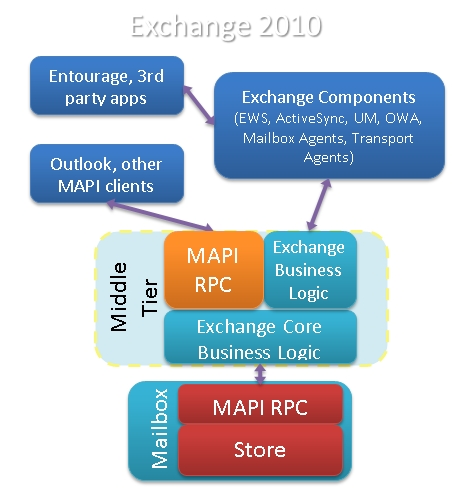
In Exchange 2007, 5 server roles that performed distinct functions within the Exchange organization. One role in particular – the Client Access server role – introduced a variety of new Web services, including the Availability service, the Auto discover service and Calendar Concierge services.

In Exchange 2010, same 5 server roles exists. However, there are some significant architectural changes and some shift in responsibilities. The most significant change in Exchange 2010, two new services on CAS called the RPC Client Access and Address Book services establish the RPC (Repote Procedure Call) endpoint for MAPI(Messaging Application Programming Interface), NSPI(Name Service Provider Interface) and RFR (Request for Response) client access. This new functionality replaces the RPC endpoints in the Information Store. The RPC endpoint in the Information Store has not been removed in Exchange 2010, but it has been modified to only accept requests from CAS servers. The RPC endpoint for public folder database access remains on the Mailbox server, however, Outlook clients now communicate directly with the RPC Client Access service on the Mailbox Server for public folder database access, and not with the Information Store.

When CAS starts communicating with the Mailbox server, it makes sense to view it as the Client Access server communicating with the Mailbox database via the Mailbox server that hosts the database. This is especially evident in a load-balanced array of Client Access servers and/or where your environment is configured to use Database Availability Groups that are associated with a Client Access server or Client Access server array.

  • In a non-load balanced environment, the mailbox database is associated with only a single Client Access server.
  • In a load-balanced environment, the Mailbox database is associated with the load balanced array of multiple Client Access servers.

By default, before a Client Access array is configured,

  • all databases are associated with a Client Access server in the environment
  • the Outlook clients communicate directly with the Client Access server until the association with the database is updated to be the Client Access array.

In order for the clients to utilize a CAS array

  1. Create a Client Access array with an FQDN (Fully Qualified Domain Name).
  2. Load balance your CAS servers in a CAS array by whatever method you choose – Both Hardware LB or Windows Network LB are supported load balancers
  3. Add the Client Access servers within the AD site to a load balanced array and in DNS associate the unique FQDN to the Virtual IP of the load-balanced array.
  4. Configure your load balancing array to load balance the MAPI RPC ports – TCP 135, UDP/TCP 6005-65535; or set static ports
  5. Configure the databases to utilize the CAS array… Use the new-clientaccessarray cmdlet to create the CAS array object. Eg: New-ClientAccessArray –Name “Tromso CAS Array” –Fqdn tromso.site.com” –Site “SITEA”
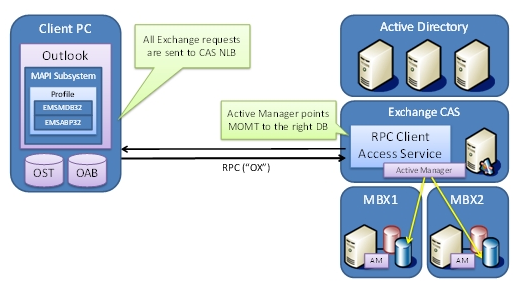
How to Setup!!!..

Goto one of the CAS server where the NLB is ( to read more about New-ClientAccessArray cmdlet, click here )

[1] Check is there are any pre-created CAS Arrays. PS Command : Get-ClientAccessArray

[2] Create new Client Access Array. Run the Cmdlet in EMS New-ClientAccessArray -Fqdn server.contoso.com -Site “Redmond” -Name “server.contoso.com”

[3] Associate databases with this CAS Array –

Use this CMDLet to add mailbox database to CAS array. Add all mailbox databases at once – Get-MailboxDatabase | Set-MailboxDatabase -RPCClientAccessServer “CASNLB.contoso.com”

Now the best part –

Configuring Outlook 2010 using Auto Discover

If you already configured Outlook client, Close the outlook, then goto Control Panel->Mail and change the Server name to the new CAS NLB name
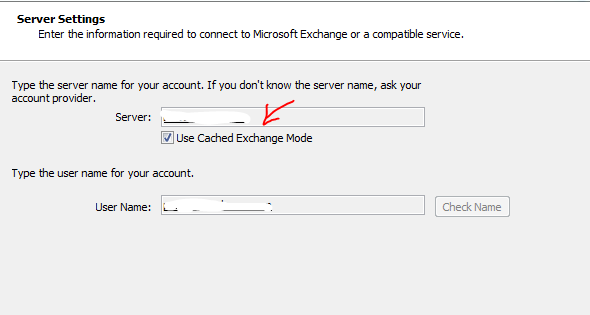
If you are going to use a new outlook configuration, Auto discover will return the new CAS NLB name.

Thats all folks!!! Enjoy!!!

Microsoft SharePoint Workspace 2010 – New turn

SharePoint Workspace 2010 is the new name for and succeeds Microsoft Office Groove 2007. SharePoint Workspace 2010 is a client application that provides fast, any-time interactive access to document libraries and lists on Microsoft SharePoint Server 2010 and Microsoft SharePoint Foundation 2010. SharePoint Workspace 2010 also provides options for creating Groove peer workspaces and Shared Folder workspaces. SharePoint Workspace 2010 is more versatile than Microsoft Office Groove 2007 and can be integrated with Microsoft SharePoint Server 2010 or can run independently. Microsoft SharePoint Workspace 2010 provides a client for Microsoft SharePoint Server 2010 and Microsoft SharePoint Foundation 2010 that enables real-time synchronization of desktop content with SharePoint documents and lists. SharePoint Workspace 2010 also provides options for creating Groove collaboration workspaces and synchronized shared folders. By using SharePoint Workspace 2010, information workers can easily synchronize online and offline content with a designated SharePoint site or collaborate with external partners and offsite team members through shared workspaces. SharePoint Workspace 2010 is included with Microsoft Office Professional Plus 2010.

Key features of SharePoint Workspace 2010 include the following:

A choice of workspace types:

  • SharePoint workspaces — Provide direct bi-directional synchronization of library and list content between a SharePoint site and a workspace on an individual client computer. Creation of a SharePoint workspace enables individual SharePoint users to check out and check in SharePoint library documents from their local computers, bring SharePoint documents and lists to their computers where they can work online or offline, and synchronize local content with a SharePoint site. When an individual client establishes a connection with a SharePoint server, synchronization occurs at regular intervals when the client is online. When a client cannot connect to a SharePoint site, the user can easily take work offline to make updates. The updated documents are automatically synchronized with SharePoint document libraries and lists when the user reconnects. This interface offers an efficient and satisfying alternative to browser access of SharePoint. Unlike other workspace types, the SharePoint workspace is a personal synchronized copy of a SharePoint site.
  • Groove workspaces — Provide a rich and secure peer collaboration environment that supports synchronization of content among peer client computers that host a shared workspace. Creation of a Groove workspace enables SharePoint Workspace users to quickly form teams and automatically synchronize online or offline contributions with fellow team members. A full set of collaboration tools lets team members schedule meetings, hold discussions, and share work with trusted partners around the world. Support for communications under various network conditions and across firewalls facilitates timely and effective collaboration.
  • Shared Folder workspaces — Support Windows folder sharing among clients. Creation of a Shared Folder workspace lets information workers share the contents of a common folder in a designated Windows Explorer directory.
  • Easy setup   Windows users can easily download and run SharePoint Workspace 2010 without IT assistance.
  • Offline and online collaboration   Information workers can easily synchronize online and offline work, through a SharePoint workspace, Groove workspace, or Shared Folder workspace. Content is synchronized dynamically among online collaboration points and updates are transmitted immediately when an offline client comes back online. When an offline client reconnects, SharePoint Workspace automatically adds offline contributions to the workspace and applies workspace updates to the previously offline client.
  • Integration with Windows logon   SharePoint Workspace 2010 uses Windows logon credentials to authenticate users so that a separate logon is not necessary.
  • Common file dialog boxes   Windows technology enables Microsoft Office 2010 users to directly open and save files in SharePoint Workspace.

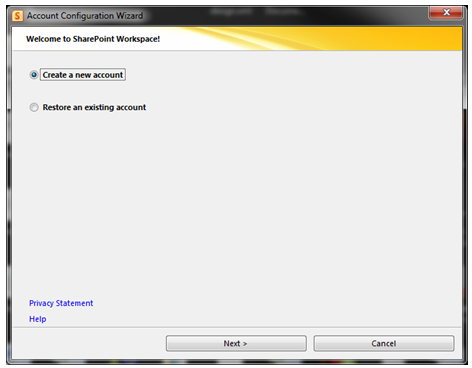
When you install Microsoft Office 2010 package, you will get a program, which is Sharepoint workspace 2010, which is the replacement of Grove and the installation as follows

If you have a SPS domain in your domain network, use your own login credential only.

Once this is done, click Internet Explorer and open your SPS webpage. Under Site Action, Click Sync to SPS workspace

Once the Sync is completed, you can now use your doman SharePoint Site offline and online.

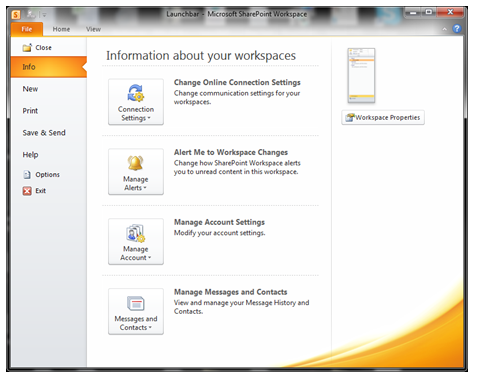
For Setting modification, use the File menu and do the needful

Operational Restrictions
SharePoint Workspace operates with a recommeded maximum number of synchronized documents – 10,000. Synchronizing extremely large document libraries, such as a Document Center, is not supported.

SharePoint Workspace also has limited support for metadata extensions to the document library. BDC Fields based on Business Connectivity Services – tagging documents based on external datasources – is not supported, and libraries that use BDC field definitions cannot be synced to Workspace. On the other hand, Managed Metadata fields (MMS) can be included in synchronized libraries. SharePoint Workspace is able to view, but not modify, field values based on MMS term stores.

To Download SharePoint Workspace 2010: Groove Web Services Software Development Kit, Click here.

Enjoy!!!
View user mailbox size from Outlook

Adding attachment size limit in Outlook through Exchange 2010 EMC

Common for entire organization, from the mail box server, from EMC, under Organization, Mailbox->Select database, Properties, do the following

Here i mentioned about 20MB attachments to send and receive by the users. The problem here is that, it take a bit time to receive/send because of the high size. So be careful and be patient.

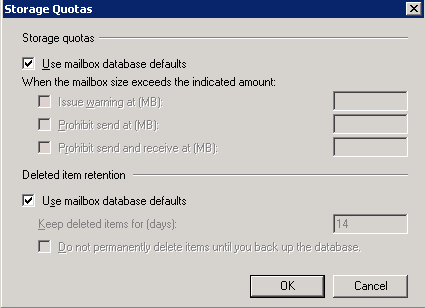
When you do this default setting on the organization level, each users mailbox will have the following (User mailbox database defaults)

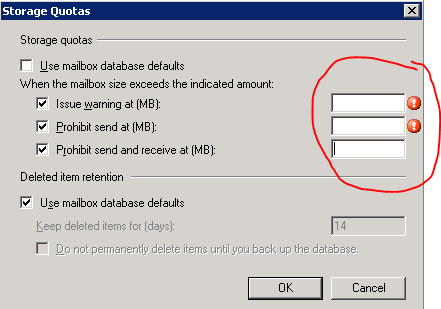
If you want to over write this policy to certain users, go to the users mailbox settings, Storage quotas and edit as below. 

First Uncheck the “Use mailbox database defaults and insert the value as you want. This settings will override the defaults.

Thats all folks!!!

Recover deleted email item(s) – Outlook 2010 with Exchange 2010

Even if you delete item from the deleted items from your outlook 2010, you can go to the tab under folder on the main page of the outlook 2010 and click “Recover Deleted Item” and view the items on the list

Outlook 2010 feature


Automatically accepting meeting request from Microsoft Outlook 2010

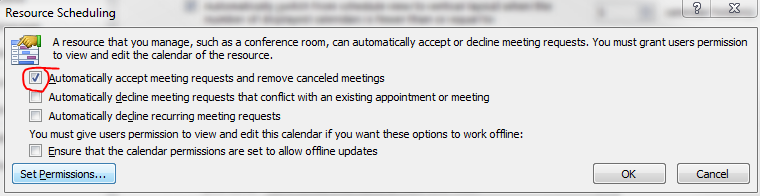
Recently we have noticed that some of the users after upgrading from Microsoft Outlook 2007 to 2010, Meeting request gets auto accept and user won’t notice it.

How to resolve it in Outlook 2010…!

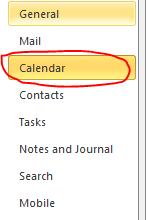
Goto->File->Options->Calender->Resource scheduling and uncheck it

Thats it…uncheck and click ok..problem solved.

Microsoft Office 365…whaooo

Microsoft Office 365 - Online Services & Hosted Software in the Cloud

What is this?????

Microsoft Office 365 delivers the power of cloud productivity to businesses of all sizes, helping to save time and money and free up valuable resources. Office 365 combines the familiar Microsoft Office desktop suite with online versions of our next-generation communications and collaboration services: Microsoft Exchange Online, Microsoft SharePoint Online, and Microsoft Lync Online. Office 365 services are easy to administer and simple to use—with the robust security, reliability, and control you need to run your business

Microsoft Office 365 includes: Exchange Online, SharePoint Online, Lync Online and the latest version of Microsoft Office Professional Plus desktop suite.

Microsoft Exchange Online is designed for organizations who want to get the benefits of cloud-based email without sacrificing the business-class capabilities that Exchange Server has been providing for decades. Built on Exchange Server 2010, Exchange Online provides organizations with the latest capabilities including built-in archiving, optional Conversation View, and MailTips, along with powerful web-based tools for managing online deployments.  With Exchange Online, Microsoft handles the ongoing maintenance, patches, and upgrades of the Exchange infrastructure while providing IT administrators the control and flexibility they require.

Microsoft Lync Online is a next-generation cloud communications service that connects people in new ways, anytime, from anywhere. Lync Online provides intuitive communications capabilities across presence, instant messaging, audio/video calling and a rich online meeting experience including PC-audio, video and web conferencing. Transform your interactions with colleagues, customers and partners from today’s hit-and-miss communication to a more collaborative, engaging, and effective experience.

Office 365 is the introduction of new productivity online services and capabilities. It provides new online platform capabilities related to the introduction of the latest underlying 2010 server software into Microsoft Online Services datacenters.  The limited beta release will be offered in following languages: Chinese (traditional), English, French, German, Italian, Japanese, and Spanish.

To know more..click here and to follow their blog, click here

Office 365 will be available for purchase in 2011.

Enterprise customers can contact a Microsoft sales representative or Microsoft partner directly for purchase details..to know about volume licensing, click here

Multiple email ID for your Social connector(s)

You can add multiple email ID to your    OR    account.

Why you want to link this?

Most of the users have more than one email id..one/two personnel email id, one business email id etc..and if you link all in one social connector account, its very easy to track others, whether it is business contacts, collegues or friends.. How to do it.

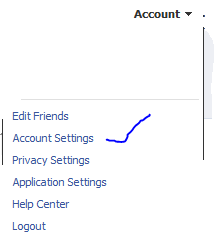
Go to your profile home page, and click on top right cornnet Account

Click Account settings…and click “change” on the Email tab

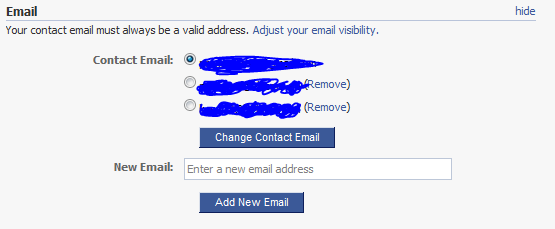
Enter the other email ID here and click “add new” (If you have more than one email id other than the primary one..keep on add here)

REMEMBER : When you add an email id here, there will be a confirmation email send from this account..please confirm it back so that the email id you added get registered

Once you finish adding and click on the confirmation email(s), you will see the account like above, where your primary email id is now been selected in the radio button.

Thats it for FACEBOOK

Logon to your linkedin profile and go to the top right corner and click “Settings”

Under Personnel information, Select Email Address

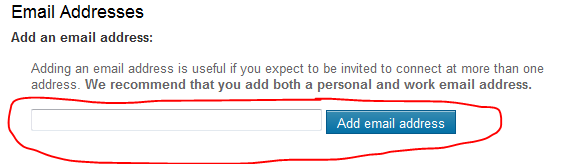
Add your other email id’s here…

REMEMBER : A Confirmation email will be send to each of the email id you add..

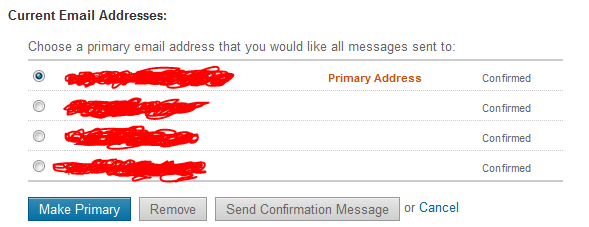
Once you done..your email profile will look like above…

That’s all

Public folder email forwarding issue!!!

When you have a mail enabled  public folder in your exchange server 2007/2010 environment, you might face issues with email forwarding from the public folder from your user account, where you will get an error “Operation failed”.

Resolution :

  1. Logon to outlook with administrator(Domain) credemtial
  2. Goto the Public folder
  3. Select the folder where you are facing the issue
  4. Right click
  5. Select Properties
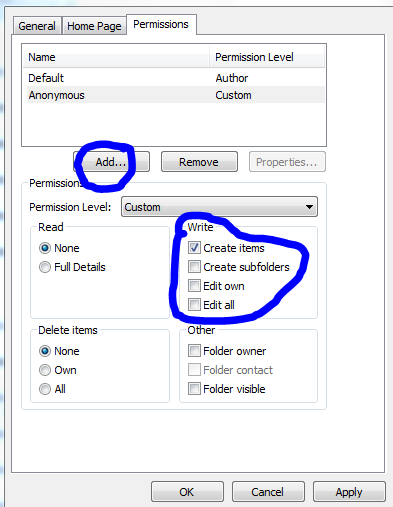
  6. Goto Permission TAB
  7. Add users
  8. Check mark the appropriate rights on the “Write” permission area..normally “Edit all” will do the work
  9. Click apply and click ok.

Outlook cannot open attachments!!!

Recently i come across this issue, and resolution for how to fix it

PROBLEM : When you receive attachment in your outlook, and when you try to open it, it says ” No permission to open the attachment”

Troubleshoot : This has nothing to do with the permission..this is because the temp folder is full…either you clear the temp folder or do the following..

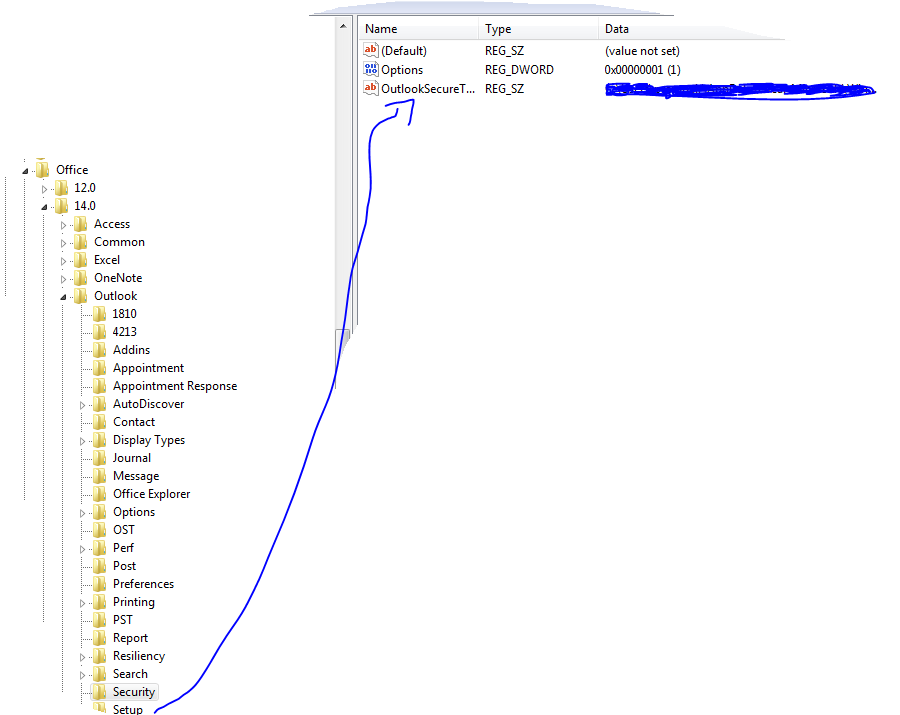
Solution : Go to REGEDIT->HKEY_CURRENT_USER ->Software ->Microsoft ->Office then click

  • 12 ->If you are using Microsoft Outlook 2007
  • 14 ->if you are using Microsoft Outlook 2010

then click Outlook -> expand it, select Security and edit the path “OutlookSecureTempFolder

Check the image below

 (Normally here you will see the default path..creat a temp folder under the available drive and then give the path here)