OS X – Lion from Apple…releasing on July 2011!!!

In continuation of my previous blog about Mac OS X Lion developer preview 3, Apple announced its release on July 2001 to Mac App Stores for just $29.99. This software works hand in hand with apple hardware for a better operating system.

  • Built on a rock-solid UNIX foundation
  • OS X is engineered to take full advantage of the technologies in every new Mac
  • Deliver the most intuitive and integrated computer experience possible.

Enjoy!!!

Microsoft Windows Phone – Previews of Next Release

In my previous blog i mentioned that  today May 25th, 2011, As promised, Microsoft intends to unveil a more detailed and full roadmap for the Windows Phone 7 mobile line. Yesterday, Microsoft previewed the next major release of Windows Phone, code-named “Mango,” through a series of media events around the world. “Mango” will deliver more than 500 new features to push the boundaries of the smartphone experience around communications, apps and the Internet. The “Mango” release will be available for free to Windows Phone 7 customers and is scheduled to ship on new phones beginning this fall. More details on device update timing will be provided closer to availability. Windows Phone will also add support for additional languages, expand access to apps by launching Windows Phone Marketplace in new countries, and partner with new OEMs to enable expansion to new markets.

This release include features such as

  • Threads: Switch between text, Facebook chat and Windows Live Messenger within the same conversation.
  • Groups: Group contacts into personalized Live Tiles to see the latest status updates right from the Start Screen and quickly send a text, email or IM to the whole group.
  • Deeper social network integration: Twitter and LinkedIn feeds are now integrated into contact cards, and “Mango” includes built-in Facebook check-ins and new face detection software that makes it easier to quickly tag photos and post to the Web.
  • Linked inbox: See multiple email accounts in one linked inbox. Conversations are organized to make it easy to stay on top of the latest mail.
  • Hands-free messaging: Built-in voice-to-text and text-to-voice support enables hands-free texting or chatting.

More information about this release, read the press release from Microsoft News Center.

Enjoy!!!

Exchange 2010 – Distribution group email id – Not able to receive email from external source – Solution

On Exchange server 2010, If you create a distribution group with scope as Universal and type as Distribution, in your domain active directory.

and then you enable the mail from creating the mailbox server, then do the testing of email flow from internal and external.,

if you ever had face an error, “Technical details of permanent failure: SERVER tried to deliver your message, but it was rejected by the recipient domain. We recommend contacting the other email provider for further information about the cause of this error. The error that the other server returned was: 550 550 5.1.1 User unknown (state 14).”

Please do the following.

From your active directory, select the property of the group email id, then under mail flow settings, select Message Delivery Restrictions, then select Properties…, new window will open.

uncheck the box which states “Require that all senders are authenticated” and click ok..then apply and ok again.

Give some time to replicate this to Edge server…

Enjoy!!!!

Outlook Hotmail Connector 32-bit

With Microsoft Outlook Hotmail Connector 32-bit, you can use Microsoft Office Outlook 2003, Microsoft Office Outlook 2007 or Microsoft Office Outlook 2010 to access and manage your Microsoft Windows Live Hotmail or Microsoft Office Live Mail accounts, including e-mail messages, contacts and calendars for free!

Outlook Hotmail Connector enables you to use your Live Hotmail accounts within Outlook:

    • Read and send your Office Live Mail/Windows Live Hotmail e-mail messages.
    • Manage your contacts in Windows Live Hotmail.
    • Use advanced options for blocking junk e-mail messages.
    • Manage multiple e-mail accounts in one place.
    • Manage, and synchronize multiple calendars, including shared calendars to Windows Live Calendar from Outlook

If you use the Outlook Hotmail Connector with Outlook 2010 you gain these additional benefits:

  • Your Safe Sender List/Blocked sender list/Safe Recipient lists are synchronized between Outlook and Hotmail.
  • Send/receive works like your other Outlook accounts.
  • Your Hotmail account status appears in the Outlook status bar.
  • Rules work with the Hotmail account in Outlook even if it’s not your primary account.

To download this from Microsoft site, click here

Microsoft and Skype

On May 10, 2011, Microsoft Corp. (Nasdaq: “MSFT”) and Skype Global S.à r.l today announced that they have entered into a definitive agreement under which Microsoft will acquire Skype, the leading Internet communications company, for $8.5 billion in cash from the investor group led by Silver Lake. The agreement has been approved by the boards of directors of both Microsoft and Skype.

Read the press release from Microsoft News Center.

Microsoft CEO Steve Ballmer and Skype CEO Tony Bates announce Microsoft's acquisition of Skype. San Francisco, May 10, 2011

Article from The Telegraph about this deal.

Skype will support Microsoft devices like Xbox and Kinect, Windows Phone and a wide array of Windows devices, and Microsoft will connect Skype users with Lync, Outlook, Xbox Live and other communities. Microsoft will continue to invest in and support Skype clients on non-Microsoft platforms. The acquisition will increase the accessibility of real-time video and voice communications, bringing benefits to both consumers and enterprise users and generating significant new business and revenue opportunities. The combination will extend Skype’s world-class brand and the reach of its networked platform, while enhancing Microsoft’s existing portfolio of real-time communications products and services.

Microsoft Office for Mac 2011 SP1… comming soon

Next week (Week 15), Microsoft will release Office for Mac 2011 Service Pack 1 (SP1) which will provide increased stability, security, and some new features to the suite – including improved Outlook syncing support – as well as some performance enhancements. This update will enable calendar syncing between Outlook for Mac and Apple’s Sync Services. This will let you sync your Outlook calendar as well as contacts, notes and tasks with any service or device that supports Sync Services, including your iPhone and iPad.  Apple is introducing with their new version of MobileMe. MobileMe will no longer sync with MacOS Sync Services as of May 5th (or now if you have already moved your account to the new version of MobileMe calendar). As a result, Outlook 2011 SP1 calendars that sync with Sync Services on the Mac, will NOT be synced with MobileMe calendars.

The new Apple MobileMe Calendar service is an updated calendar service for iPhone, iPad, iPod touch, Mac, and PC. It includes:

  • The best calendar service for iPhone, iPad, and iPod touch
  • Calendar sharing with family and friends
  • Calendar publishing for a group or team
  • Event invitations with RSVPs
  • A new web application

The new MobileMe Calendar uses the CalDAV standard so users can view and edit their calendars using the built-in calendar applications on their iPhone, iPad, iPod touch, and Mac. Windows users can also view and edit their calendars with Microsoft Outlook using the MobileMe Control Panel for Windows.

More info Click here

Trojan downloader Chepvil on the UPSwing – Microsoft Malware protection center

A new spam campaign using UPS (United Parcel Service) as a social-engineering draw was initiated this week.

The spammed message contains an attachment, detected as TrojanDownloader:Win32/Chepvil.I.

The spam campaign actually started around March 16th 2011. The threat was originally detected as Backdoor:Win32/Hostil.gen!A (was Backdoor:Win32/Hostil.F).

More specific signatures (TrojanDownloader:Win32/Chepvil.I and TrojanDownloader:Win32/Chepvil.J) were added on March 22nd 2011.

Encyclopedia entry – Microsoft Security Portal Updated:        Mar 26, 2011        |  Published:        Mar 25, 2011..Click here for more info

Exchange server 2010 CAS array to MAPI load balance – Detailed

Most of you guys must have experience the scenario when “Outlook connection lost….” even if you have Exchange server 2010 (with Edge, 2 clustered H&C and 2 DAG configured MB) and Outlook 2010 in place. The reason is that, when you are doing a maintenance on one of the H&C, and if the client is connected to that H&C, communication to the MB is lost. The reason for this is that the cluster load balancing on the H&C cluster handler is not in place, even if the cluster name is published in the DNS server.
In Exchange 2007, 5 server roles that performed distinct functions within the Exchange organization. One role in particular – the Client Access server role – introduced a variety of new Web services, including the Availability service, the Auto discover service and Calendar Concierge services.

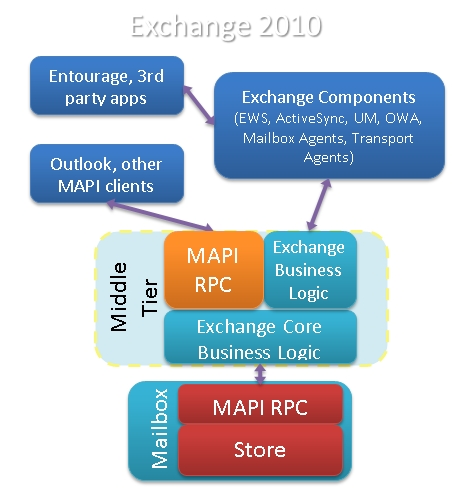
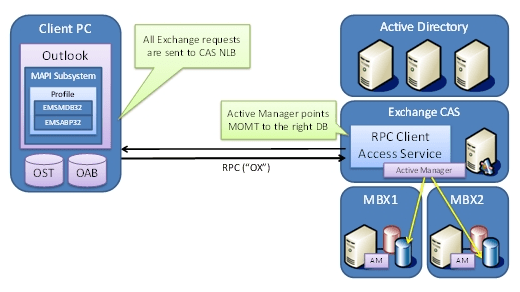
In Exchange 2010, same 5 server roles exists. However, there are some significant architectural changes and some shift in responsibilities. The most significant change in Exchange 2010, two new services on CAS called the RPC Client Access and Address Book services establish the RPC (Repote Procedure Call) endpoint for MAPI(Messaging Application Programming Interface), NSPI(Name Service Provider Interface) and RFR (Request for Response) client access. This new functionality replaces the RPC endpoints in the Information Store. The RPC endpoint in the Information Store has not been removed in Exchange 2010, but it has been modified to only accept requests from CAS servers. The RPC endpoint for public folder database access remains on the Mailbox server, however, Outlook clients now communicate directly with the RPC Client Access service on the Mailbox Server for public folder database access, and not with the Information Store.

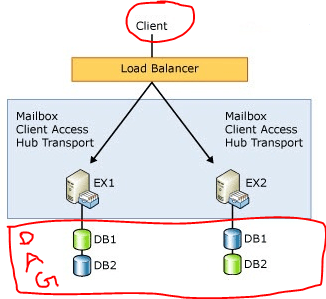
When CAS starts communicating with the Mailbox server, it makes sense to view it as the Client Access server communicating with the Mailbox database via the Mailbox server that hosts the database. This is especially evident in a load-balanced array of Client Access servers and/or where your environment is configured to use Database Availability Groups that are associated with a Client Access server or Client Access server array.

  • In a non-load balanced environment, the mailbox database is associated with only a single Client Access server.
  • In a load-balanced environment, the Mailbox database is associated with the load balanced array of multiple Client Access servers.

By default, before a Client Access array is configured,

  • all databases are associated with a Client Access server in the environment
  • the Outlook clients communicate directly with the Client Access server until the association with the database is updated to be the Client Access array.

In order for the clients to utilize a CAS array

  1. Create a Client Access array with an FQDN (Fully Qualified Domain Name).
  2. Load balance your CAS servers in a CAS array by whatever method you choose – Both Hardware LB or Windows Network LB are supported load balancers
  3. Add the Client Access servers within the AD site to a load balanced array and in DNS associate the unique FQDN to the Virtual IP of the load-balanced array.
  4. Configure your load balancing array to load balance the MAPI RPC ports – TCP 135, UDP/TCP 6005-65535; or set static ports
  5. Configure the databases to utilize the CAS array… Use the new-clientaccessarray cmdlet to create the CAS array object. Eg: New-ClientAccessArray –Name “Tromso CAS Array” –Fqdn tromso.site.com” –Site “SITEA”
How to Setup!!!..

Goto one of the CAS server where the NLB is ( to read more about New-ClientAccessArray cmdlet, click here )

[1] Check is there are any pre-created CAS Arrays. PS Command : Get-ClientAccessArray

[2] Create new Client Access Array. Run the Cmdlet in EMS New-ClientAccessArray -Fqdn server.contoso.com -Site “Redmond” -Name “server.contoso.com”

[3] Associate databases with this CAS Array –

Use this CMDLet to add mailbox database to CAS array. Add all mailbox databases at once – Get-MailboxDatabase | Set-MailboxDatabase -RPCClientAccessServer “CASNLB.contoso.com”

Now the best part –

Configuring Outlook 2010 using Auto Discover

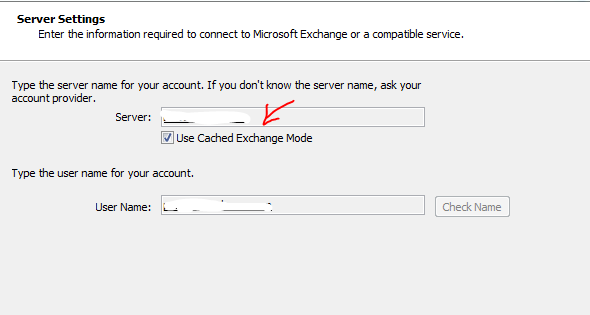
If you already configured Outlook client, Close the outlook, then goto Control Panel->Mail and change the Server name to the new CAS NLB name

If you are going to use a new outlook configuration, Auto discover will return the new CAS NLB name.

Thats all folks!!! Enjoy!!!

Restricting email to the Internet on a per user AND per domain basis

This blog post is meant to show how easy it now is to accomplish this oft heard request in Exchange 2010. Transport rules, introduced with Exchange 2007, provided a lot of new options for administration of mail resulting in even more requests for additional functionality. The rules now have new predicates and actions extending the possibilities of what can be done. For our example, the rule will restrictActive Directory Mail enabled users” who have their ‘Department‘ defined as ‘Temp Employees‘ from sending mail to the internet, except they must be allowed to send to 2 external domains called: ‘partnerdomain.com‘ and ‘fourthcoffee.com‘. Additionally, to reduce Helpdesk calls, you want to send an NDR when they violate the rule. For demonstration purposes I will use 2 Conditions, one Action and one Exception.

Microsoft Exchange Team Blog will explain you how to do it in Exchange 2010…beautiful blog post..click here