Automatically accepting meeting request from Microsoft Outlook 2010

Recently we have noticed that some of the users after upgrading from Microsoft Outlook 2007 to 2010, Meeting request gets auto accept and user won’t notice it.

How to resolve it in Outlook 2010…!

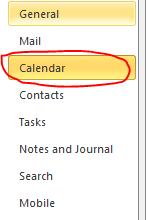
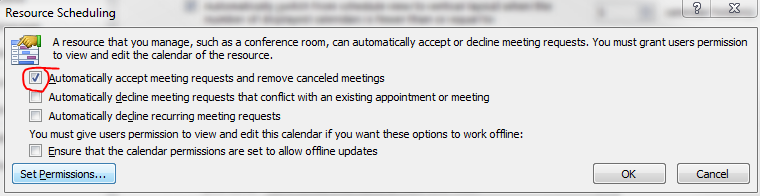
Goto->File->Options->Calender->Resource scheduling and uncheck it

Thats it…uncheck and click ok..problem solved.

Exchange Server 2010 SP1…Now Available

From my previous post Exchange Server 2010 Service Pack 1 Beta released and Exchange Server 2010 Service Pack 1 – Sneak-peak , they have released the RTM of Exchange server 2010 SP1..Read the blog 

Release Notes for Exchange Server 2010 SP1…Click here
What’s New in Exchange 2010 SP1…Click here
Exchange Server 2010 SP1 – Deployment topics … Click here
Deploy it today

Evernote 4 for Windows

Evernote 4 is a major departure from Evernote 3.5 in every way. While 3.5 added tons of great new features. So theydecided to start over from scratch, with fast, native C++ that we knew we could rely on. As you’ll see, the results are amazing. This new version will set a foundation for rapid improvement. It is designed to give you a great experience on any computer that you use, whether you’re on a netbook, a five year old Windows XP machine or a super fast top-of-the-line Windows 7 computer.

Here are a few of our favorite user interface improvements:

  • Space saving layout: The toolbar and menu bar are merged to take up less screen space. You can always switch to the old school layout in the Option menu.
  • More responsive interface: Switching between notes, displaying searches, bringing Evernote into the foreground, and virtually all other interactions are much faster.
  • Easier new note creation: We’ve added a New Note split button, which lets you pick the type of note you wish to create (text, ink or webcam). It will remember your selection for next time.
  • Relocated Search Bar: Note search and the search description now reside directly over the note list—a more intuitive location. You can click the small arrow to open and close the search description. Closing the description gives you more room to view your notes list, opening it makes it easy to modify your search.
  • Clearer note info: The note information panel is more crisp and clear with the title, notebook and source links right up top. Just like the search panel, you can open the note information panel to access the details. Navigating through the note info panel and tagging notes using your keyboard is fast and efficient.

Microsoft Office for Mac 2011- released

Microsoft says it’s learned from user feedback about Office 2008 and has tweaked the user interface accordingly in Office 2011. Most notably, there’s a new Ribbon at the top of each document window. The Mac version of the Ribbon doesn’t replace any menu bars, but it does replace Office 2008’s controversial Elements Gallery, which took some fire from Mac users for its size and inflexibility. This new Ribbon is designed to give users quick access to each program’s most commonly used tools. Unlike the Elements Gallery, the ribbon is customizable and, if you want more screen space, completely collapsible.  Now users who has volume license can start download the new version from their site and for the rest, it will arrive in time for the 2010 holiday season.

The other big news in Office 2011 is the demise of Entourage and the return of Outlook. The new Outlook will support PST imports (allowing you to move an Outlook installation, including all your old e-mails, from a Windows PC to a Mac). It will also support Microsoft’s Information Rights Management (IRM), which allows senders to specify what recipients can do with messages (print, forward, and so on). Previously-Windows only, IRM is required in some corporate settings.

Microsoft has re-engineered the Outlook message database system to be a series of small files, so it’s more easily backed up with Time Machine and searched in Spotlight. “Outlook’s new database is more reliable, faster, and fully supports Time Machine and Spotlight.

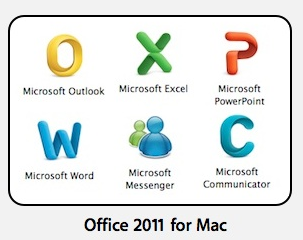
Icons also changed…now they look more professional too..To see the Office 2011 box art,Word click here Excel click here Powerpoint click here


Visual Basic was dropped from Office 2008 in part because it was too technically difficult to port it to the Mac’s then-new Intel CPUs. Microsoft says it began work on that port as far back as 2008—before the last Mac Office shipped. That work is now complete. And the Mac suite will be using the most up-to-date version of Visual Basic, so it’ll be much more compatible with Office for Windows than the Visual Basic in previous versions of Office for Mac.

New Hotmail look & feel …cool

I really love the new look and features…Outlook webapps is playing an important role here…Now, its  faster Hotmail experience with great new features like one-click filters, Sweep, Active Views and more..also it does’nt now sign you automatically to messenger, when you log on to mail…cool one

New look and feel

 Junk mail options are getting better..need room to improve..i’m waiting for the active sync for hotmail…or direct push service…

Hotmail on iPhone..superb…i tried..really cool..read this post

Best of luck to Hotmail Team!!!!

For your feedbacks…click here to post

Windows Live Team Blog…click here

Multiple email ID for your Social connector(s)

You can add multiple email ID to your    OR    account.

Why you want to link this?

Most of the users have more than one email id..one/two personnel email id, one business email id etc..and if you link all in one social connector account, its very easy to track others, whether it is business contacts, collegues or friends.. How to do it.

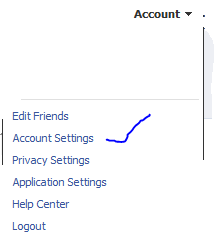
Go to your profile home page, and click on top right cornnet Account

Click Account settings…and click “change” on the Email tab


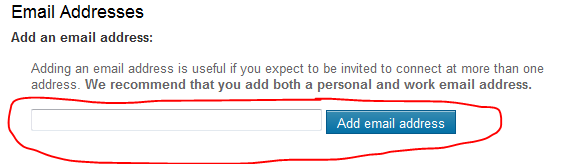
Enter the other email ID here and click “add new” (If you have more than one email id other than the primary one..keep on add here)

REMEMBER : When you add an email id here, there will be a confirmation email send from this account..please confirm it back so that the email id you added get registered
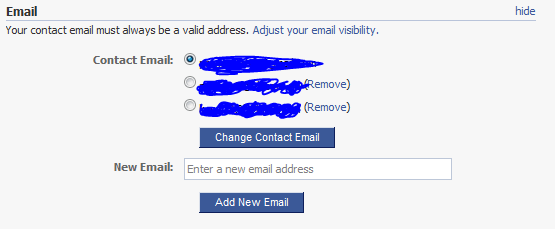
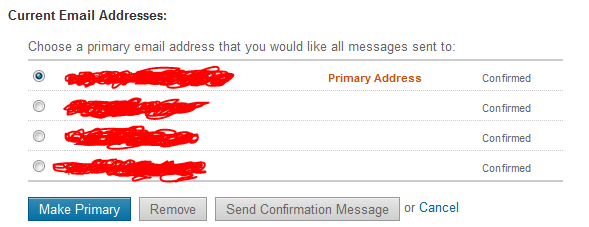
Once you finish adding and click on the confirmation email(s), you will see the account like above, where your primary email id is now been selected in the radio button.

Thats it for FACEBOOK

Logon to your linkedin profile and go to the top right corner and click “Settings”

Under Personnel information, Select Email Address

Add your other email id’s here…

REMEMBER : A Confirmation email will be send to each of the email id you add..

Once you done..your email profile will look like above…

That’s all

Public folder email forwarding issue!!!

When you have a mail enabled  public folder in your exchange server 2007/2010 environment, you might face issues with email forwarding from the public folder from your user account, where you will get an error “Operation failed”.

Resolution :

  1. Logon to outlook with administrator(Domain) credemtial
  2. Goto the Public folder
  3. Select the folder where you are facing the issue
  4. Right click
  5. Select Properties
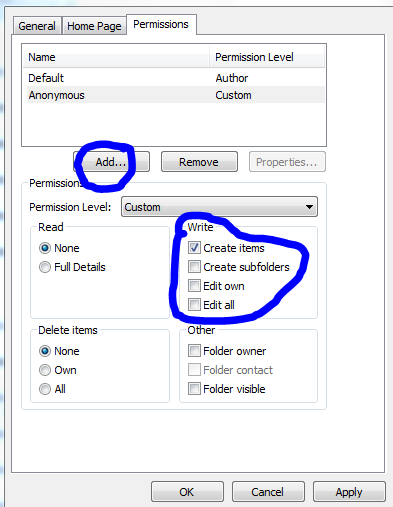
  6. Goto Permission TAB
  7. Add users
  8. Check mark the appropriate rights on the “Write” permission area..normally “Edit all” will do the work
  9. Click apply and click ok.

Outlook cannot open attachments!!!

Recently i come across this issue, and resolution for how to fix it

PROBLEM : When you receive attachment in your outlook, and when you try to open it, it says ” No permission to open the attachment”

Troubleshoot : This has nothing to do with the permission..this is because the temp folder is full…either you clear the temp folder or do the following..

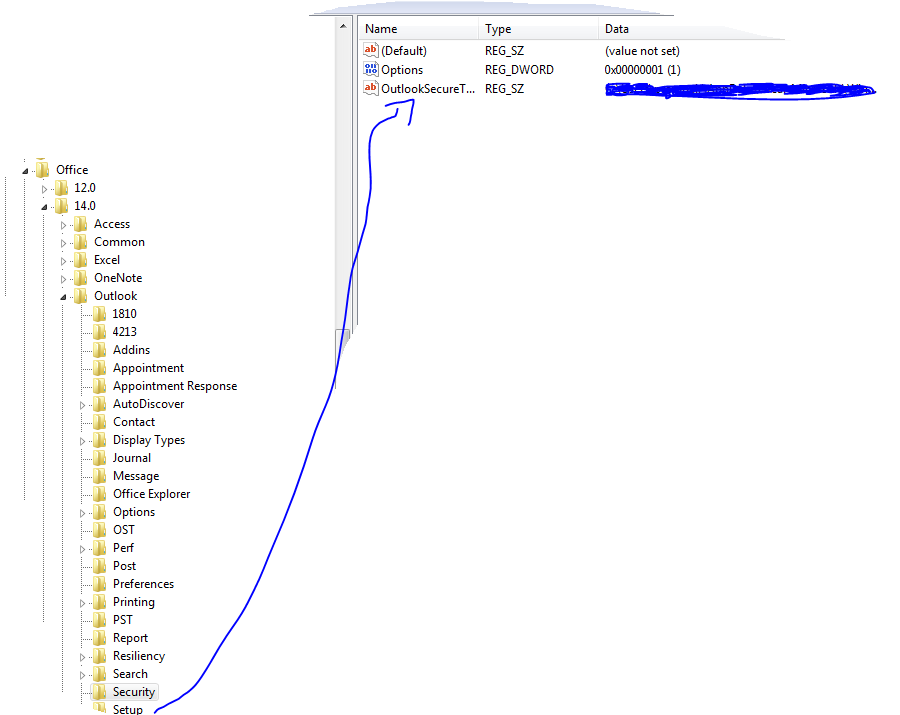
Solution : Go to REGEDIT->HKEY_CURRENT_USER ->Software ->Microsoft ->Office then click

  • 12 ->If you are using Microsoft Outlook 2007
  • 14 ->if you are using Microsoft Outlook 2010

then click Outlook -> expand it, select Security and edit the path “OutlookSecureTempFolder

Check the image below

 (Normally here you will see the default path..creat a temp folder under the available drive and then give the path here)

Microsoft Outlook Social Connector Provider for Facebook

The Microsoft Outlook Social Connector Provider for Facebook allows you to connect your Facebook account to the Outlook Social Connector and obtain information about your friends and colleagues.

You can see status updates and recently posted items from your Facebook contacts.

You can also use Outlook Social Connector to display a quick view of related Outlook content when you click on an email from a contact, such as recent e-mail conversations, meetings, and shared attachments to help you easily track your communications

Once you finish installing the Social connector, Please re-start the Outlook and then goto your reading panel below down you can see the user icon  and underneath, there is a button called +ADD…click that (Check the above image) and then select each connector and type the credential…

You are ready to go!!! …read my previous blog for more Microsoft Outlook 2010 – Social connector
NOTE: The Microsoft Outlook Social Connector Provider requires Microsoft Outlook Social Connector and the related update (KB983403) to be installed. If these components are not already installed on your machine, the Microsoft Outlook Social Connector Provider for Facebook will download and install the necessary updates from the Microsoft Download Center before completing the provider installation.

To download click here

Exchange Server 2010 Service Pack 1 Beta released

In my last post Exchange Server 2010 Service Pack 1 – Sneak-peak and Microsoft Exchange Team Blog Yes Virginia, there is an Exchange Server 2010 SP1, the team shared information on some of the features  and  expected fixes  that are coming with the SP1 update. Microsoft committed to providing the final version of Exchange Server 2010 SP1 before the end of 2010, and now they have release the Beta of Exchange Server 2010 SP1. Video Preview from MSEXCHANGE Team ..You can download the Microsoft Exchange Server 2010 SP1 Beta from here…This pre-release software is intended for evaluation purposes only. You must accept the license terms before you are authorized to use the software. There is no product support for this trial software.

Is The New Exchange 2010 Service Pack Enough to Stop the Migration to Google Apps?..Click here to read