Windows Server 2012 Release Candidate

Windows Server® powers many of the worlds’ largest datacenters, enables small businesses around the world, and delivers value to organizations of all sizes in between. Building on this legacy, Windows Server 2012 redefines the category, delivering hundreds of new features and enhancements spanning virtualization, networking, storage, user experience, cloud computing, automation, and more. Simply put, Windows Server 2012 helps you transform your IT operations to reduce costs and deliver a whole new level of business value.

To know more..click here

Download Windows Server 2012 Release Candidate (RC)…click here

Windows 8 Release Preview

It’s Windows reimagined and reinvented from a solid core of Windows 7 speed and reliability. It’s an all-new touch interface. It’s a new Windows for new devices.

Windows 8 Release Preview: Frequently asked questions…click here

Metro Style apps development….click here

The Windows 8 Release Preview & Windows Upgrade…click here

Product guide…click here

Internet explorer 10 – Built for speed, Internet Explorer brings you a faster web…click here

Your apps light up with connections to your friends and family. Info from the services you connect to—Hotmail, Messenger, Facebook, Twitter, LinkedIn, and more—appears right inside the Mail, Messaging, and People apps…click here to know more

Mount ISO image on Virtual server

If you ever planning to mount ISO image rather than inserting CD for software installation, this is how you do.

  • Open  the Hyper-V console
  • Select the Virtual machine you want to mount the image
  • Choose the Settings from the right side panel (as shown below)
  • Select the DVD drive from the Left panel
  • On the right panel, select image file
  • Browse the ISO image file path
  • Click OK

Microsoft System Centre 2012 – A new look

Game Changer – with System Center 2012, you get the most cost effective and flexible platform for managing your traditional datacenters, private and public clouds, and client computers and devices.

Microsoft System Center 2012 Configuration Manager and System Center 2012 Endpoint Protection provide a unified infrastructure to manage and protect physical, virtual, and mobile client environments, helping IT:

  • Empower users to be productive from anywhere, on whatever device they choose.
  • Provide a unified infrastructure for client management and protection.
  • Make it easier and faster to administer client systems and maintain system compliance.

Deliver flexible, cost-effective infrastructure using what you already own

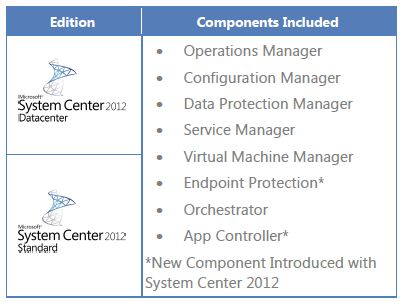
Products included

  • System Center 2012 Unified Installer is a utility designed to perform new, clean installations of System Center 2012 for testing and evaluation purposes only.
  • System Center 2012 App Controller provides a common self-service experience across private and public clouds that can help you empower application owners to easily build, configure, deploy, and manage new services.
  • System Center 2012 Configuration Manager provides comprehensive configuration management for the Microsoft platform that can help you empower users with the devices and applications they need to be productive while maintaining corporate compliance and control.
  • System Center 2012 Data Protection Manager provides unified data protection for Windows servers and clients that can help you deliver scalable, manageable, and cost-effective protection and restore scenarios from disk, tape, and off premise.
  • System Center 2012 Endpoint Protection, built on System Center Configuration Manager, provides industry-leading threat detection of malware and exploits as part of a unified infrastructure for managing client security and compliance that can help you simplify and improve endpoint protection.
  • System Center 2012 Operations Manager provides deep application diagnostics and infrastructure monitoring that can help you ensure the predictable performance and availability of vital applications and offers a comprehensive view of your datacenter, private cloud, and public clouds.
  • System Center 2012 Orchestrator provides orchestration, integration, and automation of IT processes through the creation of runbooks that can help you to define and standardize best practices and improve operational efficiency.
  • System Center 2012 Service Manager provides flexible self-service experiences and standardized datacenter processes that can help you integrate people, workflows, and knowledge across enterprise infrastructure and applications.
  • System Center 2012 Virtual Machine Manager provides virtual machine management and services deployment with support for multi-hypervisor environments that can help you deliver a flexible and cost effective private cloud environment.

Heterogeneous support

  • System Center 2012 enables you to integrate a wide range of technologies into a coherent private cloud:
  • Manage different hypervisors centrally from a single pane of glass with support for Windows Server Hyper-V, VMWare vSphere, and Citrix XenServer.
  • Monitor Windows Server, Sun Solaris, and various Linux and Unix distributions.
  • Integrate toolsets from HP, CA, BMC, EMC, and VMware into automated workflows.

 Download the trial (180days) System Centre 2012…Click here

Articles you may interest in

Enjoy!!!


Microsoft® SQL Server® 2012 Performance Dashboard Reports

The SQL Server 2012 Performance Dashboard Reports are Reporting Services report files designed to be used with the Custom Reports feature of SQL Server Management Studio. The reports allow a database administrator to quickly identify whether there is a current bottleneck on their system, and if a bottleneck is present, capture additional diagnostic data that may be necessary to resolve the problem.

Common performance problems that the dashboard reports may help to resolve include:

  • CPU bottlenecks (and what queries are consuming the most CPU)
  • IO bottlenecks (and what queries are performing the most IO)
  • Index recommendations generated by the query optimizer (missing indexes)
  • Blocking
  • Latch contention

The information captured in the reports is retrieved from SQL Server’s dynamic management views. There is no additional tracing or data capture required, which means the information is always available and this is a very inexpensive means of monitoring your server.

Few report examples

Microsoft SQL Server 2012

Editions overview

The SQL Server 2012 Editions have been streamlined to better align with how customers are deploying applications and solutions.  SQL Server 2012 will be released in 3 main editions*:

  • Enterprise for mission critical applications and large scale data warehousing
  • Business Intelligence, a new product edition, providing premium corporate and self-service BI
  • Standard for basic database, reporting and analytics capabilities

Refer to Datasheet and FAQ for more details

Top Features

  • AlwaysOn Availability Groups
  • Windows Server Core Support
  • Columnstore Indexes
  • BI Semantic Model
  • User-Defined Server Roles
  • Enhanced Auditing Features
  • Sequence Objects
  • Enhanced PowerShell Support
  • Distributed Replay
  • PowerView
  • SQL Azure Enhancements
  • Big Data Support


Exchange2010 – OAB/Outlook clients not downloading updated OAB

Issues:

  • Outlook on Cache mode not updating..Disabling Cached mode on client manually fixes the problem.
  • OWA is not affected at all. All changes are instantly reflected in OWA.
  • Deleteing the .oab files in the user app data folder fixes the problem

This is not  a solution to this issue.

Create new OAB and perform the following tasks:

  1. Create new OAB from EMC.
  2. Make sure Web based and Public Folder distribution is enabled.
  3. Restart MS Exchange System Attendant and File Distribution Service.
  4. Update the OAB from EMC and Set it As Default.
  5. Associate the new OAB to Mailbox Database.
  6. Check the location for the .LZX files C:\Program Files\Microsoft\Exchange Server\V14\ExchangeOAB
    and C:\program files\Microsoft\Exchange Server\V14\ClientAccess\OAB\
  7. Make sure you don’t have web.config file @ .LZX file location.
  8. I hope you are doing full download of the OAB in Outlook.
  9. When you download the OAB, Make sure you uncheck the box“Download changes since last send/recieve”
  10. “Global Address Book” is the only option
After you restart the File Distribution Service on the CAS server, you should be getting the same files from the OAB generating server to the C:\program files\Microsoft\Exchange Server\V14\ClientAccess\OAB\ on the CAS server . You might want to set the logging level to high to see if any errors are generated on the OAB generating server.
 
  • Set-EventLogLevel –Identity LABMBX\MSExchangeSA\* -Level High 
  • Set-EventLogLevel –Identity “LABCASHT\MSExchangeFDS\*” -Level High
 the first one will get the OAB events and the 2nd will get the File Distribution Service events. Dont forget to set the logging back to defaults. After setting the logging, regenerate the OAB and then restart the FDS, check for errors in the corresponding event logs.
 
Wait for 24hours to get the replication

USEFUL links

  • How to troubleshoot the OAB Generation process..click here
  • How Exchange 2007 OAB Files are replicated to a Client Access Server for download…Click here
  • Managing Offline Address Books…Click here
  • Understanding why error code 0X8004010F is thrown when trying to download an OAB..Click here
  • Outlook client OAB download process..Click here
  • Administering the offline address book in Outlook 2003 and Outlook 2007…Click here

MSDN Forum,TechNet Forum – Assistant Gadget

MSDN Forum Assistant and TechNet Forum Assistant offer a convenient way for the forum users to read the forum recent threads and your own threads, it also make it easy to create new threads and search in the forum.

Supported operating systems: Windows 7, Windows Vista

To download, Click here

MSDN Forum Assistant and TechNet Forum Assistant are subject to license terms that must be agreed to prior to use. Installation: 1. Double-click the gadget installation package. 2. On the popup window, click “Install” to finish the installation. 3. The gadget usually will be automatically located on the desktop. If not, look it up from the Gadget Gallery and add it to the desktop.

Enjoy!!!

Sky Drive – All you need to know!!!

If you have a Windows Live account (or an old Hotmail account), then you have 25GB of free storage on SkyDrive. If you don’t have one, go and grap it. SkyDrive is a great way to store lots of files in the cloud for easy access remotely. Windows 7  and now defenetely on windows 8 will let you map your SkyDrive folders as network drives, making access even simpler.

How to map SkyDrive to your computer?

Windows 7 will let you map your SkyDrive to your local machine. How to do it? Here is the step

  • Sign in to your Windows Live account.
  • Get your ID from the address bar (Below showing how to get it)
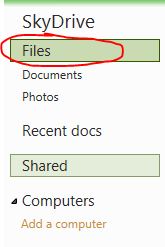
    • Click on the “Files” as shown below

    • Look at the address bar and you will find your “CID” number just copy that number
  • Now go to your Windows 7 computer
  • Open My Computer, then select “Map network drive” near the top bar.
  • Select the drive letter you want, then type the following  under the “Folder bar”
  • \\docs.live.net@SSL\ and then copy your CID number here \
  • Check mark “Reconnect at logon”
  • Click Finish
  • Once you click finish, system will automatically attempt to log on to your SkyDrive.
  • Next system will show you to enter SkyDrive credential.
  • Enter the username and password and clik PK

Thats it..your SkyDrive is now mapped to your local machine.

Here you can rename the folder (If in case the language is not proper in you SkyDrive). What ever you do at the local “mapped” Skydrive, it will reflect in your SkyDrive as well.

Apps for SkyDrive?

Allmost all the device now support SkyDrive and it is free apps..you just name it..Windows, Mac, Windows Phone, iPhone, iPad…Click here to download it

Read the article from Mike Torres, and Omar Shahine, group program managers for SkyDrive.

Enjoy!!!



SkyDrive from Microsoft – Delivering new capabilities

Mike Torres, Oman Shahine and skydrive team did a wonderful job. Read this post