This page has been move to a dedicated page..click here.
Office 365 – Migration approach
Reply

This page has been move to a dedicated page..click here.
This page has been moved..please click here
In my previous post…ADFS…Active Directory Federation Service i was talking about the ADFS architecture and promise for the deployment or migration to O365 from Microsoft.
Here i’m dedicating a page for Office 365 live migration …Click here to divert to the page
Enjoy..!!!
If you are an existing Visual Studio Professional, Premium or Ultimate with MSDN subscriber, you get free access to Windows Azure each month, and up to $3,700.00 in annual Windows Azure benefits at no charge….click here to learn more
An offline address book (OAB) is a copy of a collection of address lists that has been downloaded so that a Microsoft Outlook user can access the information it contains while disconnected from the server. Microsoft Exchange generates the new OAB files, compresses the files, and then places the files on a local share. Exchange administrators can choose which address lists are made available to users who work offline, and they can also configure the method by which the address books are distributed.

Pretty straight forward explanation of OAB replication on Exchange 2010 SP2 Rollup Update…Thanks to Greg Taylor, Principal Program Manager @ Exchange Customer Experience, who explained on EHLO…click here to read more of this article
One important thing to share :
| Important: |
|---|
| OAB data is produced by the Microsoft Exchange System Attendant service running as Local System. If an administrator uses the security descriptor to prevent users from viewing certain recipients in Active Directory, users who download the OAB will be able to view those hidden recipients. Therefore, to hide a recipient from an address list, you set the HiddenFromAddressListsEnabled parameter on the Set-PublicFolder, Set-MailContact, Set-MailUser, Set-DynamicDistributionGroup, Set-Mailbox, and Set-DistributionGroups cmdlets. Alternatively, you can create a new default OAB that doesn’t contain the hidden recipients.
Click here to understand more on offline Address Book
|
Windows Server 8 beta version is out, soon after the Windows 8 consumer preview…and Installing of the beta version requires a minimum 1.4 GHz 64 bit processor, 512 MB RAM and 32 GB of free disk space and upgrade path for this version of Server 8 is from a Windows Server 2008 R2…The two ways of Windows Server 8 installation: Server Core (POWER SHELL…love to be back like the old days..DOS), which is the option Microsoft recommends and Server with a GUI Installation.
Features as

I think now the action time….we all waiting for a long time to get a good look and feel…Microsoft attempted it on Vista..and got hurt!!!…i think this time will be a stable platform like windows 7…best of luck to team

This page has been moved to a dedicated page for Office 365 users..click here

Transforming IT with Microsoft Private Cloud….Concept is aimed only for cost saving and maintenance free environment.
For a growing number of businesses, the journey to cloud computing starts with a private cloud implementation. A Microsoft private cloud dramatically changes the way your business produces and consumes IT services by creating a layer of abstraction over your pooled IT resources. This allows your datacenter to offer true infrastructure service capability as well as optimally managed application services. Microsoft private cloud solutions are built on Windows Server and System Center technology. Windows Azure is Microsoft’s public cloud computing platform. It’s a place to run your applications out on the internet, at scale. With geographically distributed datacenters worldwide, applications can be built, hosted and managed around the world. With Windows Azure, you can extend and even move your datacenter services off-premises or beyond a hosted environment, paying only for the resources you use at any given time. The flexible cloud computing platform of Windows Azure lets you focus on solving business problems and addressing customer needs, not on the infrastructure. Right now Public cloud on 3 platform flavour…Windows Azure, Office 365 and Microsoft online Services
To know more about Office 365, click here
To registed Office 365 for trial, click here
Enjoy!!!
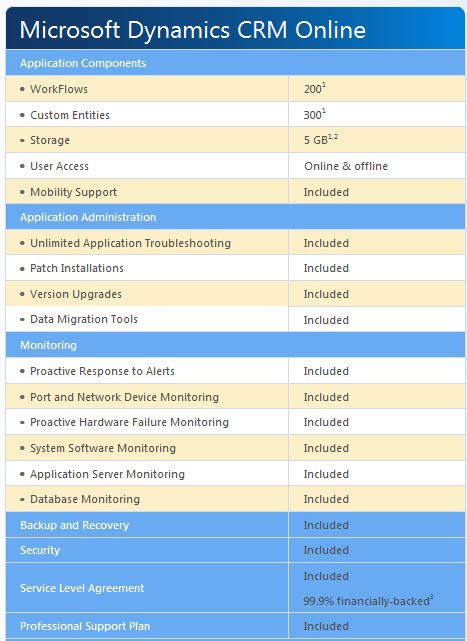
To know more about the CRM cloud flavour…click here
 PREMNAIR'S Blog