iOS 4 and Exchange ActiveSync

Apple released iOS 4 recently and since its release there have been numerous reports of a number of issues with new iPhone 4s when using Exchange ActiveSync . Here is the link from Microsoft Exchange Team Blog

PATCH Released from Apple : iPhone users who use the iPhone4 or upgraded to iOS4 must install a related Apple configuration patch on their iPhone. The patch, along with installation directions, can be found here:
http://support.apple.com/kb/TS3398.

Exchange Server 2007 Service Pack 3 released

Exchange Server 2007 SP3 supports all Exchange 2007 roles on the Windows Server 2008 R2 operating system.

Exchange 2007 SP3 provides support only for a new installation of Exchange on Windows Server 2008 R2.

Exchange 2007 SP3 is not supported in an upgrade scenario on Windows Server 2008 R2. For example, Exchange 2007 SP3 does not support the following installation scenarios:

  • A new Exchange 2007 SP3 installation on a Windows Server 2008 R2-based computer that has been upgraded from Windows Server 2008
  • Upgrading Exchange 2007 SP2 to Exchange 2007 SP3 on a Windows Server 2008 R2-based computer that has been upgraded from Windows Server 2008
  • Upgrading the operating system from Windows Server 2008 to Windows Server 2008 R2 on a computer that has Exchange 2007 SP3 installed

Exchange Server 2007 SP3 provides

  • further flexibility with the addition of Windows Server 2008 R2 support for server roles and Windows 7 support for the Exchange management tools.
  • These additions, along with enhancements for the advanced protection options against e-mail security threats, such as spam and viruses and the tools which help manage internal compliance and high availability needs provide Exchange administrators with the tools they need to manage their Exchange 2007 environments efficiently.
  • Exchange 2007 SP3 introduces password reset functionality for Internet Information Services (IIS) 7.
  • Exchange 2007 SP3 includes updates to the Exchange Search (MSSearch) component.
  • MSSearch provides support for creating full text indexes for Exchange stores.
  • Exchange 2007 SP3 updates the MSSearch binary files to MSSearch 3.1.
  • Exchange 2007 SP3 includes Active Directory schema changes for certain Unified Messaging (UM) mailbox attributes.
  • Exchange 2007 SP3 includes support for Right-to-Left text in e-mail message disclaimers in a right-to-left language, such as Arabic.
  • In earlier versions of Exchange, when you use a transport rule to create a disclaimer in a right-to-left language on an Exchange 2007 Hub Transport server, the text appears incorrectly when you view it from Outlook 2007.
  • Exchange 2007 SP3 adds functionality to the transport rule setting to fully support right-to-left text in disclaimers

Useful Links

Other downloads

Issues

  1. In the recently released Exchange 2007 Service Pack 3, there’s a version mismatch between the Outlook Web Access (OWA) S/MIME Control, an Active X control used to provide S/MIME support in OWA. After you install SP3, users who have the control installed will get prompted to install the latest version of the control. The way this works – the code compares the “Version” property of the client S/MIME control (MIMECTL.DLL) on the user’s computer with the ProductVersion property of the MSI file (OWASMIME.MSI) on the Client Access Server. to know more click Exchange 2007 SP3 and OWA S/MIME Version Mismatch from Microsoft Exchange Team Blog

Microsoft Dynamics CRM 2011 Public Beta

Announced at the Microsoft Worldwide Partner Conference on July 12, 2010, Microsoft Dynamics CRM 2011 – formerly codenamed “CRM5” – will be publicly available as a beta release in September 2010 for both online and on-premises deployments. If you want to get notified for this release, please click this link

Microsoft is going to stop support for Windows XP SP2

SP1 and SP2 retirement

Microsoft support for the Windows XP with Service Pack 2 (SP2) 32-bit operating system will end July 13, 2010, and support for the Windows Vista Release to Manufacturing (RTM) operating system will end April 13, 2010.

Important Dates Product End of Mainstream Support End of Extended Support
Windows XP SP2   July 13, 2010
Windows Vista RTM April 13, 2010  
Windows 2000 Professional SP4   July 13, 2010
Windows 2000 Server SP4   July 13, 2010

Users can upgrade their Windows XP SP2 to Windows XP  SP3 and use the system till 2014… If you are still running Microsoft Windows XP SP2 (Service Pack 2), you have until July 13 to upgrade. The venerable SP2 version reaches the end of its life on July 13, after which there will be no more updates…more info click here

Technet Top 10 Webcasts

Microsoft has recently clubbed the most viewed top 10 Technet Web cast, which is now available on the site.. To view that, click here

Now most of the microsoft site is well organized..cool

Configure EWS, Autodiscover, OWA, OAB, ECP on Exchange Server 2010

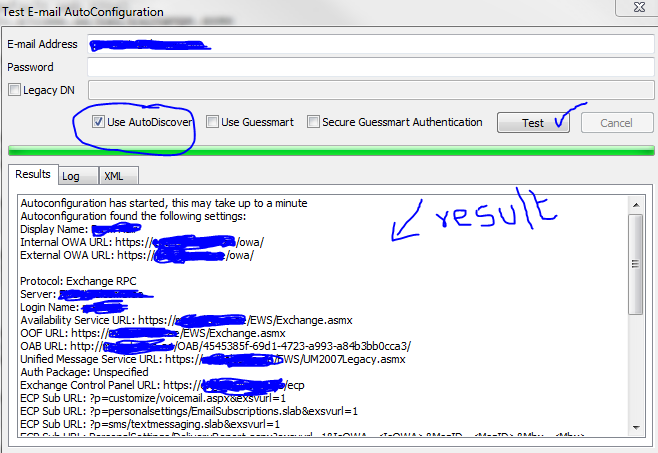
As you all know that the service connectivity for a mail server is the  main concern to all of us. In Exchange server 2010, the connectivity is as same as Exchange server 2007. Once you migrate or install the new version, this should be tested with the proper credentials and certificate..or else, you will end up with your mail server IP going to the blacklist, because of the wrong pointers and configurations. First of all, do the internal test. Go to your computer start bar, right side where Date and time is showing, you will find the Outlook icon, hold Ctrl + right click on the outlook icon and click “Test Email Auto Configuration…”

Select the “Use AutoDiscover” and click Test..

Above one is a success one..If failed, do the below. The Exchange Web Service (EWS) is the web service that allows access to the Out of Office service. If either the internal or external URL for the EWS is missing or incorrect, OOF will fail and other services may not work as expected. Using Exchange Management Shell, check the URLs assigned to the web service virtual directory using the Get-WebServicesVirtualDirectory command

First goto CAS server

Type the following Power Shell command for EWS (Exchange Web Service)

Copy code Get-WebServicesVirtualDirectory |fl identity,internalurl,externalurl

You will get the result like below

Identity    : ECAS1\EWS (Default Web Site)
InternalUrl : https://mailv.domain.com/EWS/Exchange.asmx
ExternalUrl : https://mailv.domain.com/ews/exchange.asmx

Identity    : ECAS2\EWS (Default Web Site)
InternalUrl : https://mailv.domain.com/EWS/Exchange.asmx
ExternalUrl : https://mailv.domain.com/ews/exchange.asmx

If this is not correct, you need to fix it.. This has to be done on Powershell command on the CAS server.

To do that…Copy code

[PS]C:\Windows\system32>Set-WebServicesVirtualDirectory -Identity “ECAS1\EWS (Default Web Site)” -InternalUrl https://mail.domain.com/EWS/Exchange.asmx -BasicAuthentication:$true

[PS]C:\Windows\system32>Set-WebServicesVirtualDirectory -Identity “ECAS2\EWS (Default Web Site)” -InternalUrl https://mail.domain.com/EWS/Exchange.asmx -BasicAuthentication:$true

[PS] C:\Windows\system32>Get-WebServicesVirtualDirectory |fl identity,internalurl,externalurl

Identity    : ECAS1\EWS (Default Web Site)
InternalUrl : https://mail.domain.com/EWS/Exchange.asmx
ExternalUrl : https://mail.domain.com/ews/exchange.asmx

Identity    : ECAS2\EWS (Default Web Site)
InternalUrl : https://mail.domain.com/EWS/Exchange.asmx
ExternalUrl : https://mail.domain.com/ews/exchange.asmx

Now you can see that the URL has been fixed. This is for Web Services.

Now for Autodiscovery….

[PS] C:\Windows\system32>Get-AutodiscoverVirtualDirectory

To see the settings

[PS] C:\Windows\system32>Get-ClientAccessServer |fl identity,autodiscoverserviceinternaluri

RESULT

[PS] C:\Windows\system32>Get-ClientAccessServer |fl identity,autodiscoverserviceinternaluri
Identity                       : ECAS1
AutoDiscoverServiceInternalUri : https://mailv.domain.com/Autodiscover/Autodiscover.xml

Identity                       : ECAS2
AutoDiscoverServiceInternalUri : https://mailv.domain.com/Autodiscover/Autodiscover.xml

To FIX it..

[PS] C:\Windows\system32>Set-ClientAccessServer -Identity ECAS1 -AutoDiscoverServiceInternalUri https://mail.domain.com/Autodiscover/Autodiscover.xml
[PS] C:\Windows\system32>Set-ClientAccessServer -Identity ECAS2 -AutoDiscoverServiceInternalUri https://mail.domain.com/Autodiscover/Autodiscover.xml 

 Now for the Outlook Web Apps, Exchange Control Panel, Exchange ActiveSync, Offline Address book…you have to go to Exchange Management Console (EMC)

  1. Goto one of the CAS server
  2. Open EMC
  3. Goto Server Configuration
  4. Select Client Access
  5. On the Middle top pannel, you can see the CAS server listed.
  6. Select one, on the bottom pannel, you will see like below.
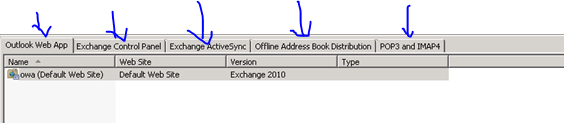
Select each tab and then right click on the object and change the path as required. Once you done with the first CAS servr, do the same for the second as well.

Thats it…you are good to go for production.

Exchange Server 2010 Service Pack 1 – Sneak-peak

Exchange Team Blog that provides the first public details about Exchange Server 2010 Service Pack 1 (SP1).  SP1 will of course include fixes and enhancements in the areas customers have helped us identify (including code from all of the Exchange 2010 post RTM update rollups we’ve released to date).  But SP1 will also include some new features and functionality changes, as well….cool

  • A new search preview helps with early case assessment by providing you an estimate on the number of items in the result set-with keyword statistics-before e-mail located in the search are copied to the designated discovery mailbox.
  • And, a new search result de-duplication option, when checked, only copies one instance of a message to the discovery mailbox.

Look at the below  menu for the DAG…what a cool feature it will be

With the release of Exchange Server 2010 last November, Microsoft introduced integrated archiving capabilities aimed at helping you preserve and discover e-mail data. In SP1, this has enhanced its archiving functionality based on the great feedback you’they got since the launch. This includes adding the flexibility to provision a user’s Personal Archive to a different mailbox database from their primary mailbox. This means your organization can now more easily implement separate storage strategies (or tiered storage) for less frequently accessed e-mail. And, we didn’t just stop there! We’ve also added new server side capabilities so you can import historical e-mail data from .PST files, directly into Exchange, as well as IT pro controls to enable delegate access to a user’s Personal Archive.

To help streamline the implementation of retention policies, SP1 updates the Exchange Management Console with new tools to create Retention Policy Tags, so you can automate the deletion and archiving of e-mail and other Exchange items. New optional Retention Policy Tags give you even more flexibility in defining your organizations retention management strategy….coooool

Can’t wait to get hold of this…Announcement blog from Microsoft Exhange Team …click here Yes Virginia, there is an Exchange Server 2010 SP1

Learn more about our approach to archiving by reading the Archiving with Exchange 2010 whitepaper.

Scott Schnoll’s weblog…click here

Exchange Server 2010 Migration – Useful tools

Exchange Pre-Deployment Analyzer..Click here

The ExPDA tool performs a scan of your existing Exchange and Active Directory environments and produces a report that lists all items that require attention prior to deployment.

Exchange Server Profile Analyzer..Click here

The EPA tool performs a scan of either a single database or the entire organization to create an aggregated report of mailbox statistical information.

Log Parser…Click here

Log Parser, a powerful tool for querying text-based log files such as those that are generated by IIS and Message Tracking on Exchange servers

Exchange Server Remote Connectivity Analyzer..Click here

This tool will help you analyze whether the configuration has been done properly.

Performance Monitor..Click here or click here

The built-in Performance Monitor tool for Windows lets you collect performance data for every element of the Exchange servers and use it for capacity planning of the new Exchange 2010 servers.

Mailbox Server Requirements Calculator…Click here

The most complicated server role in an Exchange Server 2010 environment to calculate the sizing for is the Mailbox Server role, particularly when it comes to storage.

Windows server 2008 to 2008 R2 upgrade – need to know

When you upgrade your server from Windows server 2008 to Windows server 2008 R2 upgrade, make sure that you write down all the IP’s related to each port, include SAN IP’s using iSCSI. The reason its because after you upgrade to Windows Servr 2008 R2, all the IP you setted up manually for the system, no matter whether it is local ip or SAN ip will be resetted and you have to do it manually again.

This is for your information that you should take a screen shoot or write it manually somewhere.

Microsoft Forefront Threat Management Gateway (TMG) 2010 Service Pack 1

Microsoft® Forefront Threat Management Gateway (TMG) 2010 Service Pack 1 (SP1) introduces new features and functionality to Forefront TMG 2010 Standard and Enterprise Editions.
The service pack includes the following new features and feature improvements:

New Reports
• The new User Activity report displays the sites and site categories accessed by any user.
• All Forefront TMG reports have a new look and feel.

Enhancements to URL Filtering
• You can now allow users to override the access restriction on sites blocked by URL filtering. This allows for a more flexible web access policy, in that users can decide for themselves whether to access a blocked site. This is especially useful for websites that have been incorrectly categorized.
• You can now override the categorization of a URL on the enterprise level; the override is then effective for each enterprise-joined array.
• Denial notification pages can now be customized for your organization’s needs.

Enhanced Branch Office Support
• Collocation of Forefront TMG and a domain controller on the same server, which can help reduce the total cost of ownership at branch offices.
• When installed on a computer running Windows Server 2008 R2, SP1 simplifies the deployment of BranchCache at the branch office, using Forefront TMG as the Hosted Cache server.

Support for publishing SharePoint 2010
• Forefront TMG SP1 supports secure publishing of SharePoint 2010.

To read the release notes, see the Forefront TMG Release Notes (SP1).
how to install and uninstall Forefront TMG Service Pack 1 (SP1)…click here
Download TMG SP1 click here