Good News for installations guys out there, Exchange server 2010 SAN certificate creation very easy…click here to read my blog
ENJOY!!!!!!!!!!!!!!!!!!!!

Did you know that when you have Exchange 2010 server in your organization and you login through Outlook Web Apps, with administrator account, you have a lot of options to manage and view the entire organization, rather than going through EMC!!!!!
Logon to Outlook Web apps in your organization, and select options on the right side of the screen on top
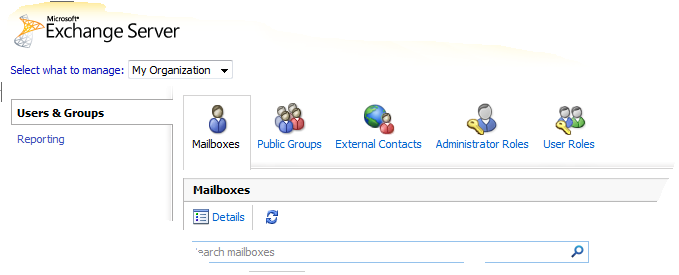
You get this screen, from there Select “Select what to manage:” and from the drop down menu, select My Organization..and then go to Reporting on the Left pane

Here you can view the queues, delevery status of each users, Public folder status, Mail enabled public folder status etc…!
BUT IF YOU LOGIN AS A NORMAL USER, ALL YOU CAN SEE IS AS BELOW..LIKE
Your organization contact details, Tools for organize mails, Groups belogs to, Settings, Syncronized phone device to this account, etc…

and a cool feature of Outlook web apps is thaton the right side of the window, where help button is, click on the down arrow of the help icon and you will see “About”..click there and you will see the connectivity of your account with exchange server (good for administrators) like below one

Enjoy!!! i am enjoying it
Now with Exchange server 2010 and Outlook Web apps, there is a menu called Option, where this is actually giving you the Exchange control panel for the selective user. From here you can manage the Phone syncronization.
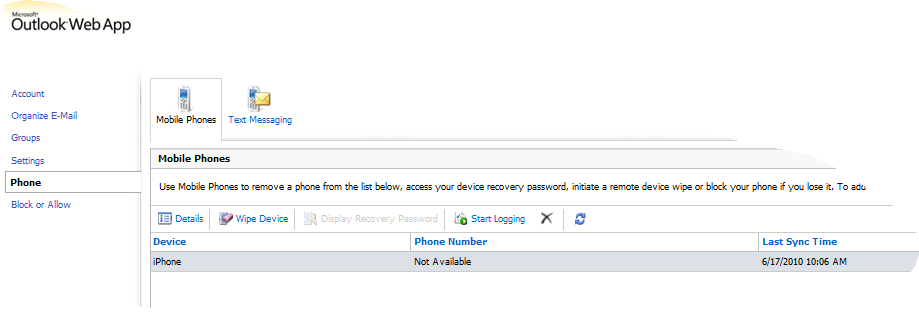
From this option, you can see your device sync status and also when you lost the phone, you can wipe the data from here to protect your data of the lost phone.
Cool features..when you do Exchange server 2010 with Office 2010 and Office web apps.
Microsoft launched its free Windows Live versions of Office Web Apps on Monday…click here to know more

The new service is currently available in English for Canada, Ireland, the United Kingdom and the United States. Canadians can access a French version too; a Spanish version is also available for the United States. Office Web Apps are simplified versions of Word, Excel, PowerPoint and OneNote that run in supported Web browsers. These applications use the “Ribbon” user interface menu system that was first introduced in Office 2007. Users need to sign up for a Windows Live password to access the service, but it’s all free. The service can be accessed anywhere using a supported browser and an Internet connection at http://www.office.live.com. Smartphone users can view Word and PowerPoint files without additional software on most devices, according to Microsoft’s announcement. Printing files in Word and PowerPoint Web Apps can be done right from the browser. Office Web Apps are tied to SkyDrive, Microsoft’s storage space in the Internet cloud. SkyDrive provides Office Web App users with 25 GB of storage space, which can be used to save files and share them with others. A coauthoring feature is available, but just for Excel and OneNote. Microsoft claims that users can collaborate on a document at the same time and not be locked out, even as various people try to access it. In addition, Office Web Apps preserves a version history, which is saved on SkyDrive.

Interested in checking out the new web platform capabilities of Internet Explorer 9?…Test Drive
Internet Explorer 9 now also supports TIFF and JPEG XR images. JPEG XR offers better image quality than JPEG at the same file size.
A comparison video on the windows blog..click here
If you have not already done so, I highly recommend you create an SPF record for your domain as this will make it much more difficult for spammers to forge your domain in order to spam domains in other organizations.
Sender Policy Framework..WikiPedia Definition
Creating your own SPF record is a relatively simple process, Microsoft even provides a web-based GUI wizard that will help you do this.. Domain holders need to complete an inventory and publish all IP addresses of their outbound e–mail servers in the DNS zone file. This is an administrative step that requires no changes to an organization‘s e–mail or DNS software. Even if your domain has no outbound e–mail servers, you can help protect your domain from spoofing by publishing an SPF record in the DNS that states this. Microsoft Safety Home Page click here

Implementation Tips for the Sender ID Framework—Creating Your SPF Record..Click here
Sender ID Overview Click here
Users can use the Exchange Control Panel for Outlook Web App to manage some on-premises tasks.
The following is a list of the administrative features available:
Text messaging integration

Voice messaging integration
Multiple mailbox search
Additional proxy addresses for mailboxes
Moderation and approval for distribution list submission

Please find on my blog, one page dedicated to this task…you can see it on my blog top page… or click here
 TO
TO 
MIGRATION…Started on June 8, 2010 ….Today 20th of June..all the objects has been replicated to Exchange 2010..Now the decommissioning starts..Finish too
With Google search over SSL, you can have an end-to-end encrypted search solution between your computer and Google. This secured channel helps protect your search terms and your search results pages from being intercepted by a third party. This provides you with a more secure and private search experience. SSL helps prevent intermediary parties, such as ISPs, from knowing the exact search that you typed, they could still know which websites you visit once you click on the search results….more info click here

Link for the secured search from google https://www.google.com/
 I LOVE BOTH
 PREMNAIR'S Blog