Multiple email ID for your Social connector(s)

You can add multiple email ID to your    OR    account.

Why you want to link this?

Most of the users have more than one email id..one/two personnel email id, one business email id etc..and if you link all in one social connector account, its very easy to track others, whether it is business contacts, collegues or friends.. How to do it.

Go to your profile home page, and click on top right cornnet Account
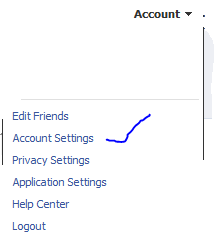
Click Account settings…and click “change” on the Email tab


Enter the other email ID here and click “add new” (If you have more than one email id other than the primary one..keep on add here)

REMEMBER : When you add an email id here, there will be a confirmation email send from this account..please confirm it back so that the email id you added get registered
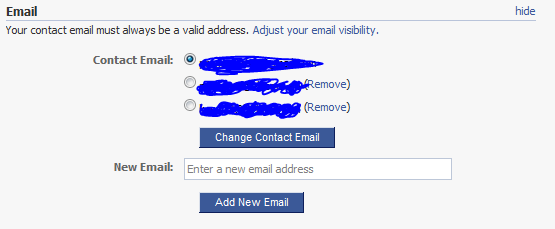
Once you finish adding and click on the confirmation email(s), you will see the account like above, where your primary email id is now been selected in the radio button.

Thats it for FACEBOOK

Logon to your linkedin profile and go to the top right corner and click “Settings”

Under Personnel information, Select Email Address

Add your other email id’s here…
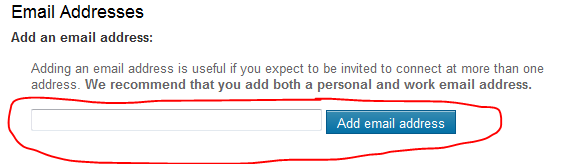
REMEMBER : A Confirmation email will be send to each of the email id you add..
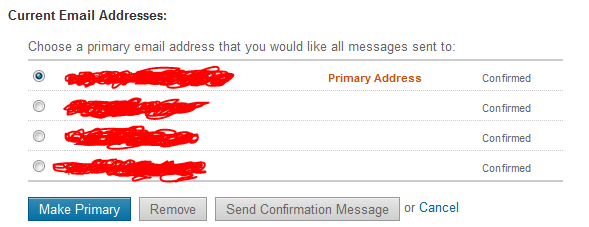
Once you done..your email profile will look like above…

That’s all

Microsoft Outlook Social Connector Provider for Facebook

The Microsoft Outlook Social Connector Provider for Facebook allows you to connect your Facebook account to the Outlook Social Connector and obtain information about your friends and colleagues.

You can see status updates and recently posted items from your Facebook contacts.

You can also use Outlook Social Connector to display a quick view of related Outlook content when you click on an email from a contact, such as recent e-mail conversations, meetings, and shared attachments to help you easily track your communications

Once you finish installing the Social connector, Please re-start the Outlook and then goto your reading panel below down you can see the user icon  and underneath, there is a button called +ADD…click that (Check the above image) and then select each connector and type the credential…

You are ready to go!!! …read my previous blog for more Microsoft Outlook 2010 – Social connector
NOTE: The Microsoft Outlook Social Connector Provider requires Microsoft Outlook Social Connector and the related update (KB983403) to be installed. If these components are not already installed on your machine, the Microsoft Outlook Social Connector Provider for Facebook will download and install the necessary updates from the Microsoft Download Center before completing the provider installation.

To download click here

Exchange Server 2010 Service Pack 1 – Sneak-peak

Exchange Team Blog that provides the first public details about Exchange Server 2010 Service Pack 1 (SP1).  SP1 will of course include fixes and enhancements in the areas customers have helped us identify (including code from all of the Exchange 2010 post RTM update rollups we’ve released to date).  But SP1 will also include some new features and functionality changes, as well….cool

  • A new search preview helps with early case assessment by providing you an estimate on the number of items in the result set-with keyword statistics-before e-mail located in the search are copied to the designated discovery mailbox.
  • And, a new search result de-duplication option, when checked, only copies one instance of a message to the discovery mailbox.

Look at the below  menu for the DAG…what a cool feature it will be

With the release of Exchange Server 2010 last November, Microsoft introduced integrated archiving capabilities aimed at helping you preserve and discover e-mail data. In SP1, this has enhanced its archiving functionality based on the great feedback you’they got since the launch. This includes adding the flexibility to provision a user’s Personal Archive to a different mailbox database from their primary mailbox. This means your organization can now more easily implement separate storage strategies (or tiered storage) for less frequently accessed e-mail. And, we didn’t just stop there! We’ve also added new server side capabilities so you can import historical e-mail data from .PST files, directly into Exchange, as well as IT pro controls to enable delegate access to a user’s Personal Archive.

To help streamline the implementation of retention policies, SP1 updates the Exchange Management Console with new tools to create Retention Policy Tags, so you can automate the deletion and archiving of e-mail and other Exchange items. New optional Retention Policy Tags give you even more flexibility in defining your organizations retention management strategy….coooool

Can’t wait to get hold of this…Announcement blog from Microsoft Exhange Team …click here Yes Virginia, there is an Exchange Server 2010 SP1

Learn more about our approach to archiving by reading the Archiving with Exchange 2010 whitepaper.

Scott Schnoll’s weblog…click here

Exchange server 2007 to 2010 Live migration!!!! Live blog!!! Live Platform…real time scenario!!!

Please find on my blog, one page dedicated to this task…you can see it on my blog top page… or click here

             TO                                          

 MIGRATION…Started on June 8, 2010 ….Today 20th of June..all the objects has been replicated to Exchange 2010..Now the decommissioning starts..Finish too

Microsoft Office 2010 – Cool product

Microsoft is now very much serious about their Productivity wagon modification…Cool features has been introduced and this time, they try to integrate their own server products, well intact with other microsoft products. Outlook has new feature for multiple exchange account configuration, Installation is very easy..it just grab the old configuration and convert it to 2010 formats..Social connectors…Word 2010…new document templates…great start…i’m really enjopying the product….

Some of the useful link to know about this product

http://techcrunch.com/2009/07/13/the-complete-guide-to-microsofts-office-2010/

http://www.microsoft.com/office/2010/en/download-office-professional-plus/default.aspx

http://blogs.technet.com/office2010/

Microsoft Outlook 2010 – Social connector

The all-new Outlook Social Connector connects you to the social and business networks you use, including Microsoft SharePoint, Windows Live, and other popular third-party sites, so you can get more information and stay in touch with the people in your network without leaving Outlook…..Stay up-to-the-minute with the people in your networks by accessing everything from e-mail threads to status updates in one single, centralized view.

Stay up-to-the-minute with the people in your networks by accessing everything from e-mail threads to status updates in one single, centralized view.

 Synchronize your contact data right into Outlook 2010 and obtain information about your friends and colleagues. See status updates from various networks and recently posted files—even view shared photos
Connect to SharePoint Server 2010 social data and receive updates from your workplace, such as newly posted or tagged documents, site activity, and more.
Easily track your communication history. Use the Outlook Social Connector to display a quick view of related Outlook content when you click on a contact’s name, such as recent e-mail conversations, meetings, and shared documents.

Top 10 benefits of Outlook 2010 – using Microsoft Office professional plus…this version has the social connector…all you need is to  install it

Top 10 benefits of Outlook 2010 using Business Contact Manager – using Microsoft Office professional plus

Outlook 2010 Social Connector

Connecting Outlook to each social network requires a provider. To get started, download and install social network provider for Outlook.

Linkedin Outlook 2010 connector, download here once you finish installing it, re-start Outlook 2010

Enjoy…!!!!