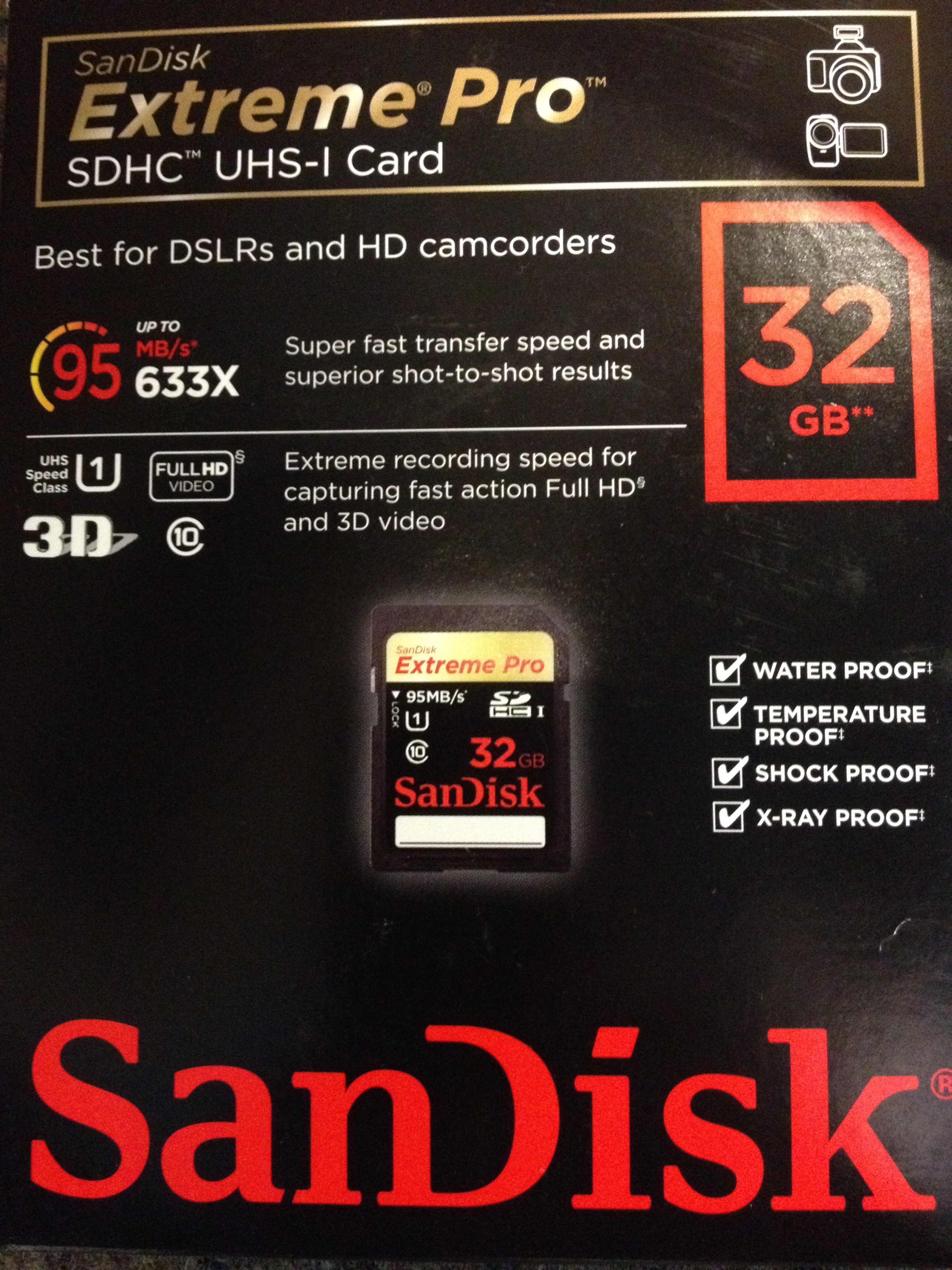
SanDisk 32GB ExtremePRO SDHC Memory Card, 95MB read/write speed

The SanDisk Extreme Pro SDHC UHS-I 32GB memory card features technologies that were previously only available in the professional line of CompactFlash memory cards. Managed by the Power Core Controller, the SanDisk Extreme Pro SDHC UHS-I memory card raises the bar for speed and performance within the SanDisk SD memory card product line. The advanced Error Correction Code engine improves overall data integrity and reliability of the card during read and write. Experience RAW + JPEG continuous burst mode shooting and capture fast-action Full HD video like never before. For capturing Full HD video or that professional shot-trust SanDisk Extreme Pro SDHC UHS-I memory cards for your DSLR or HD camcorder.

Specifications

  • Capacity: 8GB, 16GB, 32GB, 64GB
  • Performance: Up to 95MB/s (633) read for faster transfer to PC and write performance up to 90 MB/s (600x) for faster shot to shot
  • Operating temperature: -13Deg.F to 185Deg.F (-25Deg.C to 85Deg.C)
  • Storage temperature: -40Deg.F to 185Deg.F (-40Deg.C to 85Deg.C)
  • Compatibility: All SDHC and high speed bus interface supporting host devices
  • Security: Built-in write-protect switch prevents accidental data loss
  • Applications: Store a variety of digital formats, including RAW and JPEG photos, Full HD videos, music and more
  • Dimensions: 0.94″ x 1.25″ x 0.08″ (24 mm x 32 mm x 2.1 mm)

Features

  • Extreme speed means you’ll get the shot you want with more continuous burst mode shooting and rapid transfers to your computer
  • Extreme Full HD video recording speed enabled by UHS Speed Class 1 and Class 10 lets you capture fast-action video in Full HD, even in 3-D
  • Engineered with the Power Core Controller, the SanDisk Extreme Pro SDHC [SDXC for 64GB] UHS-I memory card delivers blazing fast performance distributing image data across the card more rapidly and efficiently
  • Extreme reliability and endurance, the Power Core Controller’s firmware increases endurance through wear leveling. The Power Core Controller’s advanced Error Correction Code (ECC) engine improves overall data integrity and reliability of the card during read and write
  • Extreme durability- built for and tested in harsh conditions-these cards are temperature proof, water proof, shock proof and x-ray proof
  • Extreme trust: From the flash memory card brand trusted by professional photographers


Microsoft Dynamics GP 12 – New Changes Planned Beyond Web Client

Excitement for Microsoft Dynamics GP and Windows 8…  a beautiful combination…eager to wait for the release

Now the good news is that Dexterity codes are valid for this GP web client…read this blog

Soon you will see the Dexterity Power shell for Microsoft Great Plains 🙂

Microsoft Dynamics GP team, when considering the creation of our upcoming web client user experience, looked at many technologies that would offer us an architecture for future growth, a feature set that was strong with controls and flexibility, and one that provided us a performance model that benefitted our customers.  Silverlight was a clear standout product in this research. In fact, we’ll be using Silverlight 5 features as it ships, specifically Silverlight 5 has been architected to deeply support business application development far deeper than other similar toolsets.

O365 – Directory syncronization Installation

Active Directory synchronization for Office 365click here to know more

Microsoft Open Door – UAE | 9 – 10 April 2012

Open Door is Microsoft’s premier technical education event aimed at offering technology professionals and decision makers the chance to explore and connect with a broad set of current and soon-to-be-released Microsoft technologies, tools, platforms and services. An all-encompassing 2-day event, Open Door is the perfect venue for customers and partners to engage and interact, while learning about Microsoft’s breadth of solutions, technologies and innovations.

  • Venue: Madinat Jumeirah
  • Date: 9 & 10, April 2012
  • City: Dubai, UAE

More info, Click here

Microsoft OneNote – For iPhone

Microsoft OneNote for iPhone is a note-taking app for capturing all of your ideas and to-dos on the go. With the free version of OneNote for iPhone you can access, create and edit up to 500 notes. Once you reach this limit you can still view, delete, and sync your notes. To continue taking and editing notes, you can upgrade OneNote for iPhone to unlimited use through an in-app purchase. Click here to know more.

Requirements:
▪ iPhone or iPod touch must have iOS 4.3 or higher.
▪ A free Windows Live ID is required to use OneNote for iPhone – use an existing ID or let OneNote help you sign up.
▪ Web functionality uses the free OneNote Web App available on SkyDrive, which requires a supported web browser.
▪ OneNote for iPhone opens notebooks created in Microsoft OneNote 2010 or the OneNote Web App.

Microsoft Lync – iPhone new updates

Updates to the Lync for iPhone and Lync for iPad apps have been posted to the Apple Store. Click here to know more

Windows PowerShell to manage Office 365

This page has been moved to dedicated page for O365 users. Click here

How to Configure the SPN (servicePrincipalName) for the Service Account

When you deploy an AD FS 2.0 Federation Server farm you must specify a domain-based service account, and the AD FS 2.0 service account needs to have a SPN (servicePrincipalName) registered to allow Kerberosto function for the Federation Service…Reconfiguring the service names in an ADFS Server farm requires hard work.

An ADFS Server farm uses a service account. Whenever you update the URL, the SPN for that service account needs to be updated as well.

There’s a good article from Adam Conkle on TechNet..click here to read more

Thanks Adam and Ed

Enjoy!!

Add UPN Suffixes to Active Directory users

UPN (User Principal Name) Suffixes: You can use Active Directory Domains and Trusts to add user principal name (UPN) suffixes for the existing user account. The default UPN suffix for a user account is the Domain Name System (DNS) domain name of the domain that contains the user account. You can add alternative UPN suffixes to simplify administration and user logon processes by providing a single UPN suffix for all users. The UPN suffix is used only within the Active Directory forest, and it is not required to be a valid DNS domain name.

To perform this procedure, you must be a member of the Domain Admins group or Enterprise Admins group in Active Directory Domain Services (AD DS), or you must have been delegated the appropriate authority. For using the appropriate accounts and group memberships, Click here.

To add UPN suffixes

  1. To open Active Directory Domains and Trusts, click Start, click Administrative Tools, and then click Active Directory Domains and Trusts.
  2. In the console tree, right-click Active Directory Domains and Trusts, and then click Properties.
  3. On the UPN Suffixes tab, type an alternative UPN suffix for the forest, and then click Add.

The procedure forusing the Active Directory module for Windows PowerShell. To open the Active Directory module, click Start, click Administrative Tools, and then click Active Directory Module for Windows PowerShell.

Sample AD PowerShell command to update UPNs in bulk

Get-ADUser-Filter * -properties homemdb | where {$_.homemdb -ne $null} | ForEach-Object ($_.SamAccountName) {$CompleteUPN = $_.SamAccountName + “@contoso.com”; Set-ADUser -Identity $_.DistinguishedName -UserPrincipalName $CompleteUPN}

The above script:
·        Gets all users with something in their homemdb attribute (i.e. mailbox users)
·        Creates a temporary variable called $completeUPN which is a combination of every user’s samaccountname plus @contoso.com
·        Sets each user to this new upn

Enjoy!!!