Unknown's avatar

About PREMNAIR

Working as IT, Infrastructure & Security Manager in Dubai.

Public folder email forwarding issue!!!

When you have a mail enabled  public folder in your exchange server 2007/2010 environment, you might face issues with email forwarding from the public folder from your user account, where you will get an error “Operation failed”.

Resolution :

  1. Logon to outlook with administrator(Domain) credemtial
  2. Goto the Public folder
  3. Select the folder where you are facing the issue
  4. Right click
  5. Select Properties
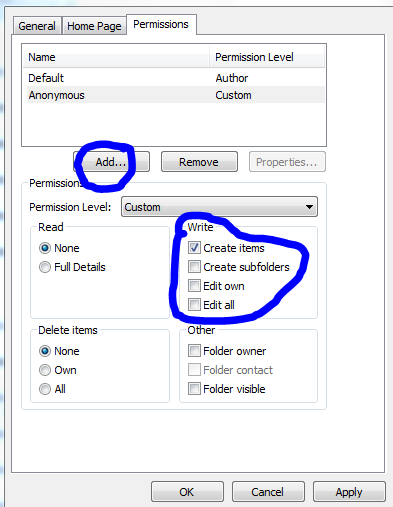
  6. Goto Permission TAB
  7. Add users
  8. Check mark the appropriate rights on the “Write” permission area..normally “Edit all” will do the work
  9. Click apply and click ok.

Outlook cannot open attachments!!!

Recently i come across this issue, and resolution for how to fix it

PROBLEM : When you receive attachment in your outlook, and when you try to open it, it says ” No permission to open the attachment”

Troubleshoot : This has nothing to do with the permission..this is because the temp folder is full…either you clear the temp folder or do the following..

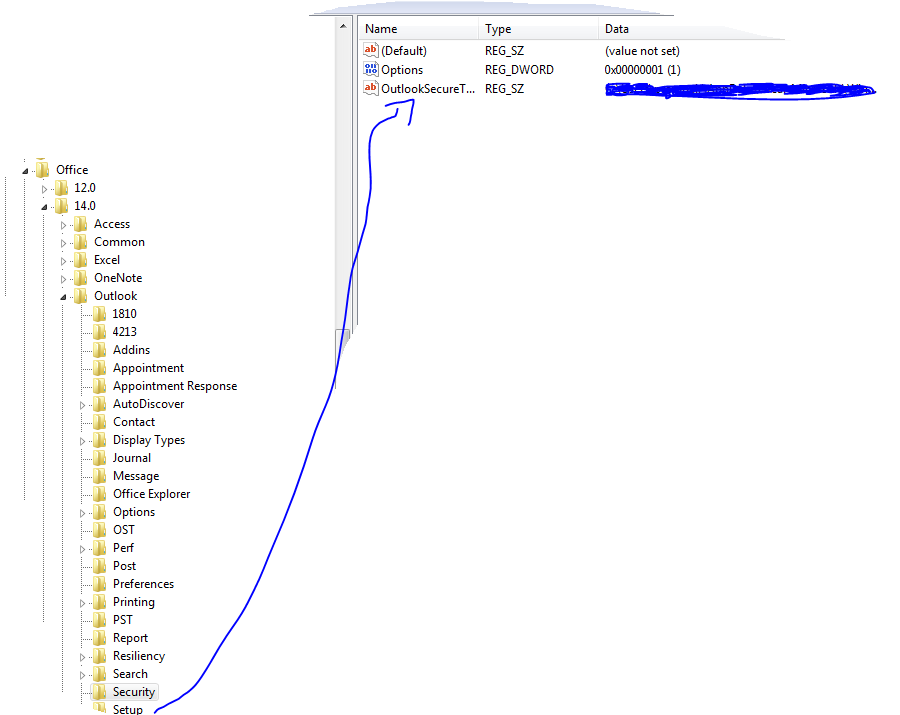
Solution : Go to REGEDIT->HKEY_CURRENT_USER ->Software ->Microsoft ->Office then click

  • 12 ->If you are using Microsoft Outlook 2007
  • 14 ->if you are using Microsoft Outlook 2010

then click Outlook -> expand it, select Security and edit the path “OutlookSecureTempFolder

Check the image below

 (Normally here you will see the default path..creat a temp folder under the available drive and then give the path here)

Microsoft Outlook Social Connector Provider for Facebook

The Microsoft Outlook Social Connector Provider for Facebook allows you to connect your Facebook account to the Outlook Social Connector and obtain information about your friends and colleagues.

You can see status updates and recently posted items from your Facebook contacts.

You can also use Outlook Social Connector to display a quick view of related Outlook content when you click on an email from a contact, such as recent e-mail conversations, meetings, and shared attachments to help you easily track your communications
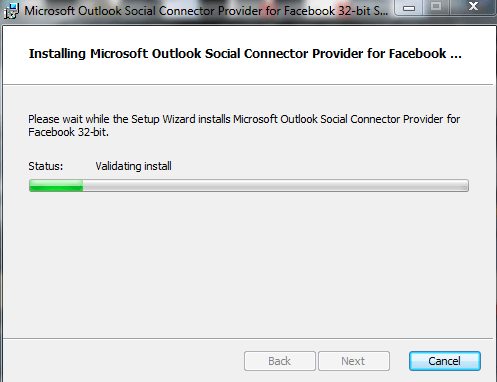
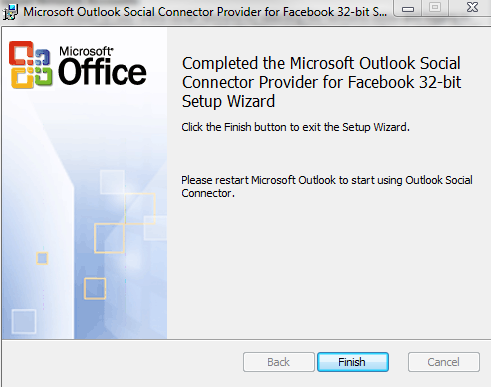
Once you finish installing the Social connector, Please re-start the Outlook and then goto your reading panel below down you can see the user icon  and underneath, there is a button called +ADD…click that (Check the above image) and then select each connector and type the credential…

You are ready to go!!! …read my previous blog for more Microsoft Outlook 2010 – Social connector
NOTE: The Microsoft Outlook Social Connector Provider requires Microsoft Outlook Social Connector and the related update (KB983403) to be installed. If these components are not already installed on your machine, the Microsoft Outlook Social Connector Provider for Facebook will download and install the necessary updates from the Microsoft Download Center before completing the provider installation.

To download click here

Indian Rupee Symbol – Changed

Indian rupee will soon have a unique symbol which is a blend of the Devanagri ‘Ra’ and Roman ‘R’ ,  joining elite currencies like the US dollar, euro, British pound and Japanese yen in having a distinct identity. A beautiful though…soon we can start using it..Now no more INR or Rs etc… just…
The new symbol, designed by Bombay IIT post-graduate D Udaya Kumar, was approved by the cabinet today…Today 15th of July will remember the new era of Indian Currency Symbol…!!!

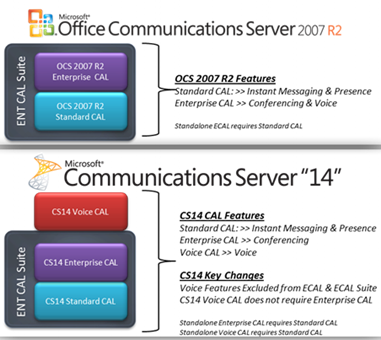
Disclosed Communications Server “14” @Tech•Ed North America 2010

Tech•Ed North America 2010 ( New Orleans, June 7-10th) is done and they disclosed Communications Server “14” features and functionality during the event.  You can catch presentation on-demand at Tech•Ed Online..Whats new in Communication 14 Video

Microsoft Communications ‘14’ really delivers on that promise of a more connected experience for people that want to stay plugged in to what’s going on, even when they are not there. The new collab experience is great. Having PowerPoint, the RoundTable view, and IM all in one view is great.

Exchange Server 2010 Service Pack 1 Beta released

In my last post Exchange Server 2010 Service Pack 1 – Sneak-peak and Microsoft Exchange Team Blog Yes Virginia, there is an Exchange Server 2010 SP1, the team shared information on some of the features  and  expected fixes  that are coming with the SP1 update. Microsoft committed to providing the final version of Exchange Server 2010 SP1 before the end of 2010, and now they have release the Beta of Exchange Server 2010 SP1. Video Preview from MSEXCHANGE Team ..You can download the Microsoft Exchange Server 2010 SP1 Beta from here…This pre-release software is intended for evaluation purposes only. You must accept the license terms before you are authorized to use the software. There is no product support for this trial software.

Is The New Exchange 2010 Service Pack Enough to Stop the Migration to Google Apps?..Click here to read

iOS 4 and Exchange ActiveSync

Apple released iOS 4 recently and since its release there have been numerous reports of a number of issues with new iPhone 4s when using Exchange ActiveSync . Here is the link from Microsoft Exchange Team Blog

PATCH Released from Apple : iPhone users who use the iPhone4 or upgraded to iOS4 must install a related Apple configuration patch on their iPhone. The patch, along with installation directions, can be found here:
http://support.apple.com/kb/TS3398.

Exchange Server 2007 Service Pack 3 released

Exchange Server 2007 SP3 supports all Exchange 2007 roles on the Windows Server 2008 R2 operating system.

Exchange 2007 SP3 provides support only for a new installation of Exchange on Windows Server 2008 R2.

Exchange 2007 SP3 is not supported in an upgrade scenario on Windows Server 2008 R2. For example, Exchange 2007 SP3 does not support the following installation scenarios:

  • A new Exchange 2007 SP3 installation on a Windows Server 2008 R2-based computer that has been upgraded from Windows Server 2008
  • Upgrading Exchange 2007 SP2 to Exchange 2007 SP3 on a Windows Server 2008 R2-based computer that has been upgraded from Windows Server 2008
  • Upgrading the operating system from Windows Server 2008 to Windows Server 2008 R2 on a computer that has Exchange 2007 SP3 installed

Exchange Server 2007 SP3 provides

  • further flexibility with the addition of Windows Server 2008 R2 support for server roles and Windows 7 support for the Exchange management tools.
  • These additions, along with enhancements for the advanced protection options against e-mail security threats, such as spam and viruses and the tools which help manage internal compliance and high availability needs provide Exchange administrators with the tools they need to manage their Exchange 2007 environments efficiently.
  • Exchange 2007 SP3 introduces password reset functionality for Internet Information Services (IIS) 7.
  • Exchange 2007 SP3 includes updates to the Exchange Search (MSSearch) component.
  • MSSearch provides support for creating full text indexes for Exchange stores.
  • Exchange 2007 SP3 updates the MSSearch binary files to MSSearch 3.1.
  • Exchange 2007 SP3 includes Active Directory schema changes for certain Unified Messaging (UM) mailbox attributes.
  • Exchange 2007 SP3 includes support for Right-to-Left text in e-mail message disclaimers in a right-to-left language, such as Arabic.
  • In earlier versions of Exchange, when you use a transport rule to create a disclaimer in a right-to-left language on an Exchange 2007 Hub Transport server, the text appears incorrectly when you view it from Outlook 2007.
  • Exchange 2007 SP3 adds functionality to the transport rule setting to fully support right-to-left text in disclaimers

Useful Links

Other downloads

Issues

  1. In the recently released Exchange 2007 Service Pack 3, there’s a version mismatch between the Outlook Web Access (OWA) S/MIME Control, an Active X control used to provide S/MIME support in OWA. After you install SP3, users who have the control installed will get prompted to install the latest version of the control. The way this works – the code compares the “Version” property of the client S/MIME control (MIMECTL.DLL) on the user’s computer with the ProductVersion property of the MSI file (OWASMIME.MSI) on the Client Access Server. to know more click Exchange 2007 SP3 and OWA S/MIME Version Mismatch from Microsoft Exchange Team Blog

Etisalat new HSPA + Wifi Router

New HSPA + Wifi Router Model number 3G21WE from Etisalat….Its a 3G Modem Router with Wireless N technology, 4Ethernet Port and 2 USB port for File/Print sharing. This supports the downlink speed upto 21Mbps and an uplink speed upto 5.76Mpbs. Purpose for this is to use remote internet access accross UAE. Cool product..

What is HSPA?

HSPA supports increased peak data rates of up to 14 Mbit/s in the downlink and 5.8 Mbit/s in the uplink. It also reduces latency and provides up to five times more system capacity in the downlink and up to twice as much system capacity in the uplink, reducing the production cost per bit compared to original WCDMA protocols. HSPA increases peak data rates and capacity in several ways:

  • Shared-channel transmission, which results in efficient use of available code and power resources in WCDMA
  • A shorter Transmission Time Interval (TTI), which reduces round-trip time and improves the tracking of fast channel variations
  • Link adaptation, which maximizes channel usage and enables the base station to operate close to maximum cell power
  • Fast scheduling, which prioritizes users with the most favorable channel conditions
  • Fast retransmission and soft-combining, which further increase capacity
  • 16QAM (Quadrature Amplitude Modulation), which yields higher bit-rates

HSPA has been commercially deployed by over 200 operators in more than 80 countries.

Microsoft Dynamics CRM 2011 Public Beta

Announced at the Microsoft Worldwide Partner Conference on July 12, 2010, Microsoft Dynamics CRM 2011 – formerly codenamed “CRM5” – will be publicly available as a beta release in September 2010 for both online and on-premises deployments. If you want to get notified for this release, please click this link