Microsoft Lync 2010 – Discovering the product

Awaiting for this product from Microsoft is over, Communications Server 2010, also called Wave 14 – renamed to Microsoft Lync Server 2010. Microsoft has announced that the new 2010 edition has been released to manufacturing (RTM). The official launch event was on November 17th 2010,  so I am sure now that those who have Software assurance, will be downloading now and preparing for the installation/migration.

Microsoft Lync Server 2010 communications software offers instant messaging (IM), presence, conferencing, and telephony solutions that can support enterprise-level collaboration requirements. This is  only available in 64-bit edition , it requires 64-bit hardware and the 64-bit edition of the Windows Server operating system.  Client computers does not required to have 64-bit hardware or software.

Features and capabilities of Microsoft Lync Server 2010 communications software clients in the following categories:

  • Presence
  • Contacts and groups
  • Instant messaging
  • Conferencing
  • Telephony
  • External user support
  • Mobile access
  • Archiving and compliance
Client Comparison Tables for the above from Microsoft site, click here.
Microsoft Lync 2010 : The default client for Lync Server 2010 meetings. Features include presence, contact management, instant messaging (IM), telephony, and greatly enhanced conferencing. To implement the manager/delegate scenario with Lync 2010, both manager and delegate need to install and use Lync 2010.
 
 
Microsoft Lync 2010 Attendee  : This is a rich conferencing client that allows users without Lync 2010 installed to fully participate in Lync Server 2010 meetings. Lync 2010 Attendee can be installed on a per-user basis, so you can choose to selectively deploy this client, or you can allow users to download and install it as needed.
 
Microsoft Lync Web App : This is a web-based conferencing client that supports most Lync 2010 collaboration and sharing features, in addition to presenter meeting controls and dial-in and dial-out voice conferencing. For users who do not have Lync 2010 installed, you can offer this conferencing option when it isn’t practical or possible to install Lync 2010 Attendee. All of the in-meeting features except computer audio, video, and PowerPoint presentations are available to Lync Web App users.
 
 Microsoft Lync Server 2010 Attendant  : This is an integrated call management application that enables a receptionist to manage multiple conversations at the same time through rapid call handling, IM, and on-screen routing. Although previous versions of Microsoft Office Communications Server 2007 Attendant supported both manager/delegate scenarios and receptionist scenarios, Microsoft Lync 2010 Attendant is designed for the receptionist scenario only. If necessary, a delegate can use Lync 2010 Attendant to receive calls for the manager, but delegate features are now provided in Lync 2010
  
Microsoft Lync 2010 Mobile : This provides IM, enhanced presence, and telephony for users in your organization who are connecting from a smartphone or a phone running a Professional edition of Windows Mobile.
 
Microsoft Lync 2010 Phone Edition : This software that runs on intelligent Internet Protocol (IP) phones (for example, USB-attached phones), and supports placing and receiving calls, enhanced presence, and client audio capabilities for conferences.
 
The Online Meeting Add-in for Microsoft Lync 2010 : This supports meeting management from within Outlook. This software is installed automatically with Lync 2010
Microsoft now recently announced that there will be an iPhone client available in addition to Windows Mobile for Microsoft Lync Server 2010.  Maybe an Android client will be next!!! Good to hear that.
  
What Lync comes with the new features !!! : There are a lot of enhancements to existing product, on server side definitely there are lot of architectural changes related to Management, Deployment, Bandwidth Resilency and Branch office redundancy mainly for call route.,  and last but not least Shell command and a basic configuration through web control panel (Commmunications Server Control Panel [CSCP] ).
Plus
  • Publish your photo using sharepoint and others can view your pictures on their client
  •  Lync client can now join the Live meeting
  • Administrative jobs have to be done through Microsoft Lync Shell Command
  • Basic configurations  through web control panel
  • Branch office resilency call route feature
  • Virtualized topology of Microsoft Lync Server 2010
  •  Active Directory for storing Lync server configurtaion has been moved into a new database server Central Management Server which hosts Central Management Store db. in SQL…but some of the info like SIP URI and phone numbers are still in AD.
  • Mediation Server can route calls to Multiple Gateways..sounds nice
  • The Lync clients can now be directly updated using windows software update service or windows update.
  • ……more to go…i will update you over here
FEW USEFUL LINK
 
Microsoft Lync Server 2010, Planning Tool Release Candidate..Click here Microsoft Lync Server 2010, Planning Tool, which is available in a 32-bit edition.
Lync Server 2010 documentation library, Click here
To successfully migrate user and client settings from Microsoft Office Communications Server 2007 R2 to Lync Server 2010 click here
Migration from Office Communications Server 2007 R2 to Lync Server 2010, click here 
Official Microsoft Lync Page click here
This is not enough for me..more to come…i will be opening a page dedicated for Lync installation…catch you later..watch my space.

View user mailbox size from Outlook

Adding attachment size limit in Outlook through Exchange 2010 EMC

Common for entire organization, from the mail box server, from EMC, under Organization, Mailbox->Select database, Properties, do the following

Here i mentioned about 20MB attachments to send and receive by the users. The problem here is that, it take a bit time to receive/send because of the high size. So be careful and be patient.

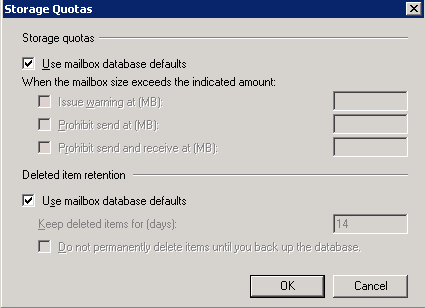
When you do this default setting on the organization level, each users mailbox will have the following (User mailbox database defaults)

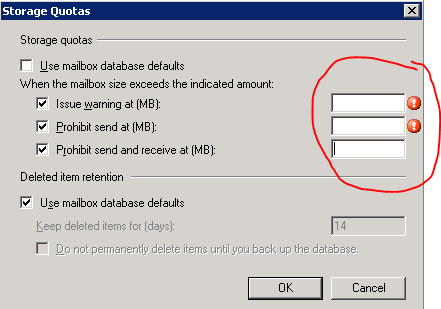
If you want to over write this policy to certain users, go to the users mailbox settings, Storage quotas and edit as below. 

First Uncheck the “Use mailbox database defaults and insert the value as you want. This settings will override the defaults.

Thats all folks!!!

Exchange 2010 Architecture Poster

To download the Exchange 2010 Architecture Poster, click here  Image size  in 36″ x 24″

To download the Exchange Server 2010 Architecture Poster (PDF).

For Transport architecture diagrams, see Exchange 2010 Transport Architecture Diagrams Available for Download.

Thanks to Microsoft Exchange Team for this

Changing your domain password in OWA

In the previous edition of OWA and Exchange server 2007, there was a problem for users to change their password…because the loss of the IISADMPWD virtual directory as a supported feature in Windows Server 2008/IIS 7.0. This prevented OWA users with expired passwords from being able to change their password and log on. This was a problem for many OWA users ; especially remote/mobile users with non-domain-joined computers..From Exchange Server 2010 Service Pack 1 and Exchange Server 2007 Service Pack 3 (running on Windows Server 2008 or Windows Server 2008 R2) onwards, they have a new feature that will allow users with expired passwords to change their password. This also works for users who have their accounts configured to change password on next logon.

Use this procedure to enable it on Exchange 2007 SP3 and Exchange 2010 SP1 Client Access servers. If you are using a CAS Array, you must perform these steps on each CAS in the array.

  1. On the Client Access Server (CAS), click Start > Run and type regedit.exe and click OK.
  2. Navigate to HKLM\SYSTEM\CurrentControlSet\Services\MSExchange OWA.
  3. Right click the MSExchange OWA key and click New > DWord (32-bit).
  4. The DWORD value name is ChangeExpiredPasswordEnabled and set the value to 1.
    Note: The values accepted are 1 (or any non-zero value) for “Enabled” or 0 or blank / not present for “Disabled”
  5. After you configure this DWORD value, you must reset IIS. The recommended method to reset IIS is to use IISReset /noforce from a command prompt.

NOTE : User can’t use a User Principal Name (UPN) (eg: myname@domain.com) in the Domain\user name field in the Change Password window like below. It should be domain\myname

Once you done with it, click submit…make sure that your new password should match with the domain password policy.

Recover deleted email item(s) – Outlook 2010 with Exchange 2010

Even if you delete item from the deleted items from your outlook 2010, you can go to the tab under folder on the main page of the outlook 2010 and click “Recover Deleted Item” and view the items on the list

Outlook 2010 feature


Microsoft Exchange Server 2010 – Organizational Settings for MailTips

MailTips are informative messages displayed to users while they compose a message. Works with only Exchange server 2010 with Outlook 2007/2010.

Microsoft Exchange Server 2010 analyzes the message, including the list of recipients to which it’s addressed. If a potential problem is detected, MailTips notify users prior to sending the message. With the help of the information provided by MailTips, senders can adjust the message they are composing to avoid undesirable situations or non-delivery reports (NDRs).

You can’t use the EMC to enable or disable MailTips. You need to be assigned permissions before you can perform this procedure. To see what permissions you need, click here

EMS : Set-OrganizationConfig cmdlet to enable or disable MailTips in your organization. MailTips are enabled by default, when you install a new Exchange 2010 organization.

Examples of Mailtips, when you activate is like

  • Invalid Internal Recipient : The Invalid Internal Recipient MailTip is displayed if the sender adds a recipient that appears to be internal to the organization but doesn’t exist in Active Directory. It comes due to name resolution cache or an entry in the sender’s Contacts or if the sender types an SMTP address with a domain for which Exchange is authoritative and the address doesn’t resolve to an existing recipient. The MailTip indicates the invalid recipient and gives the sender the option to remove the recipient from the message…cool na
  • Mail Box full :  MailTip is displayed if the sender adds a recipient whose mailbox is full and your organization has implemented a Prohibit Receive restriction for mailboxes over a specified size. MailTip will be updated every two hours in his/her draft folder even if you save it and did’nt send the message.
  • External Recipients : The External Recipients MailTip is displayed if the sender adds a recipient that’s external, or adds a distribution group that contains external recipients. By default, this MailTip is turned off. You can turn it on using the Set-TransportConfig cmdlet. The External Recipients MailTip relies on group metrics data. Therefore, if you enable the External Recipients MailTip, make sure that the group metrics MailTip is also enabled. EMS : Set-OrganizationConfig -MailTipsExternalRecipientsTipsEnabled $true

To know more.. click here

Exchange server 2010 SP1 is bringing up with more featueres and i will update you this in my comming blog

Exchange 2010 SP1 FAQ and Known Issues

Since Exchange server 2010 SP1 has been released on the 1st of September 2010, its too early for me to roll out on my production environment. “Some of the hotfixes would have been rolled up in a Windows update or service pack. Given that the Exchange team released SP1 earlier than what was planned and announced earlier, it did not align with some of the work with the Windows platform. As a result, some hotfixes are available from MSDN/Connect, and some require that you request them online using the links in the corresponding KBAs. The administrator experience when initially downloading these hotfixes may be a little odd. However, once you download the hotfixes, and receive two of the hotfixes from CSS, you can use the same for subsequent installs on other servers. In due course, all these updates may become available on the Download Center, and also through Windows Update.”. Good to know that Exchange team is closely working on all the issues and updating it. I will wait for another 1 to 2 months for my rollout. For more information http://msexchangeteam.com/archive/2010/09/01/456094.aspx

Also another helpful blog for the SP1 installation… click here

Microsoft Exchange Server 2010 SP1 accepts only ten devices per account – iOS4..more info click here

Problems when installing Exchange 2010 Service Pack 1 on a TMG configured for Mail protection..Click here  (Update: A fix for this problem is now available for download as part of Software Update 1 for Microsoft Forefront Threat Management Gateway (TMG) 2010 Service Pack 1.)

Microsoft to introduce new anti-tracking feature in IE9

IE9

IE 9 is introducing a  new anti-tracking feature to help users foil the efforts of behavioral advertisers. , called Tracking Protection List (TPL) will permit or block certain websites on the basis of preexisting lists. Users will still be able to visit them directly by clicking on a link or typing their address, but calls to them by other web pages will not be permitted. TPL builds upon the company’s existing InPrivate Filtering, but while this relies on frequency heuristics to build its ‘no go’ lists and is thus occasionally unpredictable, the new TPSs will be curated and so – hopefully – more reliable. Microsoft won’t generate the lists itself, but will instead look to third party organizations such as privacy groups or end users themselves. The lists will be an opt-in feature, and will receive regular automatic updates.

IE9 and Privacy: Introducing Tracking Protection .. Read more about this and watch the video, click here

Automatically accepting meeting request from Microsoft Outlook 2010

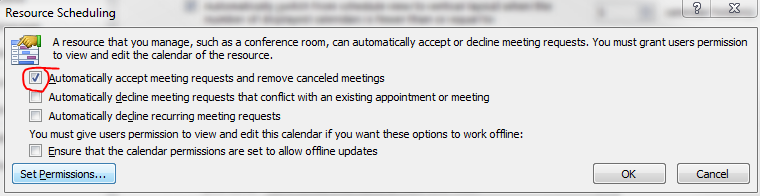
Recently we have noticed that some of the users after upgrading from Microsoft Outlook 2007 to 2010, Meeting request gets auto accept and user won’t notice it.

How to resolve it in Outlook 2010…!

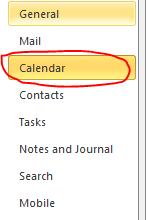
Goto->File->Options->Calender->Resource scheduling and uncheck it

Thats it…uncheck and click ok..problem solved.