Windows Server 8 – In a “Metro Style”…i think i’m gonna love this!!!

Windows Server 8 beta version is out, soon after the Windows 8 consumer preview…and Installing of the beta version requires a minimum 1.4 GHz 64 bit processor, 512 MB RAM and 32 GB of free disk space and upgrade path for this version of Server 8 is from a Windows Server 2008 R2…The two ways of Windows Server 8 installation: Server Core (POWER SHELL…love to be back like the old days..DOS), which is the option Microsoft recommends and Server with a GUI Installation.

Features as

  1. Installation itself…fastest installation..
  2. Metro style…not like Windows 8 desktop theme…but on the server, each core program will represent a tile….cool
  3. Server Manager…provides a centralized view of all logged events, services, and performance alerts on the local and all remote servers. The Best Practices Analyzer (BPA) gives recommendations for optimizing roles by scanning and reporting any best practice violations and its now located within the new Server Manager dashboard.
  4. Resilient File System (ReFS) offering and advantages over NTFS, such as extremely scalable volume size and pushes the maximum file length beyond the 255 characters. ReFS is anticipated to be used mostly in conjunction with Server 8’s Storage Spaces feature for automatically repairing data corruption…will see
  5. Microsoft Online Backup Service is encrypted cloud backup for Windows 8 beta servers….Internet bandwidth…hmmmm
  6. Metro Style RDP …oooooo
  7. Remote Desktop Services and VoIP Integration…i really need to see this one
  8. Cluster Aware Updating Self-Updating Mode…is used to provide high availability of data and applications using multi servers, or to provide increased processing power. In Windows Server 8’s they introduced to Cluster Aware Updating (CAU)—a feature in which all nodes in a cluster are updates in an automated way with no downtime of machines in the cluster.
  9. Hyper-V …Increased Memory and VHD capacity on Server 8 ..VHD now supports to 64TB…till today it was only 1TB???.
  10. SMB encryption

I think now the action time….we all waiting for a long time to get a good look and feel…Microsoft attempted it on Vista..and got hurt!!!…i think this time will be a stable platform like windows 7…best of luck to team

2048-bit key size enforcement

All digital certificates expiring after December 31, 2013 request must have 2048-bit or greater key size…after December 31, 2012, 1024-bit keys will not be accepted for any certificates.

This notice has been issued by Verisign/Symantec in their website.

Guys…now onwards for new CSR should be 2048 request!!!

Windows XP Service Pack 3 and Office 2003 – Support Ends April 8, 2014

ADFS…Active Directory Federation Service

This page has been moved to a dedicated page for Office 365 users..click here

Microsoft…Internet…and Cloud – Future of Computing

Transforming IT with Microsoft Private Cloud….Concept is aimed only for cost saving and maintenance free environment.

For a growing number of businesses, the journey to cloud computing starts with a private cloud implementation. A Microsoft private cloud dramatically changes the way your business produces and consumes IT services by creating a layer of abstraction over your pooled IT resources. This allows your datacenter to offer true infrastructure service capability as well as optimally managed application services. Microsoft private cloud solutions are built on Windows Server and System Center technology. Windows Azure is Microsoft’s public cloud computing platform. It’s a place to run your applications out on the internet, at scale. With geographically distributed datacenters worldwide, applications can be built, hosted and managed around the world. With Windows Azure, you can extend and even move your datacenter services off-premises or beyond a hosted environment, paying only for the resources you use at any given time. The flexible cloud computing platform of Windows Azure lets you focus on solving business problems and addressing customer needs, not on the infrastructure. Right now Public cloud on 3 platform flavour…Windows Azure, Office 365 and Microsoft online Services

To know more about Office 365, click here

To registed Office 365 for trial, click here

Enjoy!!!

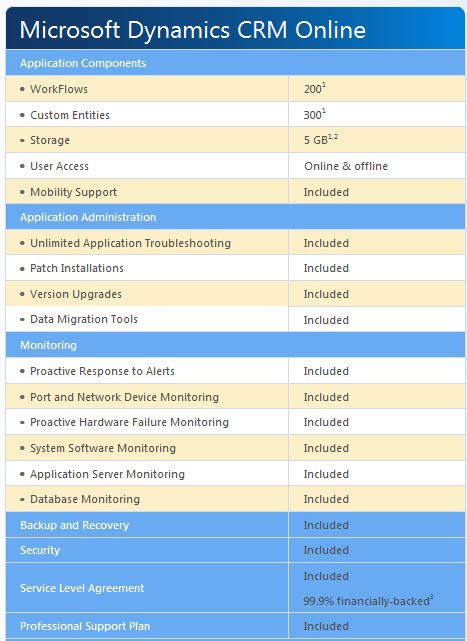
Microsoft CRM on the cloud

  • Microsoft Dynamics CRM offers the power of choice in deployment. You can implement in the cloud, on-premises or have your solution privately hosted by a technology partner. You can even change your deployment type, if the need arises.
  • With Microsoft Dynamics CRM Online, you are able to scale the number of users up or down, based on your business requirements.
  • • The architecture of Microsoft Dynamics CRM Online provides customers with complete autonomy over how they operate, manage, configure and help secure their CRM solution.
  • Customer and user administration features are designed to increase self-reliance. Customers have complete control over all aspects of data structure, user experience, business intelligence

To know more about the CRM cloud flavour…click here

Microsoft Azure – ERP on the Cloud…Slow and Steady!!!

Microsoft is moving ahead with plans to host its ERP products on Azure, but isn’t rushing users to make the jump. First, Dynamics NAV 7 (the codename of the next version of the Dynamics NAV product) will be available hosted on Windows Azure toward the end of calendar 2012. The next Microsoft ERP product to get the Azure treatment will be Dynamics GP. (Microsoft execs aren’t providing a target date at this time for the Azure-hosted GP version, though I’d think 2013 would make sense, given the cadence of the Dynamics ERP products).

Deployment

In the cloud or on-premises—choose the deployment model that’s right for you…More info Click here

Microsoft CRM is already taking a turn in cloud..click here to know more and its a matter of time to rollout this service to our region!!!

Experiencing O365 platform with Microsoft online service

We are now experiencing the O365 environment to our domain…i should tell you that “beauty lies beneath the platform”…more to explore

Built to deliver the enterprise-grade security and reliability that businesses require, Microsoft Exchange Online provides hosted email, calendar and contacts on your PC, phone and web browser.

  • Built-in anti-virus and antispam filters protect your information and help you focus on what’s most important
  • Mobile sync to hundreds of devices means you can access and update your info while on the go
  • 99.9% uptime commitment with financially-backed SLA
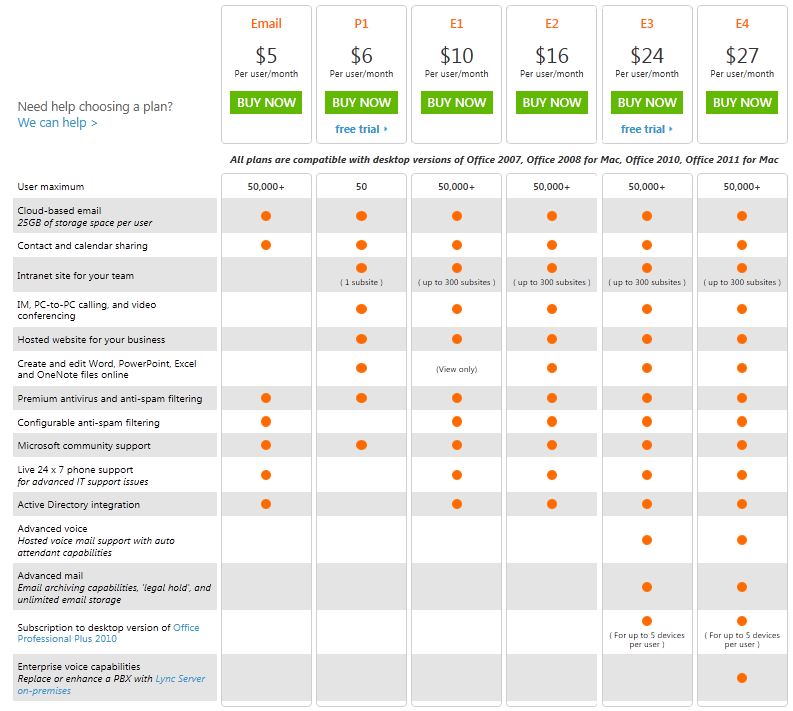
  • For a total of $5 per user per month, you control a rich hosted Exchangeenvironment with 25 GB mailboxes for every user without having to manage a server.
    • Data is hosted in geographically-distributed datacenters with continuous data backup and premiere disaster recovery capabilities
    • A team of security experts monitors Exchange Online around the clock and updates anti-virus and spam filters to address new threats as soon as they appear
    • Automatic patching eliminates the time and effort of maintaining and servicing your email system
    • An easy-to-use Web interface lets you manage your online environment from anywhere
  • Live phone support 24 hours a day, 7 days a week, 365 days a year
  • Large, 25 GB mailboxes are standard for every user so they can access all essential information in one place
  • Seamless integration with Outlook so your users can enjoy a rich, familiar email experience and offline access
  • Calendar sharing allows users to see free/busy information with colleagues, even if they work at another company
  • Email archiving, eDiscovery Search, retention policies, and optional legal hold help preserve and discover data
  • Security policies let you create approved mobile device lists, enforce PIN lock, and remotely wipe data from lost phones
  • Free tools for migrating IMAP and Exchange Server mailbox data to Exchange Online
  • Beauty of FOPE..Forefront Online Protection for Exchange integration and management through browser.

Here is the plan…and if you need more, go to O365 Home Site and for UAE users, go to O365 UAE plan

Enjoy!!!

PST Capture Tool – We ask, Microsoft Exchange team delivers it!!!

EHLO, our Exchange Halo team!!! always listening for feedback on what we’re doing well and delivers the tool best for us. As more and more of us evaluate and deploy the email archiving, retention and discovery capabilities of Exchange Server 2010 and Exchange Online, we understand that Personal Folders (.pst files) remain a challenge for us. The ability to search our network to discover and then import .pst files across your environment is critical, and that you need an admin-driven and straightforward tool for doing these things….here comes the EHLO.. In July 2011, Exchange team announce that later this year they will  be adding a new tool to our already rich portfolio of planning and deployment tools. This new tool, PST Capture, will be downloadable and free, and will enable you to discover .pst files on your network and then import them into both Exchange Online (in Office 365) and Exchange Server 2010 on-premises.

And now the EHLO action…..!!!!

PST Capture tool helps us search your network to discover and then import .pst files across your environment – all from a straightforward admin-driven tool. PST Capture will help reduce risk while increasing productivity for your users by importing .pst files into Exchange Online or Exchange Server 2010 – directly into users’ primary mailboxes or archives.

PST Capture documentation, Click here

To download PST Capture (Microsoft Exchange PST Capture is used to discover and import .pst files into Exchange Server or Exchange Online), click here

System requirements – Supported Operating Systems: Windows Server 2008 R2 Enterprise

  • Review the Technical Documentation prior to installation of Microsoft Exchange PST Capture
  • Exchange Server 2010, if used to import to Exchange Server 2010 mailboxes or archives
  • Exchange Online (Office 365) subscription if used to import to Exchange Online (Office 365) mailboxes or archives
  • Microsoft .NET Framework 3.5 or 3.5 Service Pack 1 (SP1)
  • Microsoft Outlook 2010 x64 (only required on the host computer where you install the Central Service and Console)

Thank you Microsoft Exchange Team!!!!

Update Rollup 6 for Exchange 2007 Service Pack 3

Update Rollup 6 for Exchange Server 2007 Service Pack 3 (SP3) resolves issues that were found in Exchange Server 2007 SP3 since the software was released. This update rollup is highly recommended for all Exchange Server 2007 SP3 customers. For a list of changes that are included in this update rollup, see KB2608656.
This update rollup does not apply to Exchange Server 2007 Release To Manufacturing (RTM), Exchange Server 2007 Service Pack 1 (SP1) or Exchange Server 2007 Service Pack 2 (SP2).

To Download, Click here